
-
Hi, my post page is not included in the sitemap. I have checken and its set to index

-
Hello,
We apologize for the issue you are facing with your post page not being included in the sitemap. Since you’ve confirmed that it is set to index, there are a few additional settings you can check:
-
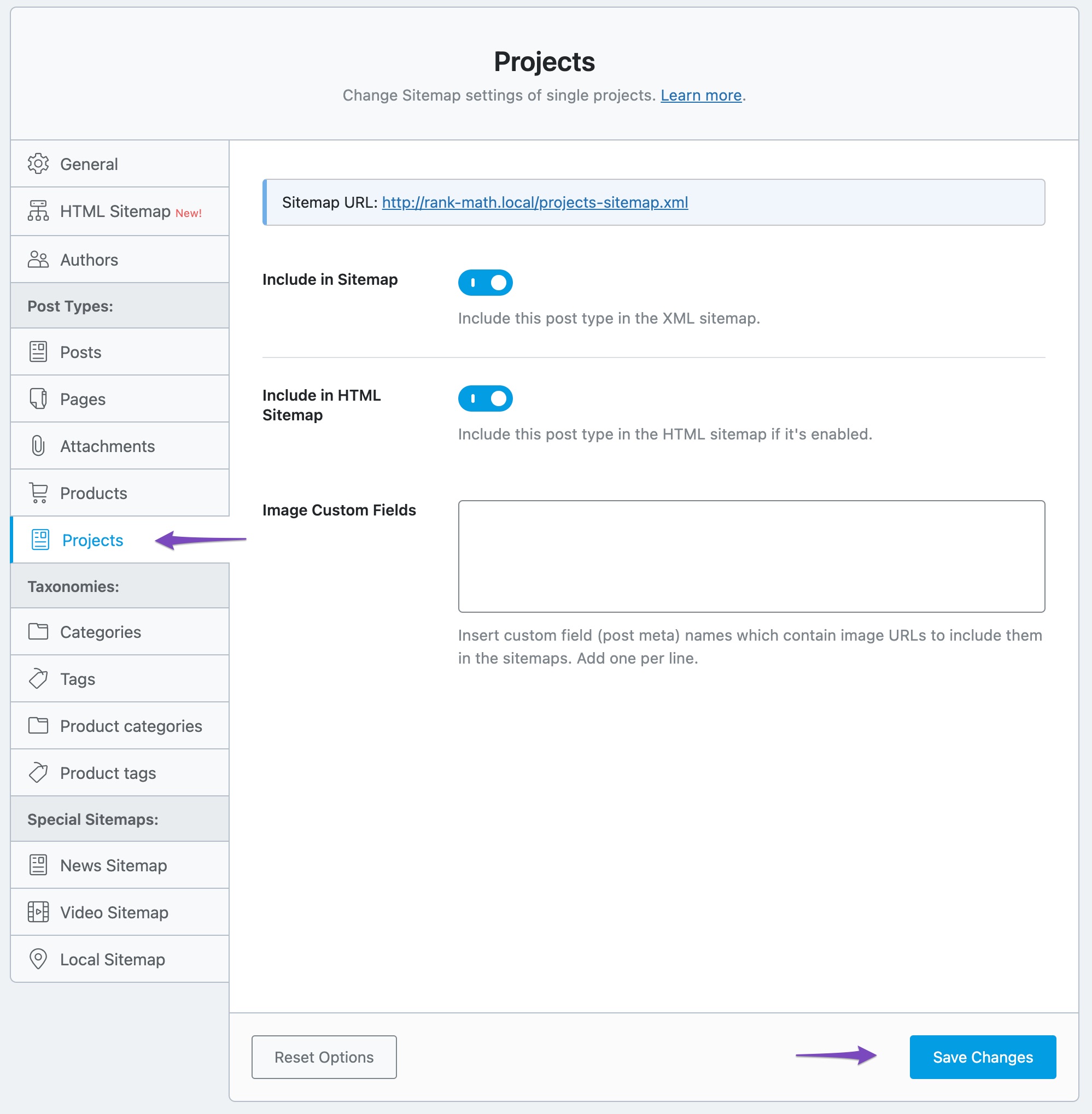
Sitemap Settings: Ensure that the post type is included in the sitemap settings. You can do this by navigating to Rank Math SEO → Sitemap Settings and verifying that the post type is enabled.
-
Include in Sitemap Option: Make sure that the option to include the post type in the sitemap is enabled. This can be found under the specific post type settings in the sitemap configuration.

-
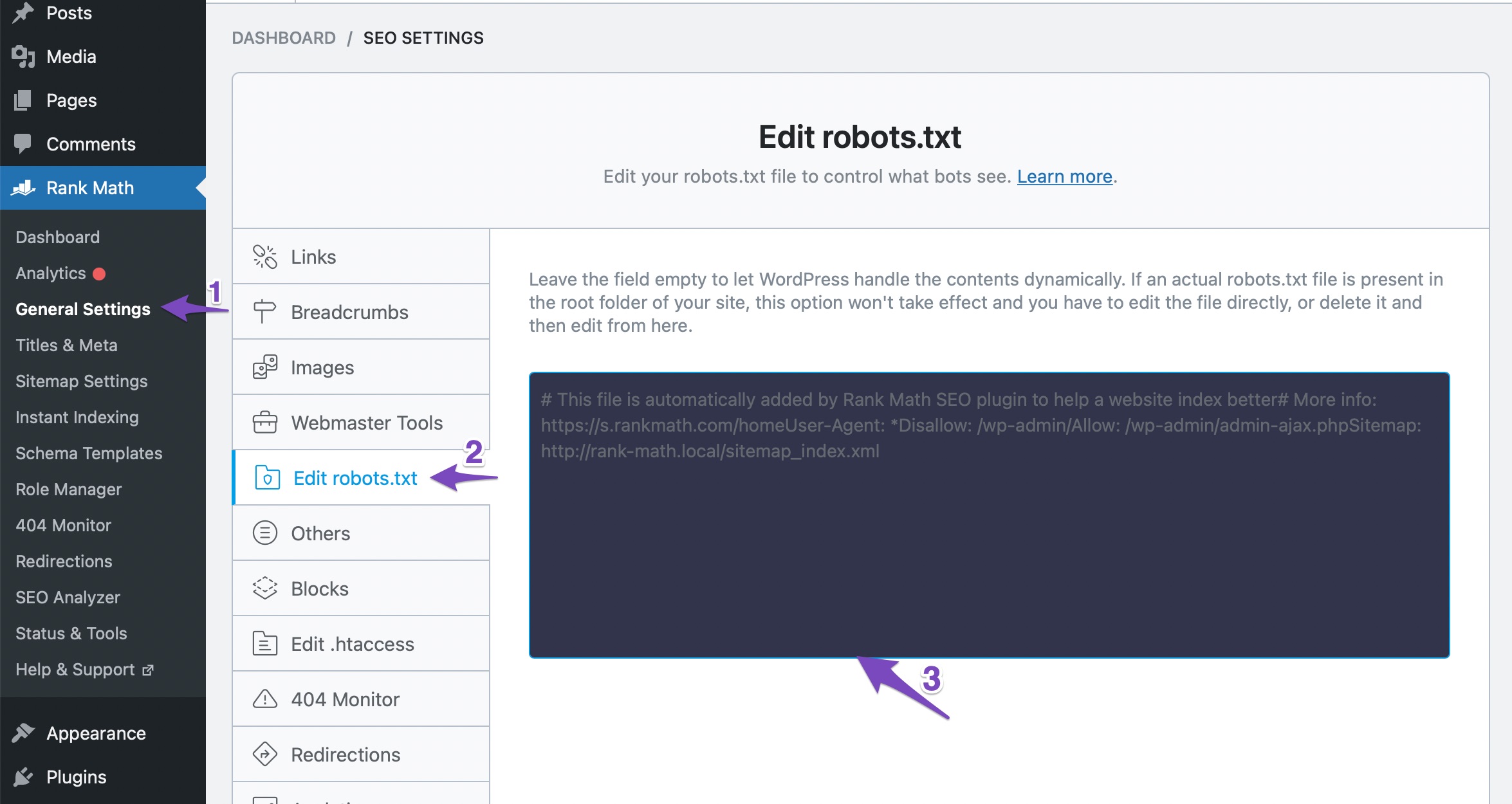
Check Robots.txt: Ensure that your robots.txt file does not have any rules that might be blocking the indexing of your post page. You can edit your robots.txt file in Rank Math at WordPress Dashboard → Rank Math SEO → General Settings → Edit Robots.txt.
If everything seems correct and the issue persists, please reply to this ticket, and a human agent from the Rank Math Support team will assist you further. Thank you for raising this concern!
Sources:
We Detected New Post Type(s) » Rank Math
How to Configure Sitemaps in Rank Math – Best Settings and TipsHello,
Thank you for contacting us and sorry for any inconvenience that might have been caused due to that.
Could you please share the affected pages which are not showing on your sitemap so that we can check the issue further for you?
Meanwhile, please try to follow the steps below and see if that works for you:
1. Flush the Sitemap cache by following this video screencast:
https://i.rankmath.com/pipRDp2. Exclude the Sitemap files of the Rank Math plugin in your caching plugin. The cache could be via a plugin or from the server. For plugins or Cloudflare, please follow this article:
https://rankmath.com/kb/exclude-sitemaps-from-caching/For more details on this issue, you can check this URL: https://rankmath.com/kb/url-not-in-sitemap/
Let us know how it goes. Looking forward to helping you.
Thank you.
There should be a references page and then a post page called kontakt & info
The references page is in the sitemap but not the kontakt & info
I have checked the box to index but its not includedHello,
Please follow our guide here to ensure that the page is included in your sitemap:
https://rankmath.com/kb/url-not-in-sitemap/If the issue persists, we might need to take a closer look at the settings. Please edit the first post on this ticket and include your WordPress & FTP logins in the designated Sensitive Data section.
Please do take a complete backup of your website before sharing the information with us.
It is completely secure and only our support staff has access to that section. If you want, you can use the below plugin to generate a temporary login URL to your website and share that with us instead:
https://wordpress.org/plugins/temporary-login-without-password/
You can use the above plugin in conjunction with the WP Security Audit Log to monitor what changes our staff might make on your website (if any):
https://wordpress.org/plugins/wp-security-audit-log/
We really look forward to helping you.
Hi, i dont know if im comfortable with giving you the login.
The page thats not included is marken as a posts page. If I try to change it from a posts page everything goes haywire with the otjer subpage.
Hello,
If the page not shown in the sitemap is a “post” (post-type), you have to include its post type in the sitemap from the Sitemap Settings. Navigate to Rank Math SEO > Sitemap Settings > Posts and enable the
Include in Sitemaptoggle.If the issue persists then try disabling the transient cache for the sitemap. This will make sure that your XML sitemap always reflects the latest changes on your site. To do this, you need to add a small piece of code to your site’s functions.php file or use a plugin like Code Snippets.
The code you need to add is this:/** * Filter if XML sitemap transient cache is enabled. * * @param boolean $unsigned Enable cache or not, defaults to true */ add_filter( 'rank_math/sitemap/enable_caching', '__return_false');If you’re not sure how to add this code, you can follow this guide: https://rankmath.com/kb/wordpress-hooks-actions-filters/.
After you add the code, please clear any cache on your site or server and check your XML sitemap again. If you’re still facing issues with the sitemap, please let us know – we are happy to investigate further.
Hope that helps, and please do not hesitate to let us know if you need our assistance with anything else.
Hello,
Since we did not hear back from you for 15 days, we are assuming that you found the solution. We are closing this support ticket.
If you still need assistance or any other help, please feel free to open a new support ticket, and we will be more than happy to assist.
Thank you.
-



The ticket ‘Post page not in sitemap’ is closed to new replies.