Post Editor Not Working After Activating Rank Math Plugin

#952680
  • Resolved Team Jio Care
    Rank Math free

    Dear Rank Math Support Team,

    I am experiencing an issue with the Rank Math plugin on my WordPress website. After activating Rank Math, the post editor (Gutenberg or Classic Editor) stops working. Here are the details of the problem:

    Issue Description:
    When I try to edit or create a new post/page, the editor does not load properly, or it freezes entirely.
    Disabling the Rank Math plugin resolves the issue, indicating that Rank Math might be causing the conflict.
    Steps I Have Already Tried:
    Checked Plugin Conflicts:

    Deactivated all other plugins and kept only Rank Math active. The issue persists.
    Activated other plugins one by one to check for conflicts, but no specific plugin seems to be causing the problem.
    Changed Theme:

    Switched to a default WordPress theme (e.g., Twenty Twenty-Three) to ensure it’s not a theme-related issue.
    Updated Software:

    WordPress Version: [Your WordPress version]
    PHP Version: [Your PHP version]
    Rank Math Plugin Version: [Your Rank Math version]
    Ensured all other plugins and the theme are up to date.
    Checked Browser Console:

    Inspected the browser console for JavaScript errors while trying to load the editor. [Add details of any errors if found.]
    Cleared Cache:

    Cleared browser cache and server-side cache, but the issue still persists.

Viewing 1 replies (of 1 total)
  • Hello,

    We apologize for the issue you are facing with the post editor not working after activating the Rank Math plugin. Thank you for providing detailed information about the steps you’ve already taken to troubleshoot the problem.

    Since you’ve already checked for plugin conflicts and switched to a default theme without resolving the issue, we recommend trying the following steps:

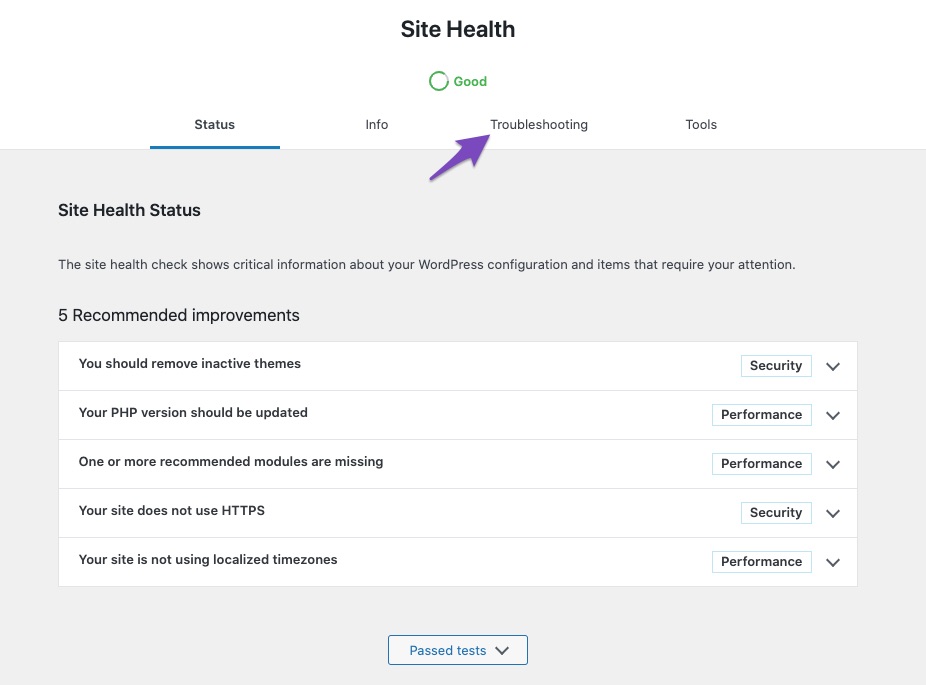
    1. Enable Troubleshooting Mode: This will help you identify if there is a conflict with any other plugins or themes. You can enable it by navigating to the Troubleshooting tab in Rank Math:
      Open Troubleshooting tab under Site Health

    2. Test with Default Settings: Once in troubleshooting mode, ensure that only Rank Math is active and try to reproduce the issue again. If the editor works, gradually enable other plugins one by one to identify any potential conflicts.

    3. Check for JavaScript Errors: Since you mentioned checking the browser console, please ensure to note any specific JavaScript errors that appear when trying to load the editor. This information can be crucial in diagnosing the issue.

    4. Contact Plugin Developers: If you identify a specific plugin causing the conflict, consider reaching out to its developer for assistance.

    If the issue persists even when only Rank Math is active and using a default theme, please reply to this ticket with any additional details or errors you encounter, and a human agent from our support team will take over and assist you further.

    Thank you for your patience as we work to resolve this issue!

    Sources:
    Confirming a Theme/Plugin Conflict With Rank Math

    This is an automated reply from Rank Math Support Bot. If you need further assistance, please reply to this topic and a human support agent will reply to you shortly.

    Hello,

    Since we did not hear back from you for 15 days, we are assuming that you found the solution. We are closing this support ticket.

    If you still need assistance or any other help, please feel free to open a new support ticket, and we will be more than happy to assist.

    Thank you.

Viewing 1 replies (of 1 total)

The ticket ‘Post Editor Not Working After Activating Rank Math Plugin’ is closed to new replies.