Hello,
I apologize for the confusion you are facing. I can help clarify how to set up placeholder links for affiliates using Rank Math on your website http://www.rockykanaka.com.
To create a placeholder link for your affiliates in Rank Math, you can follow these steps:
-
Enable Redirections Module: Before creating placeholder links, ensure that the Redirections module is enabled in Rank Math. You can do this by navigating to WordPress Dashboard → Rank Math SEO.
-
Add New Redirection: To create a placeholder link, go to Rank Math SEO → Redirections → Add New.
-
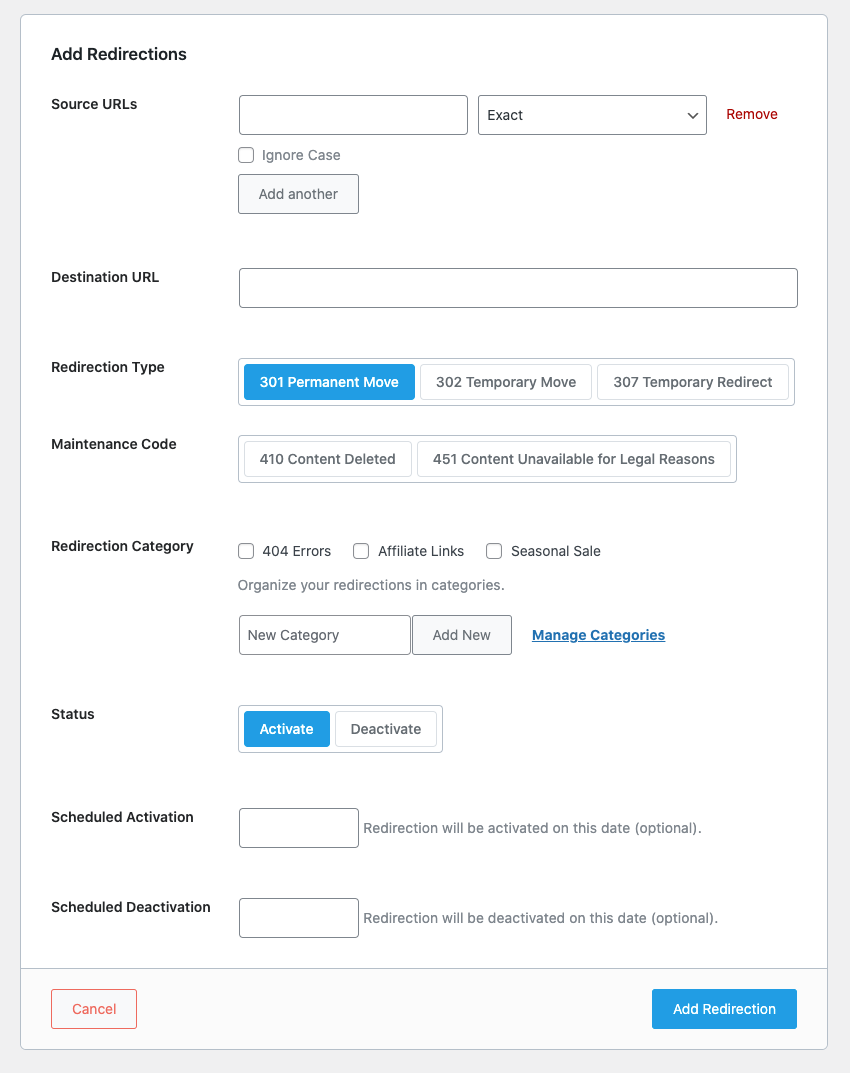
Fill in Redirection Form: In the Redirection form, you will need to provide the following information:
- Source URL: This is the placeholder link on your website that you want to redirect to the affiliate link. You can add a prefix like /go/, /refer/, /recommend/, etc., before the actual affiliate link.
- Destination URL: This is the actual affiliate link that you want to redirect users to.
- Redirection Type: Choose between 301 (Permanent Redirect) or 302 (Temporary Redirect) based on the nature of the affiliate link change.
- Redirection Category: Categorize the redirection as "Affiliate Links."
-
Save Changes: Once you have filled in the required information, save the redirection.
Here is an example:
By setting up placeholder links this way, you can easily manage affiliate link changes when affiliates switch platforms. The placeholder link will redirect users to the updated affiliate link seamlessly.
If you have any further questions or need more detailed guidance, feel free to ask.
Thank you for reaching out with your query.
Sources:
How to Manage Affiliate Links Using Rank Math » Rank Math
This is an automated reply from Rank Math Support Bot. If you need further assistance, please reply to this topic and a human support agent will reply to you shortly.
Hello,
Since we did not hear back from you for 15 days, we are assuming that you found the solution. We are closing this support ticket.
If you still need assistance or any other help, please feel free to open a new support ticket, and we will be more than happy to assist.
Thank you.