
-
/wp-admin/admin.php?page=rank-math-options-general#setting-panel-content-ai

-
Hello,
We apologize for the issue you are facing. It seems you are looking for information regarding the "Default Country" setting in the Content AI section of Rank Math.
To configure the default country for Content AI, you can follow these steps:
- Navigate to Rank Math SEO → General Settings → Content AI in your WordPress dashboard.
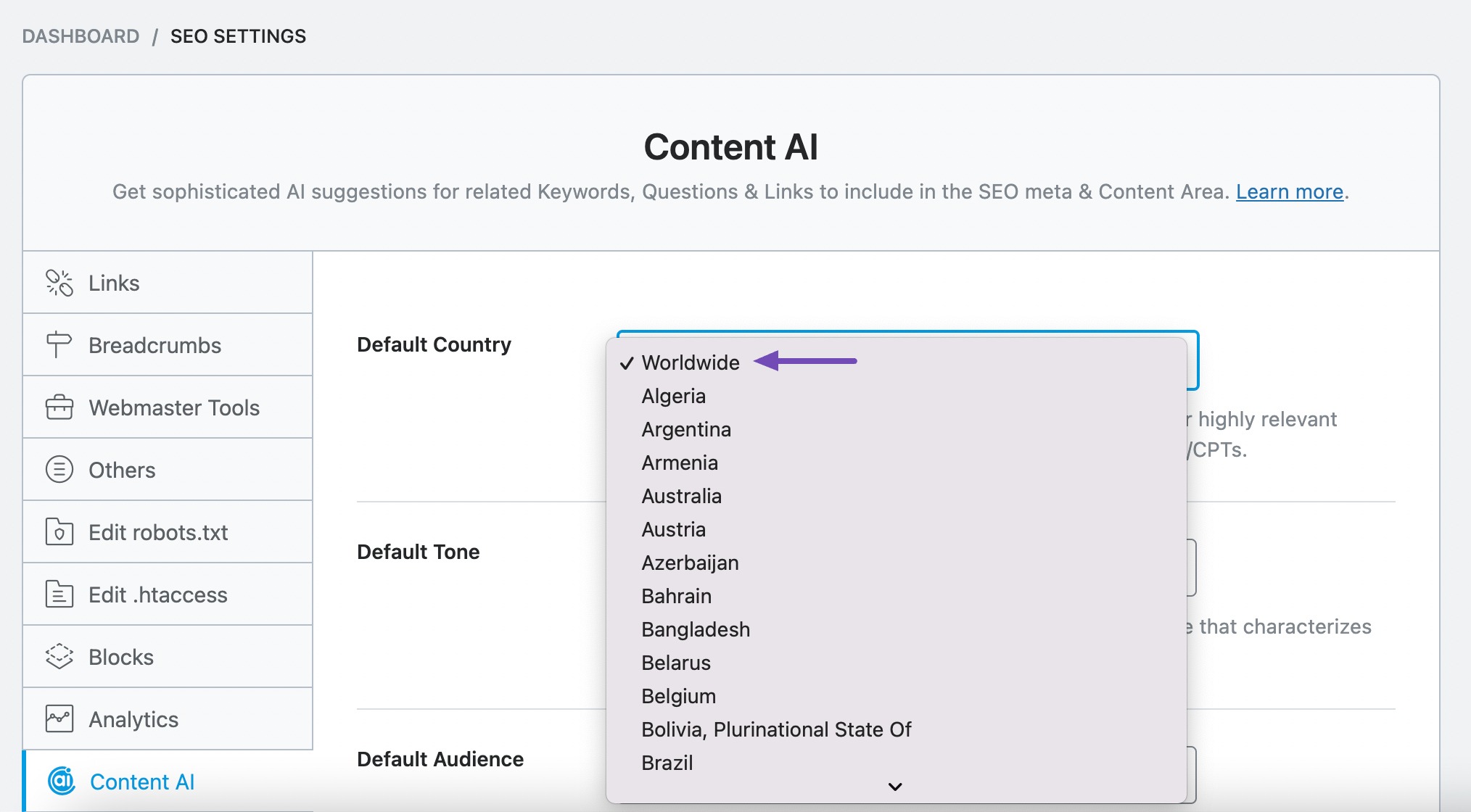
- In the Content AI settings, look for the Default Country option.
- Here, you can select the default country that you want to target. If you’re targeting a global audience, you can choose Worldwide.
If you need further assistance or have more specific questions, please reply to this ticket, and a human agent from the Rank Math Support team will be happy to assist you further.
Thank you for raising your concern!
Sources:
How to Configure Content AI’s Global Settings » Rank MathNão adianta mudar o rabkmath nao esta acatando, tanto que tenho 750 créditos e não cainum credito sequer quando tento reconfigurar Pais de Origem. Preciso que fique como Mundialmente mas o sistema não acata as modificações
Hello,
Could you please share the affected website URL so we can check?
You can add it to the sensitive data section by editing your first post
It is completely secure, and only our support staff has access to that section.
Looking forward to helping you.
Ver o link não deve adiantar de nada, acredito que seja mais para saber do que estou falando. Por fim, resumindo… Ja desinstalei, voltei versão, atualizei, até sou informado que os créditos para mudança aumentaram para 750 ajustes mas modifico a configuração e o sistema não acata o jovo ajuste. Meu site, que deveria propagar Mundialmente travou propagando só para o Brasil e minha visitação despencou em 90% depois disso. Não sei mais o que fazer e acredito que o dano foi tão grande que mesmo desativando o rankmath não consigo reverter a situação. Onibdixador de 750 esta travado, se modifico algo rle não diminui o contador, esta travado em 750 e o sistema só acata o ajuste nominalmente, mostrando na tela mas internamente, no sistema ele nada faz
Hello,
To help you investigate this issue, we might need to take a closer look at your website and settings. Please follow these steps:
- Edit the first post on this ticket and include your WordPress logins in the Sensitive Data section. This is a secure section that only our support staff can access.
- Make sure you take a complete backup of your website before sharing the information with us.
- If you prefer, you can use this plugin to generate a temporary login URL to your website and share that with us instead: https://wordpress.org/plugins/temporary-login-without-password/
- You can also use this plugin to monitor what changes our staff might make on your website (if any): https://wordpress.org/plugins/wp-security-audit-log/
We appreciate your cooperation and patience. Thank you for choosing Rank Math.
Ja esta ficando muito complicado. Por que não assumem logo que para versão free é só 5 créditos e que depois “a menos que a pessoa pague”, o sistema não mais funcionará ?
Já fiz upgrade, o contador que dizia serem 5 créditos mudou para 750 mas, por mais que eu faça ajustes, essa contagem de créditos não muda e os.ajuste não surtem efeito.
É nítido!!! Se eu pagar o problema se resolverá sozinho ‘automaticamente’ mas se eu não pagar, nada mudará porque continuarei em plano free e não é interessante paea vocês perder tempo com quem não paga e apenas usa free.
Rankmath simplesmente destruiu meu site. Eu que tinha média de 5000 mil visitas por dia e passei a ter 200/250 depois que o sistema fixou propagação só para Brasil ao invés de mundialmente. Pior que mesmo com RankMath desativando as coisas não voltam a ser como eram.
Essa limitações de ajustes (5 créditos), mesmo vindo depois a mudar para 750 não mais funcoonam e isso simplesmente destruiu o meu site. Pra piorar ainda mais, recorri a vários grupos de facebook de adsense, rankamath e wordpress e ninguém sabe dar uma dica efixaz para resolver o problema. Rankmath simplesmente matou meu site, queria nunca fer usado ou no mínimo queria nunca ter acionado o 5 crédito para ajuste no site
Se houver como pesquisar visitação do meu site verifiquem, verão que nao estou mentindo. O site funcionou bem por anos mas depois que passou a propagar só para o Brasi o site morreu
Qual arquivo, do banco de dados, tenho de acessar via FTP (gerenciador de arquivos), para encontrar ‘manualmente’ a função que determina de qual região é o site ?
Conforme mencionei anteriormente, varias cezes, não adianta fazer o ajuste pelo sistema/admin, a única forma que acredito ser possível é editando o código eu mesmo, só preciso saber qual arquivo difa isso e onde encontrar a informação.
Tentando pelo sistema não adianfa, segue informando que yenho 750 créditos para justes, possk misar a informação na tela, vai mostrar que mudou mas não muda no banco de dados e nao reduz a contagem de 750 créditos.
Hello,
The region selection in Content AI won’t have any effect on the propagation of the website worldwide as that is solely for the Content AI module. So, the drop in traffic worldwide needs to be attributed to something else, other than simply the settings for Content AI.
As for the changes you want to make to the settings of the plugin, those cannot be done manually by editing the plugin files or the database.
Most of the data is saved as serialized JSON in the database so you would need to pass the data through a serialization function which is what we do while saving the data.
If you still need assistance figuring out why the settings are not getting saved please follow the instructions mentioned before and include working WP credentials in the sensitive data section so our team can debug the issue further.
Thank you.
Hello,
Since we did not hear back from you for 15 days, we are assuming that you found the solution. We are closing this support ticket.
If you still need assistance or any other help, please feel free to open a new support ticket, and we will be more than happy to assist.
Thank you.



The ticket ‘Painel / Conteúdo com IA / País Padrão’ is closed to new replies.