
-
I have to deactivate RankMath every time I want to edit products. Only one product is available at a time.
Deactivating would be ok, but then I have to set the plugin up all over again. It is very distressing
Carol Ann Johnson
https://commissioned-art.com
i***@c***************

-
Hello,
Thank you for contacting Rank Math support, and sorry for any inconvenience that might have been caused due to that.
Can you please further describe the issue you are experiencing when editing a product while Rank Math is active? Please share a video screencast using this tool so we can determine what’s causing the issue and provide a solution accordingly.
Looking forward to helping you on this one.
I can’t get Loom to work. It claims my mic is muted although it clearly is not and my settings say that Loom is allowed access to the mic.
I can send you screenshots. Also, is there a way to send you information like installed plugins? I’m sure there are conflicts. I need Elementor for some plugins but it prefers All in One SEO. (I prefer RankMath)
I like Kubio editor, but it doesn’t get along with Elementor, etc., etc.It says that you replied, but I don’t see a response.
Please resend.
ThanksHello,
Sorry for the delay.
You can share screenshots using https://imgbb.com/ and to share the installed plugin’s information, you can copy the System status and share it with us.
https://rankmath.com/kb/rank-math-status-and-tools/#system-statusAssuming you are referring to the product list view, you can follow this guide to fix the misaligned page:https://rankmath.com/kb/woocommerce-products-page-misaligned/
Also, Elementor is compatible with Rank Math:
https://rankmath.com/compatibility/elementor/If you are facing any issues with Elementor, you can share some screenshots of the issue so we can help accordingly.
We look forward to helping you.
### rank-math ### version: 1.0.90 database_version: 1 plugin_plan: Free active_modules: link-counter, analytics, seo-analysis, sitemap, rich-snippet, content-ai, instant-indexing, local-seo, 404-monitor, redirections, woocommerce refresh_token: Token exists permissions: Search Console: Given rank_math_404_logs: 32 KB rank_math_redirections: 32 KB rank_math_redirections_cache: 32 KB rank_math_internal_links: 64 KB rank_math_internal_meta: 16 KB rank_math_analytics_gsc: 80 KB rank_math_analytics_objects: 96 KB rank_math_analytics_inspections: 176 KB ### wp-core ### version: 5.9.3 site_language: en_US user_language: en_US timezone: +00:00 permalink: /%year%/%monthnum%/%postname%/ https_status: true multisite: false user_registration: 0 blog_public: 1 default_comment_status: open environment_type: production user_count: 2 dotorg_communication: true ### wp-dropins (2) ### advanced-cache.php: true db-error.php: true ### wp-active-theme ### name: Avant (avant) version: 10.4.9 author: Kaira author_website: https://kairaweb.com/ parent_theme: none theme_features: core-block-patterns, widgets-block-editor, post-thumbnails, infinite-scroll, automatic-feed-links, title-tag, menus, html5, align-wide, custom-logo, custom-background, woocommerce, wc-product-gallery-zoom, wc-product-gallery-lightbox, wc-product-gallery-slider, header-footer-elementor, widgets, editor-style theme_path: /var/www/wp-content/themes/avant auto_update: Disabled ### wp-mu-plugins (1) ### System Plugin: author: (undefined), version: 4.28.0 ### wp-plugins-active (31) ### Akismet Anti-Spam: version: 4.2.4, author: Automattic, Auto-updates disabled Booster for WooCommerce: version: 5.5.9, author: Pluggabl LLC, Auto-updates disabled Breadcrumb NavXT: version: 7.0.2, author: John Havlik, Auto-updates disabled Bulky - Bulk Edit Products for WooCommerce: version: 1.0.14, author: VillaTheme, Auto-updates disabled Bulky - Bulk Edit Products for WooCommerce Premium: version: 1.1.8, author: VillaTheme, Auto-updates disabled CartFlows: version: 1.9.2, author: CartFlows Inc, Auto-updates disabled CoBlocks: version: 2.24.0, author: GoDaddy, Auto-updates enabled Elementor: version: 3.6.6, author: Elementor.com, Auto-updates disabled Elementor Pro: version: 3.7.1, author: Elementor.com, Auto-updates disabled Forminator: version: 1.16.2, author: WPMU DEV, Auto-updates disabled Hummingbird: version: 3.3.3, author: WPMU DEV, Auto-updates disabled MC4WP: Mailchimp for WordPress: version: 4.8.7, author: ibericode, Auto-updates enabled Rank Math SEO: version: 1.0.90, author: Rank Math, Auto-updates enabled SiteOrigin Widgets Bundle: version: 1.35.1, author: SiteOrigin, Auto-updates disabled Smush: version: 3.9.11, author: WPMU DEV, Auto-updates disabled StoreCustomizer: version: 2.4.1, author: Kaira, Auto-updates disabled Sucuri Security - Auditing, Malware Scanner and Hardening: version: 1.8.31, author: Sucuri Inc., Auto-updates enabled Temporary Login Without Password: version: 1.7.2, author: StoreApps, Auto-updates disabled UpdraftPlus - Backup/Restore: version: 1.22.12, author: UpdraftPlus.Com, DavidAnderson, Auto-updates disabled WooCommerce: version: 6.6.0, author: Automattic, Auto-updates disabled WooCommerce Additional Variation Images: version: 2.0.0, author: WooCommerce, Auto-updates disabled WooCommerce Product Add-ons: version: 5.0.0, author: WooCommerce, Auto-updates disabled WooCommerce USPS Shipping: version: 4.4.74, author: WooCommerce, Auto-updates disabled WP101 Video Tutorials: version: 0.3, author: WP101Plugin.com, Auto-updates disabled WPForms Lite: version: 1.7.4.2, author: WPForms, Auto-updates disabled WP Sheet Editor - EDD Downloads: version: 1.0.52, author: WP Sheet Editor, Auto-updates disabled WP Sheet Editor - Post Types: version: 2.24.16, author: WP Sheet Editor, Auto-updates disabled WP Sheet Editor - Taxonomy Terms: version: 1.5.26, author: WP Sheet Editor, Auto-updates disabled WP Sheet Editor - WooCommerce Products: version: 1.7.16, author: WP Sheet Editor, Auto-updates disabled WP Spell Check: version: 9.12, author: WP Spell Check, Auto-updates disabled WP Spell Check Pro: version: 9.12, author: WP Spell Check, Auto-updates disabled ### wp-server ### server_architecture: Linux 5.4.155-200.el7.x86_64 x86_64 httpd_software: Apache php_version: 7.4.29 64bit php_sapi: cgi-fcgi max_input_variables: 3600 time_limit: 3600 memory_limit: 512M max_input_time: 600 upload_max_filesize: 512M php_post_max_size: 512M curl_version: 7.80.0 OpenSSL/1.1.1o suhosin: false imagick_availability: true pretty_permalinks: true htaccess_extra_rules: true ### wp-database ### extension: mysqli server_version: 5.7.26-29-log client_version: mysqlnd 7.4.29 max_allowed_packet: 16777216 max_connections: 1000 ### wp-constants ### WP_HOME: undefined WP_SITEURL: undefined WP_CONTENT_DIR: /var/www/wp-content WP_PLUGIN_DIR: /var/www/wp-content/plugins WP_MEMORY_LIMIT: 40M WP_MAX_MEMORY_LIMIT: 512M WP_DEBUG: false WP_DEBUG_DISPLAY: true WP_DEBUG_LOG: false SCRIPT_DEBUG: false WP_CACHE: true CONCATENATE_SCRIPTS: undefined COMPRESS_SCRIPTS: undefined COMPRESS_CSS: undefined WP_ENVIRONMENT_TYPE: Undefined DB_CHARSET: utf8 DB_COLLATE: undefined ### wp-filesystem ### wordpress: writable wp-content: writable uploads: writable plugins: writable themes: writable mu-plugins: writableI think this is the screenshot,
https://ibb.co/bvhpc8f“misaligned pages” was the issue.
ThanksHello,
Can you please confirm if the issue is resolved now and we can close this ticket?
Looking forward to hearing back from you.
yes, I think everything is ok now.
Hello,
We are super happy that you have resolved the issue.
If you have another question in the future, please feel free to create a new forum topic, and it will be our pleasure to assist you again.
Thank you.
Hi, I am wondering if you can help me. I am tweaking my SEO on all my pages and products and I am getting “We found 15 outbound links in your content and all of them are nofollow.”
I vaguely remember an offer to change all of my outbound links to NOFOLLOW as it would somehow be beneficial. Unfortunately, I can’t find the source of this function although I’ve done a thorough search.
I am contacting you here since it has my system information which may help confirm if you have any ideas.
Thanks again. I am grateful for this plugin (I have PRO) and am working hard on my SEO.Hello,
The option to nofollow external links is available at Rank Math > General settings > Links
Ensure that the Advanced Mode is enabled in Rank Math:
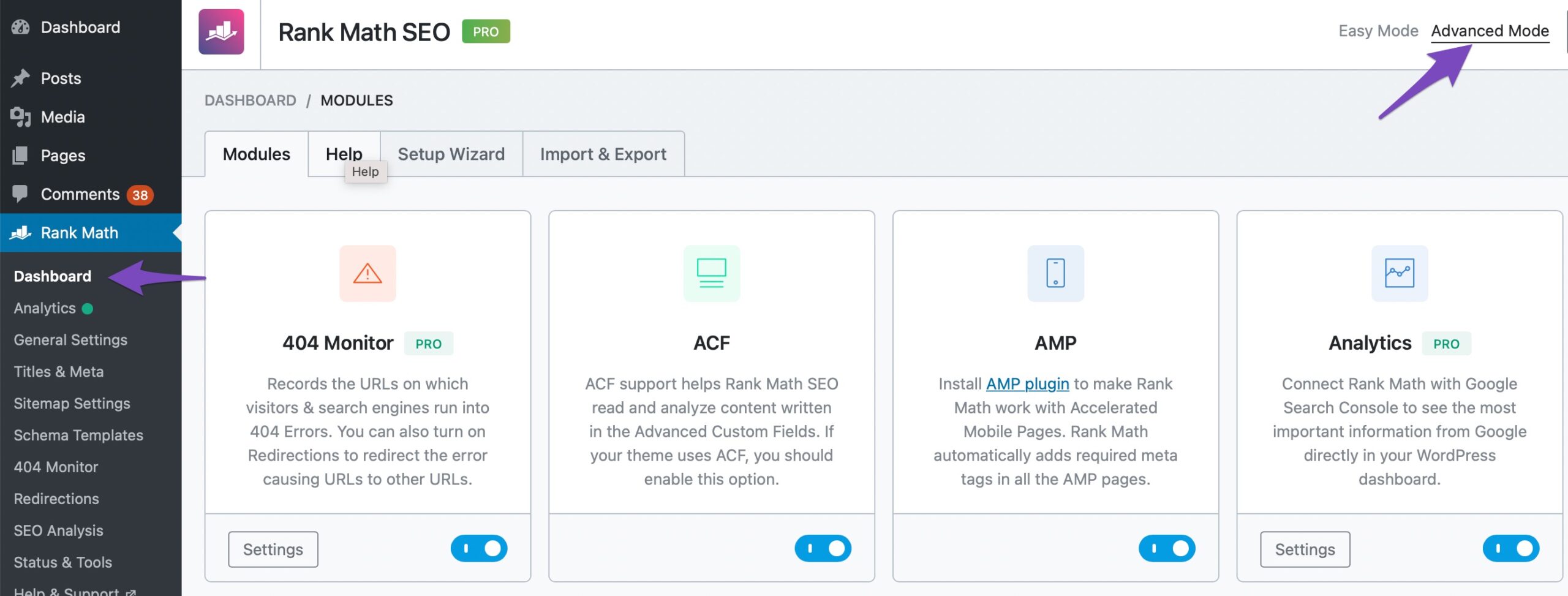
If you wish to make a link dofollow, you can override
"rel=nofollow"to a particular link by editing the anchor text as HTML.Go to your post > Select the anchor text > Edit as HTML > In
<a>tag addrel="follow"> SaveWe are aware that
rel=followis not the correct rel-tag but it is the only way to make it work.The other way would be to add the domain to the whitelist at WordPress Dashboard > Rank Math > General Settings > Links. Then, all links to that particular external domain will not be nofollowed.
https://rankmath.com/kb/general-settings/#no-follow-exclude-domainsHope that helps.
Thank you.
Hello, I can’t find the place to submit a new issue.
I have worked extremely hard to make sure that every page, product, etc has a good score, my dashboard Analytics looks like I’m only 23% optimized and that I have 50 bad scores listing ones that I 80+ scores on.
But if I ren SEO Analysis I get a 90. Why aren’t the scores being updated? I can’t find anyplace to update the Analytics and it says the last time it was updated was 4 days ago.
Thanks in advance.
I really do feel I’m more thoroughly optimized with me website than I’ve been with any other app. thanks very muchHello,
Please rebuild the Analytics index by going to Rank Math > Status & Tools > Database Tools > Rebuild Index:
The data update frequency is 3 days in the PRO plan.
Please check the recurrence of the rank_math/analytics/data_fetch Scheduled Action.
Head over to WordPress dashboard > Tools > Scheduled Actions > Pending tab
Let us know if the recurrence is not set to 3 days.
If the recurrence is 3 days, follow this guide to update the data:
https://rankmath.com/kb/delete-old-analytics-data/We look forward to helping you.
My WordPress does not have “Scheduled Actions” Pending tab under Tools.
But I was able to refresh my data, which now is at 82. I can rebuild the database as needed now.
Thanks for getting back to me Wish me luck. Will continue to work on my SEO.


You must be logged in to reply to this ticket.