Hello,
We apologize for the issue you are facing with the Rank Math sidebar not showing the full suite of options. It seems that the Rank Math Meta Box may not be displaying correctly on your client’s site. This can happen for a few reasons, especially if the homepage is set to display a specific page. In such cases, the Titles & Meta settings for the homepage can only be configured directly through the Rank Math MetaBox available in the Editor.
Here are a few steps you can take to troubleshoot this issue:
-
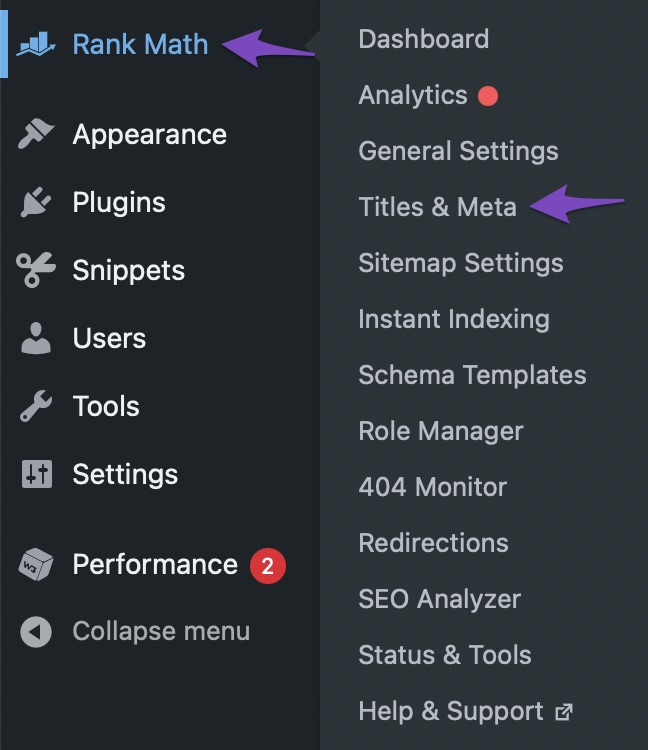
Check if the Meta Box is enabled: Navigate to Rank Math SEO → Titles & Meta from your WordPress dashboard to ensure that the Meta Box is enabled for the post type you are working on.
-
Switch to Advanced Mode: Make sure you are in Advanced Mode to access all options in the Rank Math Meta Box. The Advanced Tab includes all technical SEO options for the post.

-
Check for Plugin Conflicts: Sometimes, other plugins can conflict with Rank Math. Try deactivating other plugins temporarily to see if that resolves the issue.
If these steps do not resolve the problem, please reply to this ticket, and a human agent from the Rank Math Support team will take over and provide further assistance. Thank you for raising this concern!
“Navigate to Rank Math SEO → Titles & Meta” – there is no Titles & Meta option
Hello,
Could you please confirm if you’re using a multisite setup/environment?
We have asked since the correct way to use our plugin on a multisite setup is to install it on the network but only activate it on specific subsites.
If you have activated it on the network, please deactivate it on the network and then activate it on the subsites.
Please refer to this guide:
https://rankmath.com/kb/installing-rank-math-on-a-multisite-environment/#install-free-version
Looking forward to helping you.
No, it’s not a multisite. Just a regular WordPress site.
Hello,
For troubleshooting, please reinstall the Rank Math plugin on the website.
If the issue persists, then we might need to take a closer look at the settings. Please edit the first post on this ticket and include your WordPress & FTP logins in the designated Sensitive Data section.
Please do take a complete backup of your website before sharing the information with us.

It is completely secure and only our support staff has access to that section. If you want, you can use the below plugin to generate a temporary login URL to your website and share that with us instead:
https://wordpress.org/plugins/temporary-login-without-password/
You can use the above plugin in conjunction with the WP Security Audit Log to monitor what changes our staff might make on your website (if any):
https://wordpress.org/plugins/wp-security-audit-log/
We really look forward to helping you.
Hello,
We reinstalled the plugin on your website and now all the Rank Math options are showing on your dashboard.

The Rank Math SEO Meta box also appears on your posts/pages editor.
Hope that helps and please don’t hesitate to let us know if you have any other questions.
Thank you.
Hello,
We are glad to hear that this issue has been resolved. Thank you for letting us know. This ticket will be closed now, but you can always open a new one if you have any other questions or concerns. We are here to help you with anything related to Rank Math.
We appreciate your patience and cooperation throughout this process.
Thank you for choosing Rank Math.





