Hello,
We apologize for the issue you are facing with activating your PRO license. To activate your Rank Math PRO license, please follow these steps:
-
Ensure you have the Free version installed: Make sure that the Rank Math SEO free version is installed on your website, as the PRO version is built on top of it.
-
Download Rank Math PRO: Go to your Rank Math account area and download the Rank Math PRO plugin.
-
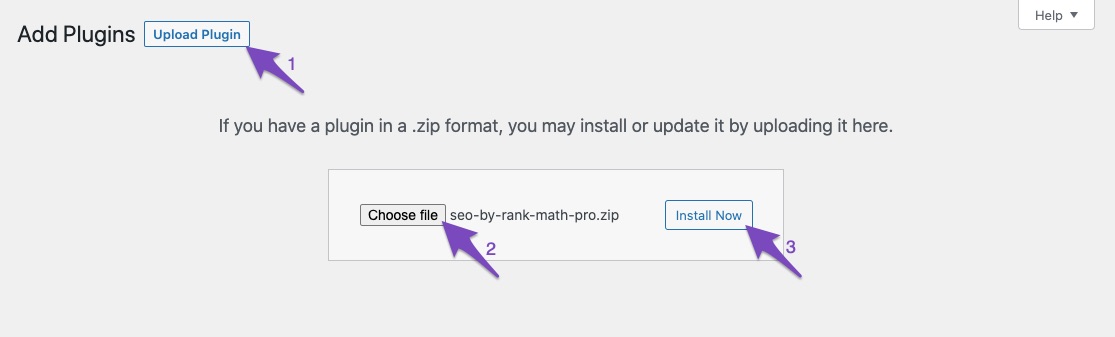
Install Rank Math PRO: In your WordPress admin area, navigate to Plugins → Add New → Upload Plugin. Select the zip file you downloaded and click Install Now.
-
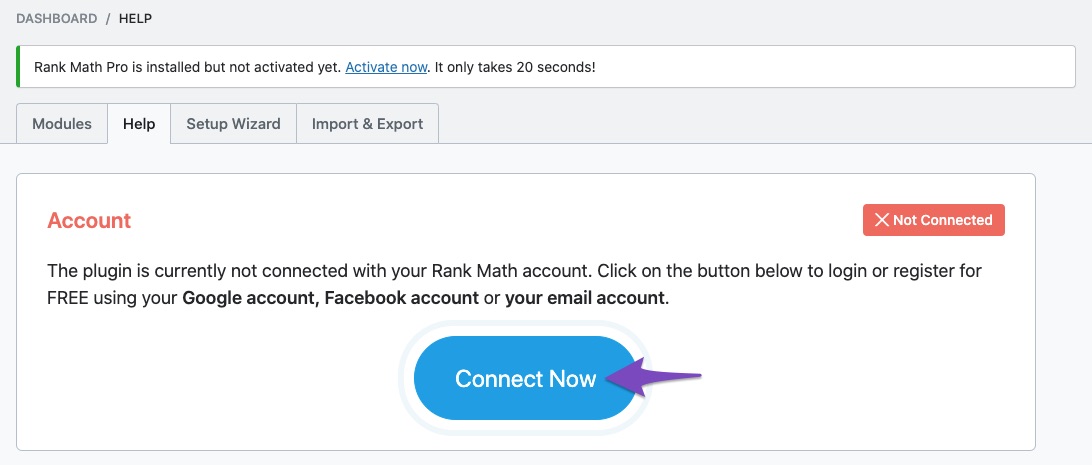
Connect Your Rank Math Account: After installing, go to Rank Math SEO → Dashboard → Help in your WordPress admin area. Click on Connect Now to authenticate your Rank Math account. Ensure you are using the same account that you used to purchase the PRO plan.
-
Select Your License Type: If you have multiple licenses, you should see an option to select the plan level during the activation process. If you do not see this option, it may be due to using a different email address for your Rank Math account.
If you continue to experience issues, please reply to this ticket with your site URL, and a human agent from our support team will assist you further. Thank you for raising this concern!
Sources:
How to Upgrade to Rank Math PRO » Rank Math
How to Upgrade to Rank Math PRO » Rank Math
Hello,
You mentioned you’re using Rank Math PRO, but the account you have used to open this ticket is the Rank Math free version (the same username you shared).
Can you please search and forward a receipt from FastSpring.com or the email address you used to purchase so we can locate your account and verify it?
Looking forward to helping you.
Hello,
Since we did not hear back from you for 15 days, we are assuming that you found the solution. We are closing this support ticket.
If you still need assistance or any other help, please feel free to open a new support ticket, and we will be more than happy to assist.
Thank you.



