No Index Tag On My Product Pages and Posts

#863494
  • Resolved Snooze
    Rank Math free

    Re: “No index” – but this should not be applied – help!

    Subject: Urgent Assistance Required: Noindex Tag Issue on Indexed Pages

    Dear Rank Math Support Team,

    I hope this message finds you well. We are currently facing an issue with our website where Google has identified certain pages with a noindex tag. However, when we check these pages using Rank Math, everything is marked as “Indexed.”

    To ensure there wasn’t a mistake on our end, we reviewed the page source directly, and to our surprise, it shows that the pages are marked as noindex. We have attached images for your reference to provide a clear understanding of the issue.

    Could you please assist us in resolving this discrepancy? Your prompt attention to this matter would be greatly appreciated, as it is crucial for our website’s SEO performance.

    Thank you for your support.

    Best regards,
    Lal

Viewing 7 replies - 1 through 7 (of 7 total)
  • Hello,

    We apologize for the issue you are facing with the noindex tag on your product pages and posts. It sounds like there may be a discrepancy between the settings in Rank Math and the actual meta tags on your pages.

    To resolve this issue, we recommend checking the following:

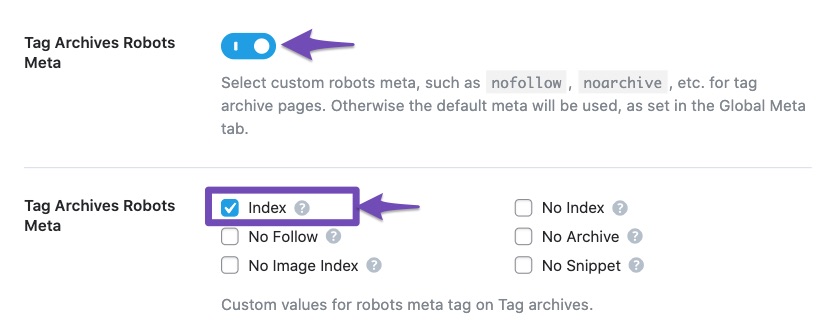
    1. Rank Math’s Titles & Meta Settings: Navigate to Rank Math SEO → Titles & Meta in your WordPress dashboard. Ensure that the noindex setting is not set as a default value for the affected pages. If you want these pages indexed, select the respective “Index” Robots Meta tag.
      Set Noindex in Titles and Meta Settings

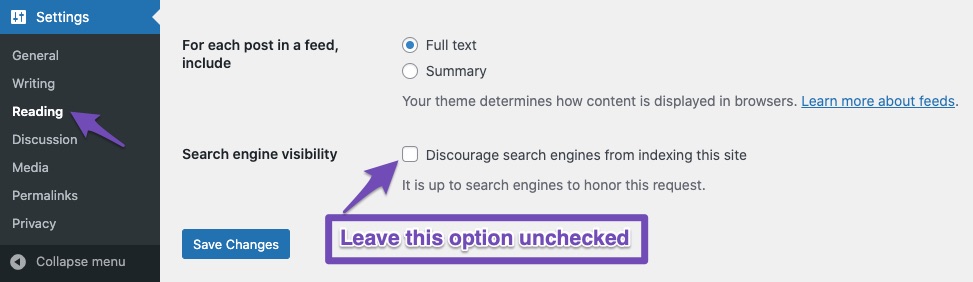
    2. Search Engine Visibility Settings: Go to Settings → Reading in your WordPress dashboard. Check if the checkbox labeled Discourage search engines from indexing this site is checked. If it is, uncheck it and save changes.
      Leave Search engine visibility unchecked

    3. Page-Specific Settings: For each individual page or post, check the Rank Math meta box to ensure that the noindex option is not selected.

    4. Clear Cache: If you are using any caching plugins, clear the cache after making changes to ensure that the updated settings are reflected.

    5. Check Robots.txt: Ensure that your pages are not being blocked from crawling in your robots.txt file.

    Once you have made these checks and adjustments, monitor the pages in Google Search Console to see if the issue resolves itself. If you continue to experience problems, please reply to this ticket, and a human agent from our support team will assist you further.

    Thank you for raising this concern, and we hope to help you resolve it soon!

    Sources:
    Fix Excluded by NoIndex Tag – Google Search Console Status » Rank Math
    How to Fix Submitted URL Marked ‘NoIndex’ Error » Rank Math

    Snooze
    Rank Math free

    Hello,

    I have updated the sensitive data as requested. Can you please check further?

    Thank you.

    Hello,

    Thank you for contacting us. We apologize for any inconvenience this issue may have caused.

    Rank Math only automatically adds the noindex to the robots meta of myaccount, checkout, cart, and empty category pages. If none of that is the case, then we might need to take a closer look at your site.

    As for the Feed URLs, they are not created for humans but for RSS feed crawlers and readers.

    They are only basic code versions of your actual content pages.

    Those are not meant to be indexed and hopefully, you won’t want these pages to be indexed as Google doesn’t like them on its SERPs and would most likely not show them to users anyway.

    In this case, please add this rule to your robots.txt to disallow them from being crawled:

    User-Agent: *
    Disallow: */feed/

    Here’s how you can edit the robots.txt file using Rank Math:
    https://rankmath.com/kb/add-sitemaps-to-robots-txt/#num-2-2-navigate-to-edit-robots-txt

    This should save your crawl budget and after the next few crawls, the warnings for them should be removed from GSC.

    As regards the other noindex tag for us to investigate the issue further please edit the first post on this ticket and include your WordPress logins in the designated Sensitive Data section.

    Please do take a complete backup of your website before sharing the information with us.

    It is completely secure and only our support staff has access to that section. If you want, you can use the below plugin to generate a temporary login URL to your website and share that with us instead:

    https://wordpress.org/plugins/temporary-login-without-password/

    You can use the above plugin in conjunction with the WP Security Audit Log to monitor what changes our staff might make on your website (if any):

    https://wordpress.org/plugins/wp-security-audit-log/

    We really look forward to helping you.

    Snooze
    Rank Math free

    Hello,

    I have updated the sensitive data as requested. Can you please check further?

    Thank you.

    Hello,

    Since your product pages contain a button to buy immediately they are considered a checkout page so we need to override the default robots meta settings with the following filter:

    
    add_filter( 'rank_math/frontend/robots', function( $robots ) {
    	if( is_checkout() ) {
    		$robots['index'] = 'index';
    	}
    	return $robots;
    }, 11, 1);
    

    After adding that to your website, the robots meta settings on the product are showing as index.

    Don’t hesitate to get in touch if you have any other questions.

    Snooze
    Rank Math free

    Thank you for identifying that the conflict was caused by the “Buy Now” button plugin. I have deactivated the plugin, and now all my other product pages that were previously marked as noindex have changed to index.

    Could you suggest an alternative plugin to add a “Buy Now” button to the product pages?

    Thank you for your assistance.

    Hello,

    You don’t need to disable that plugin, you just need to make sure that you keep the filter we added to the website enabled so that all product pages with that button still remain set to index.

    Don’t hesitate to get in touch if you have any other questions.

    Hello,

    Since we did not hear back from you for 15 days, we are assuming that you found the solution. We are closing this support ticket.

    If you still need assistance or any other help, please feel free to open a new support ticket, and we will be more than happy to assist.

    Thank you.

Viewing 7 replies - 1 through 7 (of 7 total)

The ticket ‘No Index Tag On My Product Pages and Posts’ is closed to new replies.