Hello,
We apologize for the issue you are facing with the Shop Administrator role not having access to the dashboard and the Edit robots.txt feature.
To resolve this, you can use the Role Manager feature in Rank Math to ensure that the necessary capabilities are enabled for the Shop Administrator role. Here’s how you can do it:
-
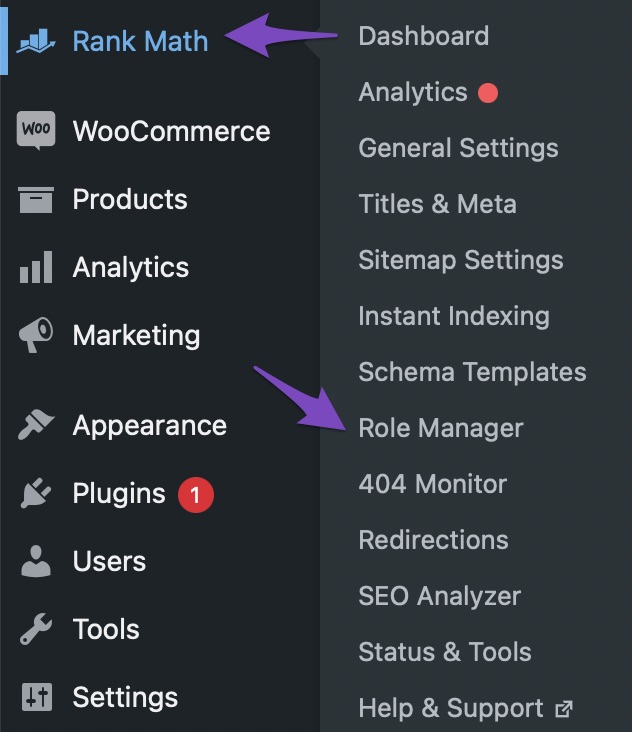
Access Role Manager: Go to WordPress Dashboard → Rank Math SEO → Role Manager.
-
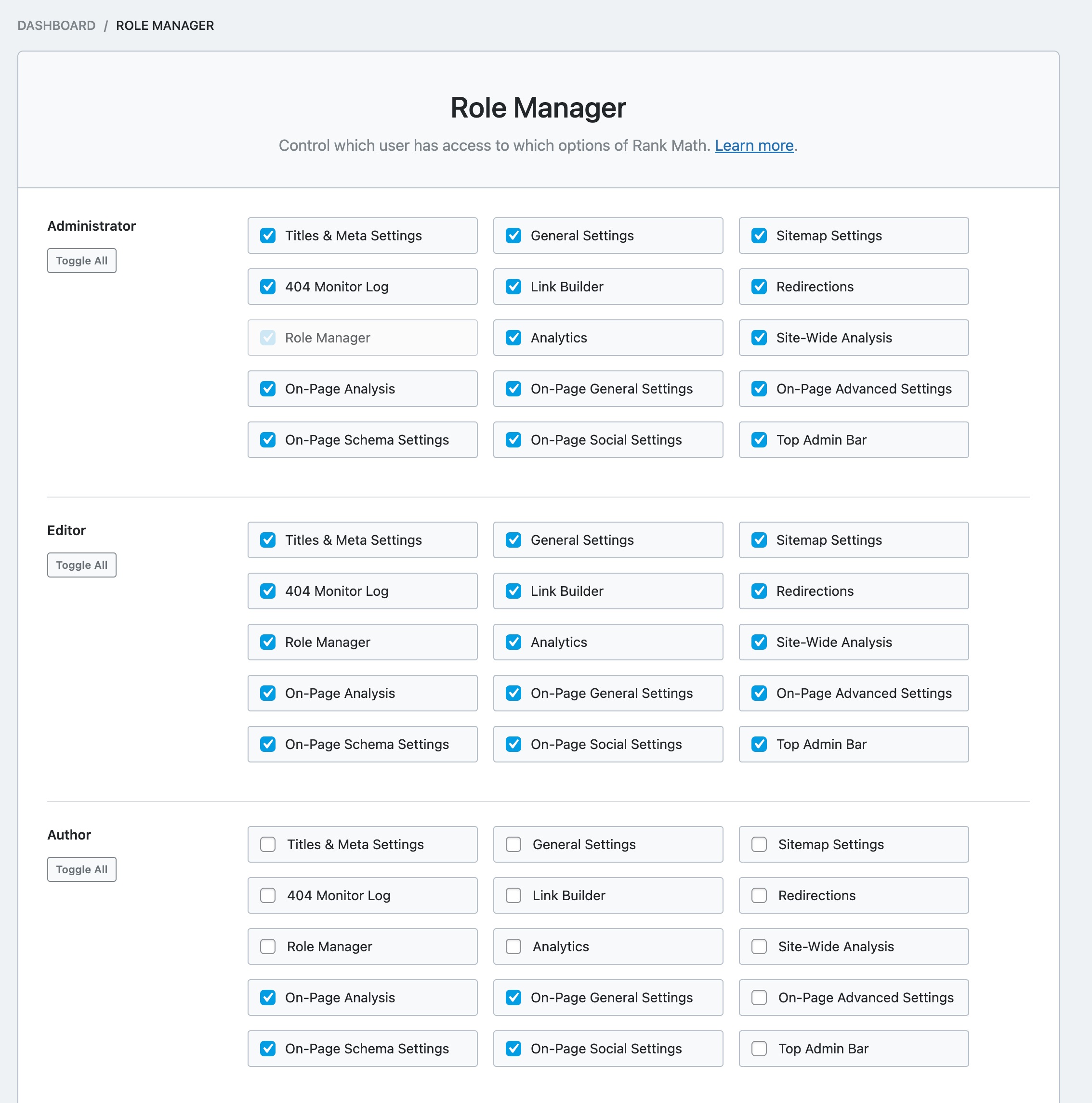
Check Capabilities: In the Role Manager, find the Shop Administrator role and ensure that the required capabilities are enabled. You may need to enable specific functions like Edit robots.txt and any other relevant settings that are currently disabled.
-
Save Changes: After making the necessary adjustments, make sure to save your changes by clicking the “Update Capabilities” button.

If you have already done this and the issue persists, please check if there are any conflicting plugins or settings that might be affecting the visibility of these features for the Shop Administrator role.
If you still encounter difficulties, please reply to this ticket, and a human agent from the Rank Math Support team will assist you further.
Thank you for raising this concern!
Sources:
How to Use the Role Manager Feature of Rank Math SEO Plugin
We have done everything mentioned in the guide, we dpn’t have plug-in conflicts, but we still have this problem
Hello,
Thank you for contacting us and sorry for any inconvenience that this issue might have caused.
To investigate this issue further, we might need to take a closer look at your website and settings. Please follow these steps:
- Edit the first post on this ticket and include your WordPress and FTP logins in the Sensitive Data section. This is a secure section that only our support staff can access.

- Make sure you take a complete backup of your website before sharing the information with us.
- If you prefer, you can use this plugin to generate a temporary login URL to your website and share that with us instead: https://wordpress.org/plugins/temporary-login-without-password/
- You can also use this plugin to monitor what changes our staff might make on your website (if any): https://wordpress.org/plugins/wp-security-audit-log/
We appreciate your cooperation and patience.
Thank you for choosing Rank Math.
We can give you access to our GitLab, will it be enough?
And I didn’t mention, we have the same problem on two websites: stage one and production one.
Hello,
We are sorry for the confusion. We do not need access to your website.
Unfortunately, the Edit Robots.txt and Edit .htaccess options are not available for the Shop Manager role. These options can only be accessed by the Administrator.
Hope that helps and please don’t hesitate to let us know if you have any other questions.
Thank you.
While I understand why this is not an option for .htaccess, it looks as a strange thing for robots.txt, especially given the fact that it is not a real file but rather a virtual robots.txt
Is it possible to include access to robots.txt settings in Access Manager?
Hello,
Sorry but at the moment, we don’t have a way to give access to robots.txt editor to user roles other than the Administrator.
If your Shop Manager user also has access to your website’s FTP, then you can insert a physical robots.txt file in your website’s folder where your Shop Manager can edit it. The virtual robots.txt our plugin generates will then be overridden by the physical robots.txt file.
Hope that helps.
Hello,
Since we did not hear back from you for 15 days, we are assuming that you found the solution. We are closing this support ticket.
If you still need assistance or any other help, please feel free to open a new support ticket, and we will be more than happy to assist.
Thank you.





