
-
Hi guys – I’ve tried reconnect Analytics about 15 times – I am not finding the hook in the Scheduled Tasks part – there was a failed one, but I deleted it.
Can you please assist?
Regards

-
Hello,
Thanks for contacting us, and sorry for any inconvenience that might have been caused due to that.
We might need to take a closer look at the settings. Please edit the first post on this ticket and include your WordPress & FTP logins in the designated Sensitive Data section.
Please do take a complete backup of your website before sharing the information with us.
It is completely secure and only our support staff has access to that section. If you want, you can use the below plugin to generate a temporary login URL to your website and share that with us instead:
https://wordpress.org/plugins/temporary-login-without-password/
You can use the above plugin in conjunction with the WP Security Audit Log to monitor what changes our staff might make on your website (if any):
https://wordpress.org/plugins/wp-security-audit-log/
Looking forward to helping you.
Thank you.
Hello,
I have updated the sensitive data as requested. Can you please check further?
Thank you.
Done, please check what’s going on
Hello,
It seems like proper permissions are not provided to Rank Math’s app:
Please follow this guide to reconnect Analytics and provide all the permissions:
https://rankmath.com/kb/zero-search-traffic-error/#refresh-tokensand then this:
https://rankmath.com/kb/delete-old-analytics-data/#permissionsOnce done, please start a fresh import of data.
Looking forward to helping you. Thank you.
Thanks for getting back to me – I removed the access for RankMath, then reconnected it – I’ve also started a manual Analytics Data Import, 4 hours left, roughly
Will let you know how that goes – I still done see rank_math/analytics/data_fetch in the Scheduled Actions though…
Hello,
The required permissions are still not provided.
Please follow these steps: (especially the 3rd one of part B)
If you do not see any data inside your Analytics module, this guide might help you.
A. Pre-check List
1. You should not be using any other Google Analytics plugin.
2. Update to the latest versions of Rank Math Free & PRO
3. Ensure that you are logged in to your account:
4. Disconnect and reconnect your account from inside WordPress:
B. Refresh Tokens
1. Please delete RankMath’s app from here:
https://myaccount.google.com/permissions
2. Re-create tables by clicking WP Dashboard > Rank Math > Status & Tools > Database Tools and click the
Re-create database Tablebutton.
3. Reconnect the account inside Rank Math by clicking here and ensure that you approve all the permission notices that show up:
WP Dashboard >> Rank Math >> General Settings >> Analytics tab, and click theReconnectlink
Allow all the permissions on the next screen.
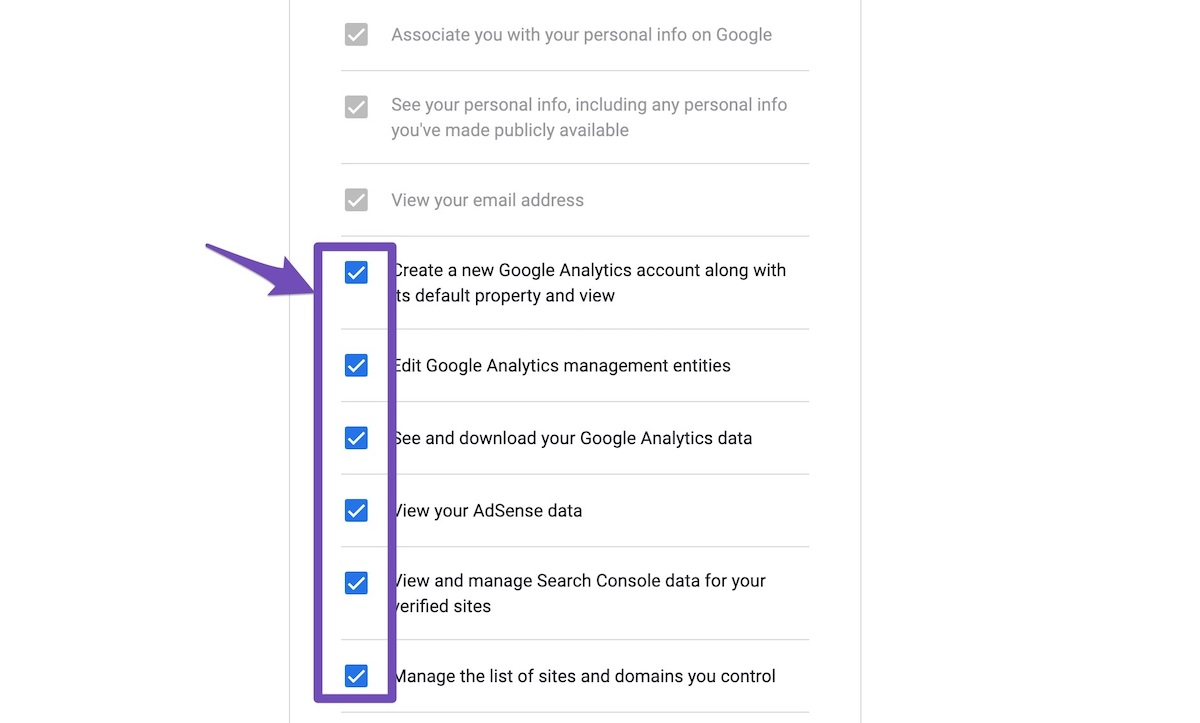
4. Let the process complete, which might take around 30 minutes.
5. Now head over to WP Dashboard > Rank Math > Status & Tools > Database Tools and click the
Rebuild Index for Analyticsbutton.
6. Please check if the data shows up here:
/wp-admin/admin.php?page=rank-math-analytics#/
If that does not help, please paste the data from here:
WP Dashboard > Rank Math > Status & Tools > System Status and click theCopy System Info to Clipboardbutton
We really look forward to helping you. Thank you.
Hi There – I’ve done all the steps
`
### rank-math ###version: 1.0.103
database_version: 1
plugin_plan: Free
active_modules: link-counter, seo-analysis, rich-snippet, role-manager, redirections, 404-monitor, image-seo, analytics, sitemap, instant-indexing, content-ai, local-seo
refresh_token: Token exists
permissions:
Search Console: Given
rank_math_404_logs: 26 KB
rank_math_redirections: 1 MB
rank_math_redirections_cache: 940 KB
rank_math_internal_links: 6 MB
rank_math_internal_meta: 455 KB
rank_math_analytics_gsc: 10 MB
rank_math_analytics_objects: 318 KB
rank_math_analytics_inspections: 2 MB### wp-core ###
version: 6.1.1
site_language: en_ZA
user_language: en_ZA
timezone: +02:00
permalink: /%postname%/
https_status: true
multisite: false
user_registration: 0
blog_public: 1
default_comment_status: open
environment_type: production
user_count: 432
dotorg_communication: true### wp-dropins (1) ###
maintenance.php: true
### wp-active-theme ###
name: SmartMag (smart-mag)
version: 9.0.0
author: ThemeSphere
author_website: https://theme-sphere.com
parent_theme: none
theme_features: core-block-patterns, custom-line-height, custom-units, align-wide, custom-spacing, editor-font-sizes, editor-color-palette, editor-style, post-thumbnails, automatic-feed-links, html5, title-tag, post-formats, menus, custom-background, widgets
theme_path: /home/rwrant/public_html/wp-content/themes/smart-mag
auto_update: Enabled### wp-mu-plugins (1) ###
p3-profiler.php: author: (undefined), version: (undefined)
### wp-plugins-active (30) ###
Advanced Ads: version: 1.38.0, author: Thomas Maier, Advanced Ads GmbH, Auto-updates enabled
Akismet Anti-Spam: version: 5.0.2, author: Automattic, Auto-updates enabled
Better Search Replace: version: 1.4.1, author: Delicious Brains, Auto-updates enabled
Bunyad Demo Import: version: 2.6.2, author: ThemeSphere & ProteusThemes, Auto-updates enabled
Bunyad Widget for Instagram: version: 1.2.4, author: ThemeSphere, Auto-updates disabled
Categories to Tags Converter Importer: version: 0.5, author: wordpressdotorg, Auto-updates disabled
Classic Editor: version: 1.6.2, author: WordPress Contributors, Auto-updates enabled
Cloudflare: version: 4.11.0, author: Cloudflare, Inc., Auto-updates enabled
Contact Form 7: version: 5.6.4, author: Takayuki Miyoshi, Auto-updates enabled
Debloat: version: 1.2.1, author: asadkn, Auto-updates enabled
Duplicate Page: version: 4.4.9, author: mndpsingh287, Auto-updates enabled
Elementor: version: 3.8.1, author: Elementor.com, Auto-updates enabled
Envato Market: version: 2.0.7, author: Envato, Auto-updates disabled
Export media with selected content: version: 2.1.4, author: Joost de Keijzer, Auto-updates enabled
Featured Image in RSS Feed by MailerLite: version: 1.0.7, author: MailerLite, Auto-updates disabled
FS Poster: version: 6.2.0, author: FS-Code, Auto-updates enabled
Imagify: version: 2.0, author: WP Rocket, Auto-updates enabled
LightStart – Maintenance Mode, Coming Soon and Landing Page Builder: version: 2.6.1, author: Themeisle, Auto-updates enabled
MailerLite – Signup forms (official): version: 1.6.1, author: MailerLite, Auto-updates disabled
OneSignal Push Notifications: version: 2.3.3, author: OneSignal, Auto-updates enabled
Open Graph Meta Tags by Heateor: version: 1.1.9, author: Team Heateor, Auto-updates enabled
Rank Math SEO: version: 1.0.103, author: Rank Math, Auto-updates enabled
Site Kit by Google: version: 1.88.0, author: Google, Auto-updates enabled
SmartMag Core: version: 1.3.8, author: ThemeSphere, Auto-updates enabled
Sphere Core: version: 1.5.2, author: ThemeSphere, Auto-updates enabled
Sphere Post Views: version: 1.0.1, author: ThemeSphere, asadkn, Hector Cabrera, Auto-updates enabled
Super Page Cache for Cloudflare: version: 4.7.2, author: Optimole, Auto-updates disabled
User Profile Picture: version: 2.6.0, author: Cozmoslabs, Auto-updates enabled
Woody code snippets (PHP snippets | Insert PHP): version: 2.4.7, author: Creative Motion, Will Bontrager Software, LLC <w***@w*************>, Auto-updates enabled
Yet Another Related Posts Plugin (YARPP): version: 5.30.1, author: YARPP, Auto-updates enabled### wp-server ###
server_architecture: Linux 3.10.0-962.3.2.lve1.5.73.el7.x86_64 x86_64
httpd_software: LiteSpeed
php_version: 7.4.33 64bit
php_sapi: litespeed
max_input_variables: 10000
time_limit: 3000
memory_limit: 2048M
max_input_time: -1
upload_max_filesize: 16M
php_post_max_size: 16M
curl_version: 7.71.0 OpenSSL/1.1.1p
suhosin: false
imagick_availability: true
pretty_permalinks: true
htaccess_extra_rules: true### wp-database ###
extension: mysqli
server_version: 10.3.37-MariaDB
client_version: mysqlnd 7.4.33
max_allowed_packet: 268435456
max_connections: 151### wp-constants ###
WP_HOME: undefined
WP_SITEURL: undefined
WP_CONTENT_DIR: /home/rwrant/public_html/wp-content
WP_PLUGIN_DIR: /home/rwrant/public_html/wp-content/plugins
WP_MEMORY_LIMIT: 512M
WP_MAX_MEMORY_LIMIT: 512M
WP_DEBUG: false
WP_DEBUG_DISPLAY: true
WP_DEBUG_LOG: false
SCRIPT_DEBUG: false
WP_CACHE: false
CONCATENATE_SCRIPTS: undefined
COMPRESS_SCRIPTS: undefined
COMPRESS_CSS: undefined
WP_ENVIRONMENT_TYPE: Undefined
DB_CHARSET: utf8
DB_COLLATE: undefined### wp-filesystem ###
wordpress: writable
wp-content: writable
uploads: writable
plugins: writable
themes: writable
mu-plugins: writableI am waiting for the data to import
Hi Guys – Okay, so I am seeing post data, but no keyword data whatsoever… I have this plugin installed on three sites (including this one) and this one is the only one that keeps on losing keyword data
Hello,
Please ensure that All the permissions are provided to the app:
Currently only this is providedSearch Console: GivenAfter deleting the app, when you reconnect to your Google account, please select all the checkboxes:
https://rankmath.com/wp-content/uploads/2021/01/Allow-Permissions-to-Google-App-1.jpgLooking forward to helping you. Thank you.
I’ve ticked all the boxes and it still says “Given” only when I reconnected it – I’ve refreshed the cache, but it still says “Given” – any advice? I manually added the GA4 code on my site cause I still want to be able to add to track on both old and new GA – I doubt that this is the issue though cause I have that set up the same way on my other two sites.
And I am seeing Keyword data on both of the sites – Permission also says “Given” (on the one, didn’t check the other one).
Hello,
Can you please add s******@r*********** as an admin to your accounts on Analytics & GSC, and we will fetch the data on your website?
There is no requirement to install Analytics via Rank Math to use the Analytics module.
Looking forward to helping you. Thank you.
Done, you should be able to access it now
Hello,
Since we did not hear back from you for 15 days, we are assuming that you found the solution. We are closing this support ticket.
If you still need assistance or any other help, please feel free to open a new support ticket, and we will be more than happy to assist.
Thank you.



The ticket ‘No Analytics Data’ is closed to new replies.