
-
After updating to the latest version of WooCommerce 9.2.3 I can’t create new redirects. Old redirections working fine, but when I want to create new redirection – the plugin doesn’t save the redirect.
I would be grateful for your help.

-
Hello,
We apologize for the issue you are facing with creating new redirects after updating to WooCommerce 9.2.3. This problem may occur if some of your database tables are missing.
To resolve this, please follow these steps:
- Navigate to Rank Math SEO → Status & Tools → Database Tools from your WordPress dashboard.
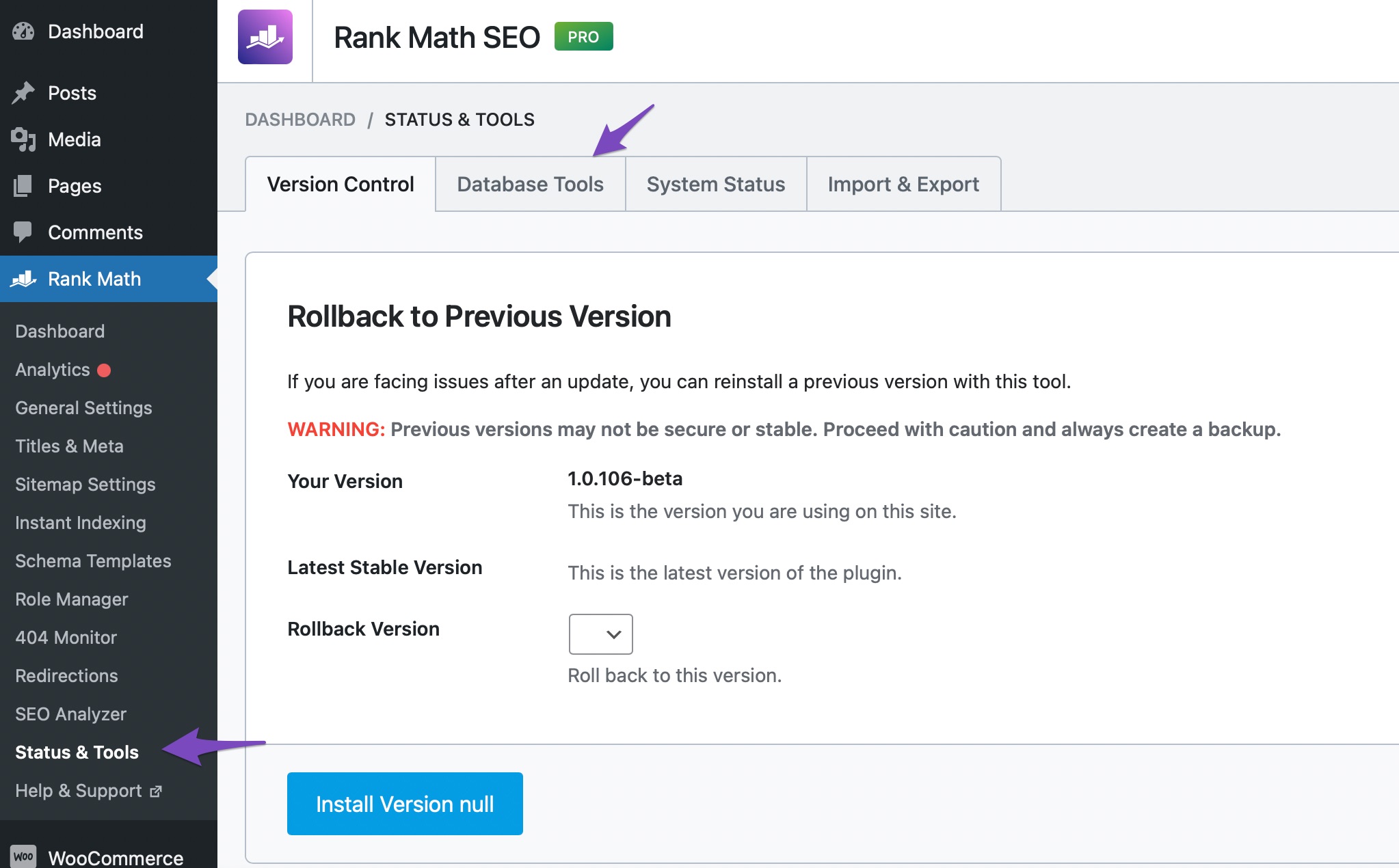
- If the Database Tools option is unavailable, enable Advanced Mode at the top-right area of the screen.
- Click on Re-create Missing Database Tables.

This should help in recreating any missing tables and allow you to save new redirects again. If the problem persists after trying this, please reply to this ticket, and a human agent from the Rank Math Support team will assist you further.
Thank you for bringing this concern to our attention!
Sources:
Solving Redirection Issues Using Rank Math SEO Plugin » Rank MathSorry, I made the ChatBot steps – but my problem is still exist.
Hello,
Thank you for contacting us and sorry for any inconvenience that might have been caused due to that.
Please verify that you’re running the latest versions of the Rank Math plugins according to the Rank Math changelog: https://rankmath.com/changelog
Then share the exact redirection you created on your website so that we can check this further for you. You can share it in this structure:
Source:
Redirection Type:
Destination URL:
Or, you can share a screenshot of the redirection by using a tool like https://imgur.com/upload so that we can check this further for you.
Looking forward to helping you.
Thank you.
Hello. Yes I have the latest version of Rank Match v1.0.227.1.
About my problem, I can’t do new redirections:
Please check my screnshoot: https://imgur.com/zjjBInkFor example I want to make redirection:
Source: /k/oswietlenie-swiateczne/lampki-choinkowe-led/
Redirection Type: 301
Destination URL: https://girlandowo.pl/k/oswietlenie-swiateczne/lampki-choinkowe-wewnetrzne/Hello,
We might need to take a closer look at the settings. Please edit the first post on this ticket and include your WordPress & FTP logins in the designated Sensitive Data section.
Please do take a complete backup of your website before sharing the information with us.
It is completely secure and only our support staff has access to that section. If you want, you can use the below plugin to generate a temporary login URL to your website and share that with us instead:
https://wordpress.org/plugins/temporary-login-without-password/
You can use the above plugin in conjunction with the WP Security Audit Log to monitor what changes our staff might make on your website (if any):
https://wordpress.org/plugins/wp-security-audit-log/
We really look forward to helping you.
Hello,
I have updated the sensitive data as requested. Can you please check further?
Thank you.
Dear Reinelle. I made temporary login, please check sensitive data.
At yesterday, I checked automation redirections option – and it is working correct. After edit page url – redirection was auto made.But still I cant make new manual redirections.
I’m waiting for your support. Thanks!Hello,
Please also share the FTP access details.
Kindly also ensure the Cron jobs are working correctly in your installation.
We suggest you discuss this with your hosting provider and make sure that the cron jobs work consistently and the scheduled actions don’t miss any of their schedules.
You can also install the WP Crontrol plugin and navigate to WordPress Dashboard > Tools > Cron Events to make sure that the Cron Jobs is working fine on your site.
Hope that helps, and please do not hesitate to let us know if you need our assistance with anything else.
Hello,
I have updated the sensitive data as requested. Can you please check further?
Thank you.
Dear Ike, I will ask my hosting support about CRON. You can check SFTP login data.
I hope you will resolve my problem…Thanks!
Hello,
After debugging the issue, it seems that you have the
DISABLE_WP_CRONset to true and once I turned that off, this error shows up:Please discuss this with your hosting provider first and make sure the CRON job is working fine on your website.
With that said, we have shared this with our development team to check what else might be causing the issue with the creation of your redirection.
We appreciate your time and patience in the meantime.
Hello Jeremy. The CRON is working good. My hosting support checked this and everything working correctly.
You can check the CRONs logs in FTP files: wp-cron.log
Hello,
Could you please make a compete database backup, as the PRIMARY KEY column might have been modified by the update and does not auto increment any more.
After the backup, we will need to run a query to modify it.
Thank you.
Dear Nicholas, Ok. I made the database and files backup. Thanks!
- Navigate to Rank Math SEO → Status & Tools → Database Tools from your WordPress dashboard.



The ticket ‘new redirection problem, after WooCommerce 9.2.3 update’ is closed to new replies.