Hello,
We apologize for the issue you are facing with your site’s indexing in Google. Thank you for raising this concern.
To address the problem of your site not being indexed correctly, you can follow these steps:
1. Request Google to Reindex Your Homepage
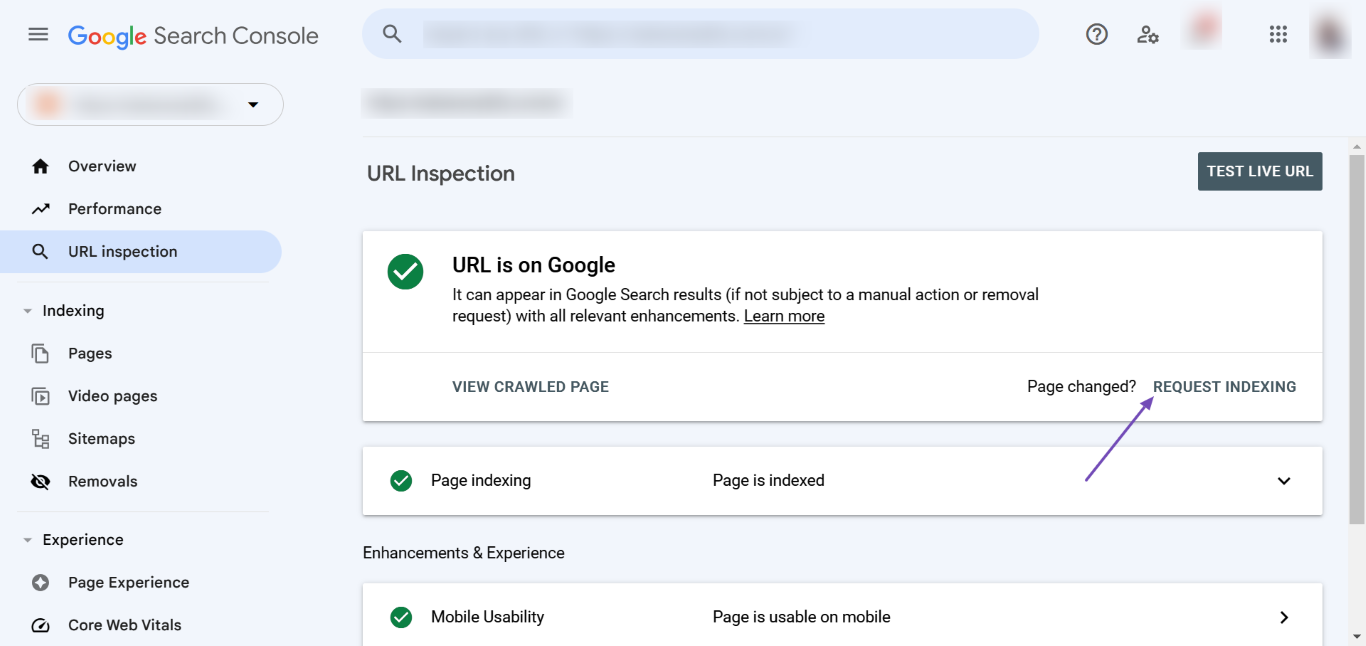
You can inform Google about the update to your site name by requesting them to reindex your homepage. Here’s how:
- Navigate to the Google Search Console.
- Enter your homepage URL into the provided field and click Enter on your keyboard.
- Click REQUEST INDEXING.
2. Use Instant Indexing Feature
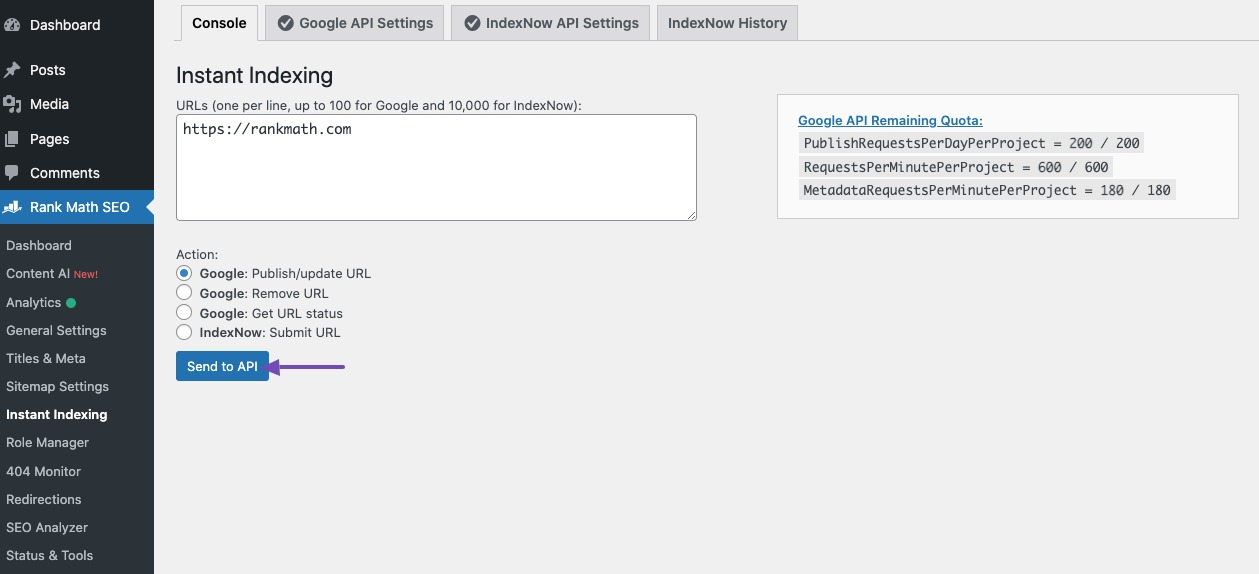
If you have configured Google’s Instant Indexing, you can use it to submit your homepage URL:
- Go to Rank Math SEO → Instant Indexing in your WordPress dashboard.
- Enter your homepage URL and click the Send to API button.
3. Check for Duplicate Content
Ensure that there are no duplicate content issues on your site, as this can affect indexing. You can use canonical tags to indicate the preferred version of a page if you have similar content across multiple pages.
4. Verify Site Name Settings
Make sure that your site name is set correctly in the WordPress settings. You can check this under Settings → General in your WordPress dashboard.
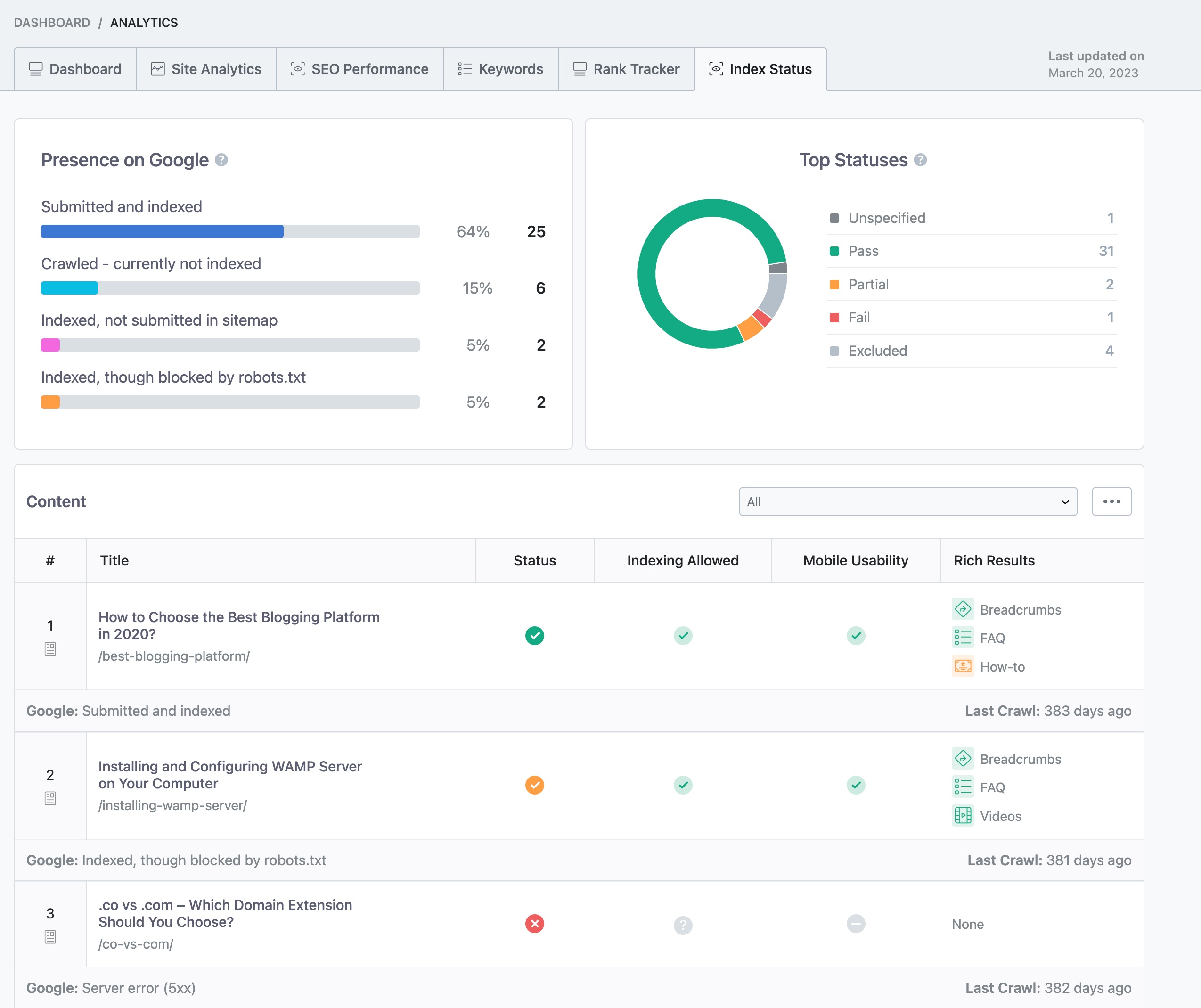
5. Monitor Index Status
You can check your page’s index status within your WordPress dashboard by navigating to Rank Math SEO → Analytics → Index Status.
If you continue to experience issues after following these steps, please reply to this ticket, and a human agent from the Rank Math Support team will assist you further.
We hope this helps you resolve the indexing issue!
Sources:
Why Google Displays URL Instead of Site Name in SERP? » Rank Math
How to Fix "Crawled – Currently Not Indexed" Error in Google Search Console » Rank Math
Hello,
The title you have set for your homepage is Vende Tu Propiedad en Madrid – Sin Comisiones.
Please note that Google sometimes ignores the custom meta info altogether and shows something from the page’s content that matches the search intent better.
Here’s a link for more information:
https://rankmath.com/kb/different-meta-title-and-description/
Regarding the sitename, Google uses a machine learning algorithm to generate the Sitename for your pages based on other information it has collected about your website and your industry.
Here’s a link for more information:
https://rankmath.com/kb/display-site-name-in-search-results/
Moreover, please go through the Google guidelines about the site name to help you increase the chances of displaying the desired site name on the SERP:
https://developers.google.com/search/docs/appearance/site-names
Looking forward to helping you.
But right now, even my title is being ignored, it shows: ezerian.
How can I fix this?
Hello,
We checked and can see that Google is using the Title you have set correctly though the description you have set is different from what is shown in the Google Search result page.

Specifically, Google has taken this description from the content of the page.

Google has made some changes to their algorithm which automatically changes the description, discarding the one you have set in your SEO meta description tag. This happens regardless of the SEO plugin you are using. We have covered this Google update here: https://rankmath.com/google-update/google-title-rewrite-update/
We hope that helps and we are here should you have any follow-up questions.
Thank you.
Hello,
Since we did not hear back from you for 15 days, we are assuming that you found the solution. We are closing this support ticket.
If you still need assistance or any other help, please feel free to open a new support ticket, and we will be more than happy to assist.
Thank you.




