
-
My rankmath is not showing up.
Suddenly rankmathseo is not showing up on my product and post editor. I have deactivated all other plugins but it still doesn’t work

-
Hello,
We apologize for the issue you are facing with Rank Math not showing up in your product and post editor. This can be frustrating, but there are a few steps you can take to troubleshoot this problem.
-
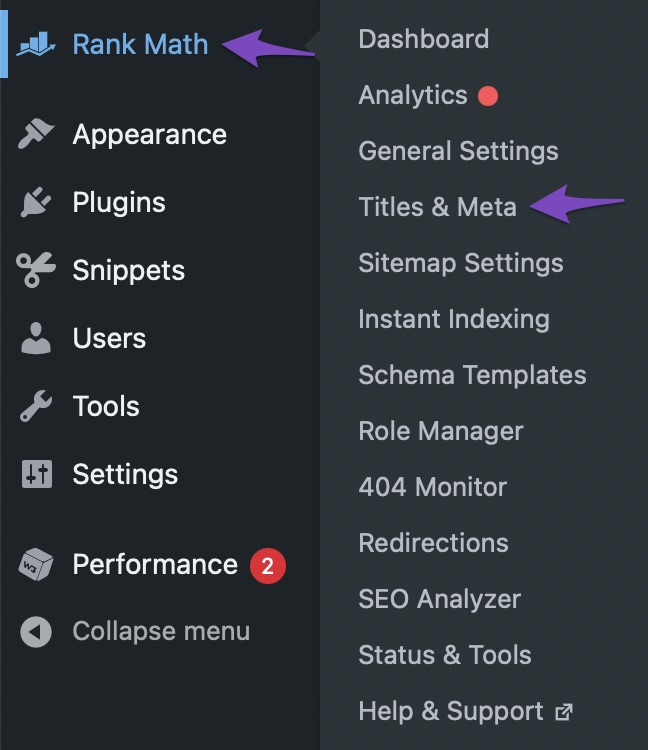
Check if the Meta Box is Enabled: Sometimes, the Rank Math Meta Box may be disabled for certain post types. You can enable it by navigating to Rank Math SEO → Titles & Meta from your WordPress dashboard. Make sure that the Meta Box is enabled for the specific post types you are working with.
-
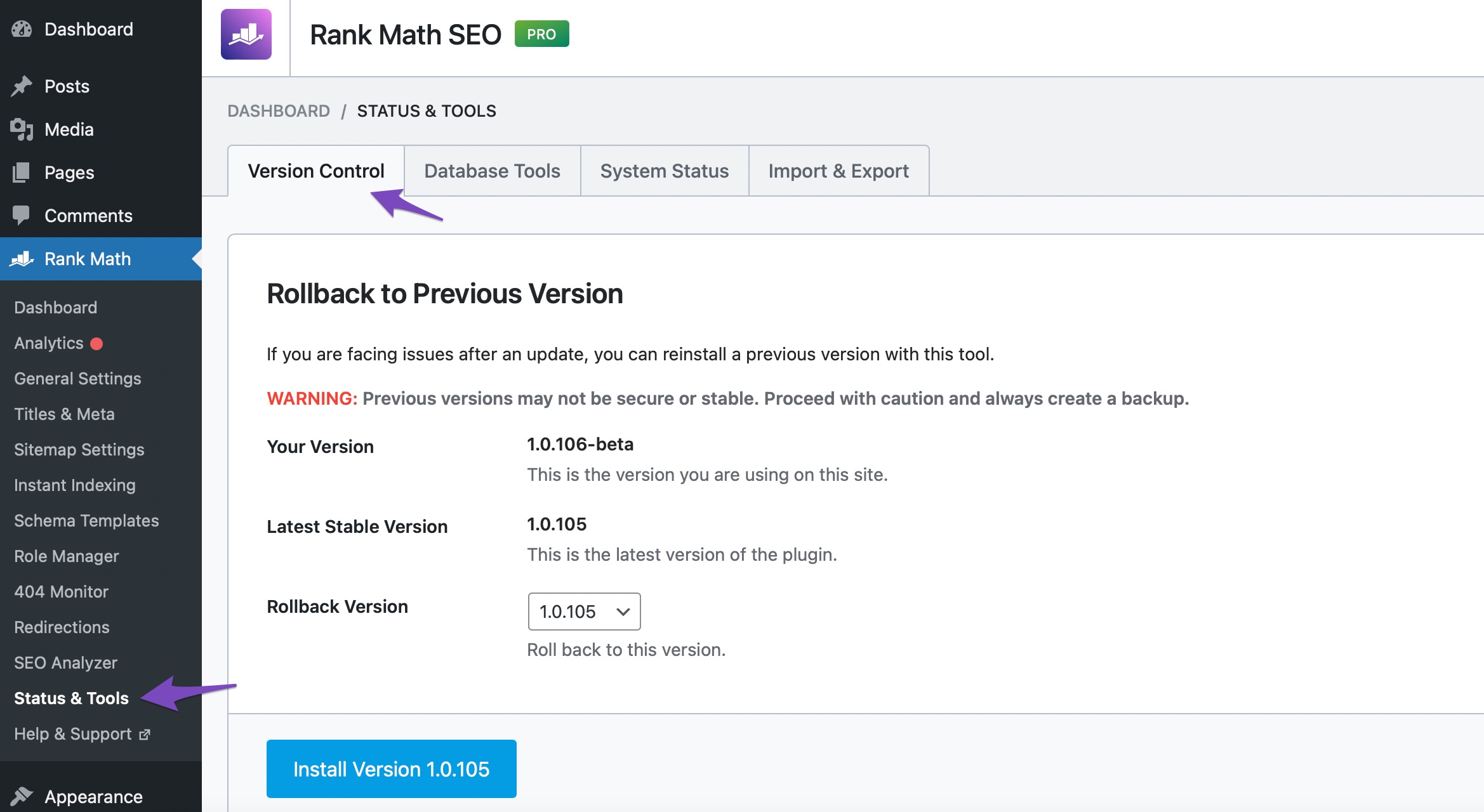
Check for Compatibility Issues: Ensure that you are using the latest version of Rank Math. You can check this by going to WordPress Dashboard → Rank Math SEO → Status & Tools → Version Control. If an update is available, please update the plugin.
-
Clear Cache: If you are using any caching plugins, try clearing the cache as it might be causing the issue.
-
Theme Compatibility: Sometimes, themes can conflict with plugins. Try switching to a default WordPress theme (like Twenty Twenty-One) to see if Rank Math appears.
If you have tried these steps and the issue persists, please reply to this ticket, and a human agent from the Rank Math Support team will assist you further. Thank you for raising this concern!
Sources:
Why Rank Math’s Meta Box is Not Showing? » Rank Math
Why Rank Math Settings Are Not Getting Saved? » Rank MathI did everything according to your instructions but it still doesn’t work
Hello,
We might need to take a closer look at the settings. Please edit the first post on this ticket and include your WordPress & FTP logins in the designated Sensitive Data section.
Please do take a complete backup of your website before sharing the information with us.
It is completely secure and only our support staff has access to that section. If you want, you can use the below plugin to generate a temporary login URL to your website and share that with us instead:
https://wordpress.org/plugins/temporary-login-without-password/
You can use the above plugin in conjunction with the WP Security Audit Log to monitor what changes our staff might make on your website (if any):
https://wordpress.org/plugins/wp-security-audit-log/
We really look forward to helping you.
Hello,
I have updated the sensitive data as requested. Can you please check further?
Thank you.
Hello,
We can see that the metabox from our plugin can be opened just fine as you can see from the following screenshot:
If this is not opening on a particular page please let us know exactly which one so we can debug the issue further.
Don’t hesitate to get in touch if you have any other questions.
https://ibb.co/VVVdwG0
I don’t see it in posts and products, I clicked the down arrow in rankmath but still can’t see itHello,
I’m afraid we were unable to replicate this issue.
Please clear your server and browser cache then try again. You might also want to try using a different browser./ If you are experiencing this issue only of specific posts/products, then please share their URL with us so we can help take a look.
Thank you for choosing Rank Math
Hello,
We checked on Chrome browser and we can see the Rank Math SEO Meta box is working properly. However, can you please confirm if you’re using any extension on your browser as it can create conflicts?
You can try to check in the incognito mode of your browser and see if that works for you.
Let us know how it goes. Looking forward to helping you.
Thank you.
Hello,
Since we did not hear back from you for 15 days, we are assuming that you found the solution. We are closing this support ticket.
If you still need assistance or any other help, please feel free to open a new support ticket, and we will be more than happy to assist.
Thank you.
-



The ticket ‘My rankmath is not showing up’ is closed to new replies.