Issue Connecting Rankmath with my account from WordPress

#847421
  • Resolved Duaal Studio
    Rank Math free

    Hi,
    My name is Alina and I need help to connect Rankmath with a woocommerce website I manage.
    I already tried to connect it, but something prevents the connection to be done properly.
    As now it shows on Rankmath that it’s connected, but in wordpress keeps requesting a connection.

    The website has an IP location block, so in order to connect please use a vpn with IP from the Netherlands, or let me know your country, so I can add it temporary to the whitelist.

    Many thanks in advance.
    Alina

Viewing 5 replies - 1 through 5 (of 5 total)
  • Hello,

    We apologize for the issue you are facing while connecting Rank Math with your WooCommerce website. It sounds like there may be some restrictions due to the IP location block you mentioned.

    To resolve this, you can try the following steps:

    1. Check Connection Status: Ensure that you have properly connected your Rank Math account by going to the settings and clicking on Connect Now. Make sure to select the correct account and click on OK, Activate Now.
      Click Connect Now
      Activate Rank Math PRO Subscription

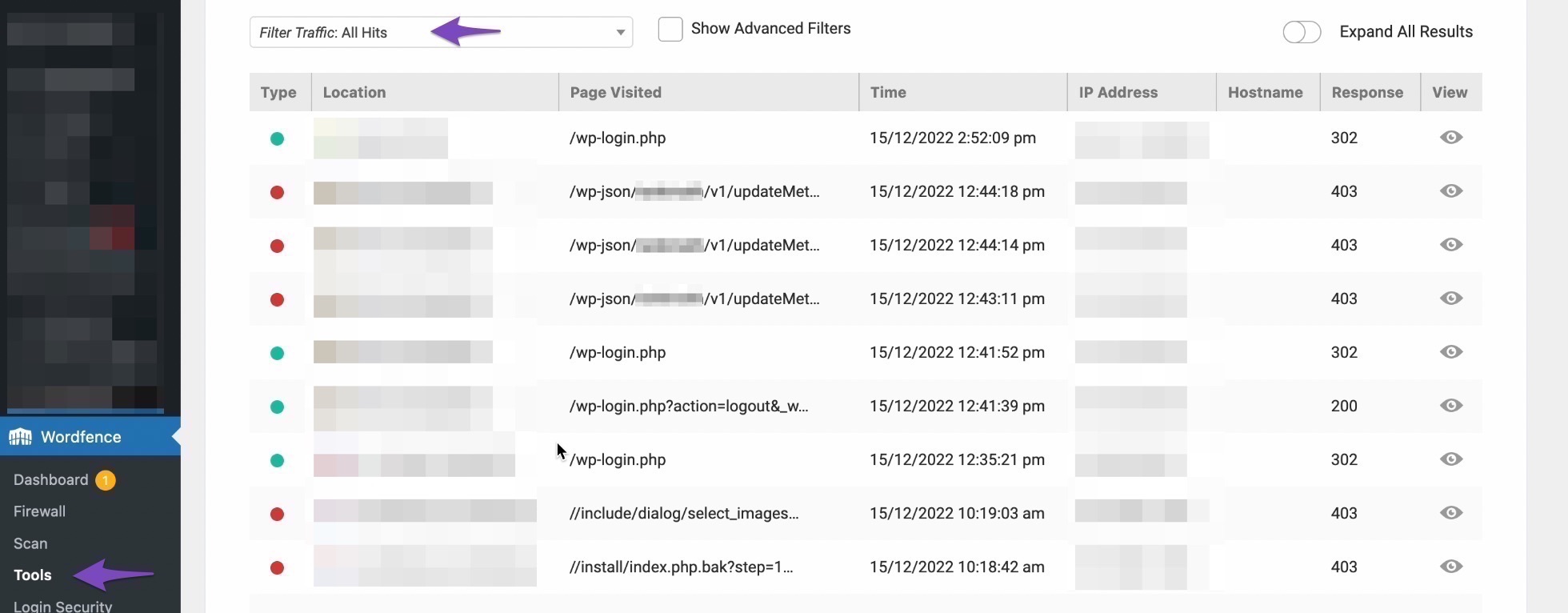
    2. Whitelist Rank Math: If you are using a firewall or security plugin, ensure that Rank Math is whitelisted. You can refer to our guide on whitelisting Rank Math in Wordfence for detailed instructions.
      Live Traffic in WordFence

    3. Use VPN: Since you mentioned using a VPN with an IP from the Netherlands, that could help establish the connection. Alternatively, if you let us know your country, we can provide guidance on how to temporarily whitelist it.

    If you continue to experience issues after trying these steps, please reply to this ticket, and a human agent from the Rank Math Support team will assist you further.

    Thank you for raising this concern, and we hope to resolve it quickly for you!

    Sources:
    Website Not Shown In Rank Math Account Area » Rank Math
    How to Whitelist Rank Math in Wordfence » Rank Math

    Thank you for the bot recommendations, but I still can’t find what is blocking Rankmath.

    Hello,

    Thank you for contacting us and sorry for any inconvenience that might have been caused due to that.

    To solve the issue with your website not being connected properly to your Rank Math account, let’s start by checking your WordPress settings and making sure that your website URL is correct. Sometimes, a mismatch in the URL or a missing slash can mess up the connection.

    To do this, please go to your WordPress dashboard and click on Settings > General. Then look at the WordPress Address (URL) and Site Address (URL) fields and see if they match your website URL exactly.
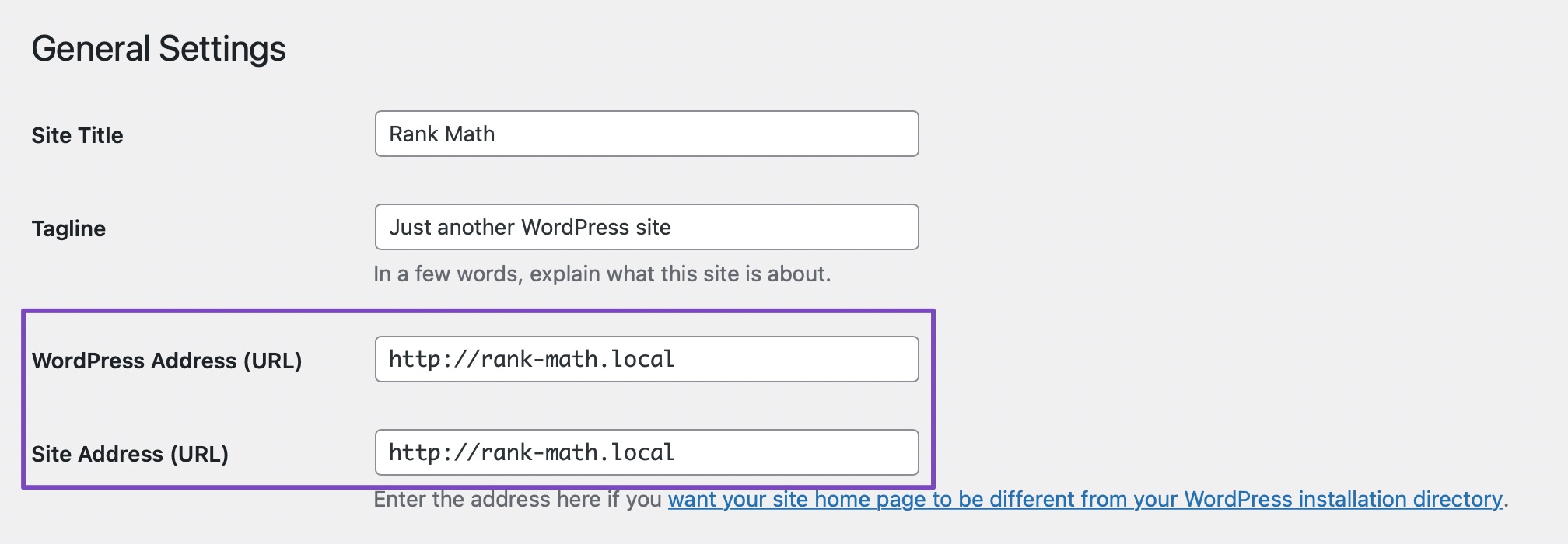
    If you find any mismatches, please correct them and save the settings.

    After that, please try disconnecting and reconnecting your Rank Math account to see if this resolves your issue.

    If this doesn’t work, you can try adding a filter code to your website that will bypass the URL check. This might help if there is some issue with your server configuration or DNS settings. The filter code you need to add is below:

    
    /**
     * Filter whether we need to check for URL mismatch or not.
     */
    add_filter( 'rank_math/registration/do_url_check', '__return_false' );


    To add the filter code, please follow this guide: https://rankmath.com/kb/wordpress-hooks-actions-filters/

    And that’s it! ​​​​​​​The website should now be able to stay connected without any issues.

    For more information on why this issue happens and how to fix it, you can check this page: https://rankmath.com/kb/problems-while-connecting-account/

    However, if the issue persists, please try to whitelist or open access to the following countries India, Bangladesh, Nigeria, Portugal, and the Philippines so that we can investigate this issue further for you.

    Our support team operates 24/7 across various time zones, and as such, our IP addresses could vary frequently due to shift changes.

    This means that by the time a specific IP or country is whitelisted, the associated team member might no longer be on shift.

    If you permit access from any of the countries above, whichever support representative is online at that moment can assist you in resolving your issue.

    We look forward to helping you.

    Thank you.

    Hi Adetayo,

    Thanks for your help! I was able to connect the account using the code 😀
    Now I am faced with another issue: I can’t connect with the Google console. I’ve been through the login process, and given permissions, but it doesn’t show connected in WordPress.

    Please help. Many thanks in advance!
    Alina

    Hello,

    Can you please confirm if you have a verified Google Search Console and Google Analytics property on the Google account you connected? Please double-check that the Google account you connected has a functional Google Search Console and Google Analytics property. If you do not have a Google Search Console property, you can create one by following this guide. You can also sign up for Google Analytics here.

    Looking forward to helping you resolve this issue.

    Hello,

    Since we did not hear back from you for 15 days, we are assuming that you found the solution. We are closing this support ticket.

    If you still need assistance or any other help, please feel free to open a new support ticket, and we will be more than happy to assist.

    Thank you.

Viewing 5 replies - 1 through 5 (of 5 total)

The ticket ‘Issue Connecting Rankmath with my account from WordPress’ is closed to new replies.