Hello,
We apologize for the issue you are facing with the Instant Indexing plugin showing a 202 – Accepted status for an extended period. Thank you for providing the details regarding your verification steps.
The 202 status indicates that the IndexNow API has accepted your request, but it still needs to validate the API key to confirm that the URL belongs to your site. Here are a few additional steps you can take to troubleshoot this issue:
-
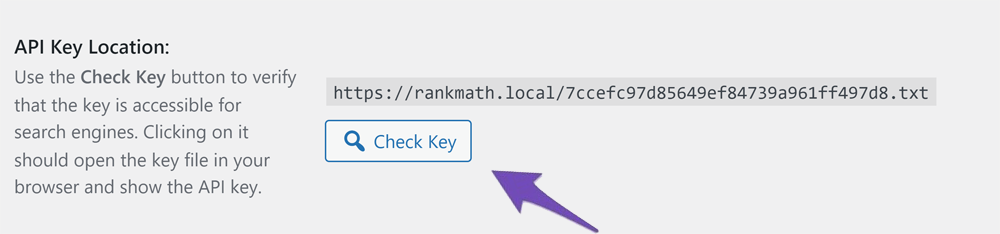
Check API Key Location: Ensure that the API key is correctly placed and accessible. You can do this by clicking on the Check Key button in the Rank Math settings to verify that the API key is being served correctly.
-
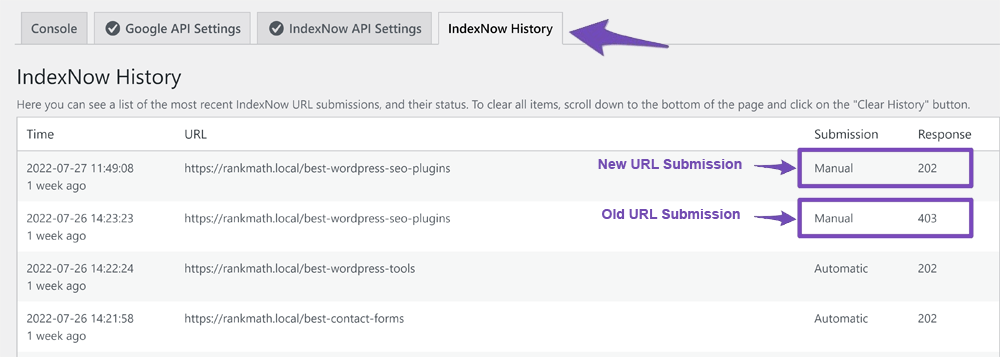
Review the History: Navigate to Rank Math SEO → Instant Indexing → History in your WordPress dashboard to check the response codes associated with your submitted URLs. If you see any other error codes (like 403 or 429), those may provide further insight into the issue.
-
Manual API Key File: If the API key file is not accessible or if there are issues with it, consider manually creating a text file containing your API key in the root directory of your website.
-
Wait for Validation: Sometimes, it may take a bit longer for the API to validate and change the status from 202 to 200, especially if there are high volumes of requests.
If you’ve checked all these aspects and the issue persists, please reply to this ticket with any additional details or errors you might be encountering, and a human agent from our support team will assist you further.
Thank you for your patience, and we hope to resolve this for you soon!
Sources:
How to Use IndexNow With Rank Math » Rank Math
How to Fix 403 Forbidden Error with IndexNow » Rank Math
Hello @analytics27,
The 202 status code means that the URL has been accepted by the IndexNow API, but the site has yet to get verified by the API. For more details on response codes, you can check this URL: https://rankmath.com/kb/how-to-use-indexnow/#history
We suggest you wait for IndexNow to verify your site and submit URLs to Bing.
Hope that helps and please don’t hesitate to let us know if you have any other questions.
Thank you.
Hello @jonniekerry,
Can you please share the affected page URL that is not showing on your sitemap so that we can check the issue further for you?
Meanwhile, please try to follow the steps below and see if that works for you:
1. Flush the Sitemap cache by following this video screencast:
https://i.rankmath.com/pipRDp
2. Exclude the Sitemap files of the Rank Math plugin in your caching plugin. The cache could be via a plugin or from the server. For plugins or Cloudflare, please follow this article:
https://rankmath.com/kb/exclude-sitemaps-from-caching/
For more details on this issue, you can check this URL: https://rankmath.com/kb/url-not-in-sitemap/
However, it looks like you’re currently using the Rank Math PRO plugin on your websites, but the account you have used to open this ticket is the Rank Math free version.
Please search and forward a receipt from FastSpring.com so we can locate your account and verify it.
Let us know how it goes. Looking forward to helping you.
Thank you.
Bro Help me how to create a ticket.
Hello @muhammadhusnain13,
We have recently migrated our support forum to provide a better and more secure user experience. You can now easily create a support ticket here: https://rankmath.com/support/
Please note that while we always try to respond as quickly as possible, it may sometimes take up to 24 hours for our support staff to get back to you.
Please feel free to let us know if you have any other questions.
Thank you.
Hello,
Since we did not hear back from you for 15 days, we are assuming that you found the solution. We are closing this support ticket.
If you still need assistance or any other help, please feel free to open a new support ticket, and we will be more than happy to assist.
Thank you.




