
-
Hello,
I put it a ticket the other day for this but it still is not right. I am not getting anything to show up all 0’s. URL: https://www.goehrecreative.com/

-
Hello,
Thank you for contacting Rank Math, and sorry for any inconvenience caused.
I tried to log in to your website but Wordfence is blocking the access.
Please disable the Firewall or if you have geo-restrictions, you can temporarily disable them for India, Portugal, and the Philippines so we can check.
We look forward to helping you.
I have opened wordfence up for the above 3 countries.
While you are in there can you also look at the SEO Analysis for
Post Titles Missing Focus Keywords
There are 1 Page published posts where the primary focus keyword does not appear in the post title. It as my Home page as not rightHello,
Please reconnect your Analytics account on this website, to regenerate the auth token from Google, by going to WordPress Dashboard > Rank Math > General Settings > Analytics:
This should help start the process of importing fresh data from Google Search Console and Google Analytics.
As for the error on the SEO Analysis that is correct since the title of the page is “Home” and the focus keyword is
graphic design, so they are not matching.Don’t hesitate to get in touch if you have any other questions.
I have done the above and still showing 0’s
As for the Home page. All websites have a Home page but you don’t use Home in the content on the page.
Can you help me any further to get either of these items fixed?
Hello,
You haven’t given any permission to fetch data from GSC when you setup the analytics feature in our plugin. Please refer to my screenshot below:
Please proceed with following the steps below:
1. Log in to your website in an incognito window in Chrome/Edge/Safari and also login to the Google account (ensure that you are logging into the correct account).
2. Remove the access to Rank Math from your Google account:
https://myaccount.google.com/permissions?gar=1&pli=1
3. Reconnect with your Google account, give all the permissions, and re-configure the settings.
As for the homepage issue, to fix that, you need to change the page’s title that matches your keyword “graphic design”, re-run the SEO analysis and check if the error is still there.
Looking forward to helping you with this one.
Can you check to see if I have this connected properly? I had it connected properly before. Not sure how this got messed up.
As far as my home page, I thought the Home page was always supposed to be Titled Home for search engines. Is that not true?
Thank you.Linda
When will we see if this is now working. When will it start showing website visitors and keywords. My keywords went from 15 or 16 to 5 before all of these recent problems started
Hello,
Please share a screenshot of the Google Analytics organic traffic for the last 30 days so we can compare it to the data displayed on Rank Math’s analytics dashboard.
Please note that if the sample data is very small, due to sampling issues the data might not be able to be imported into our Analytics module.
I suggest giving it some time for your website to gain more stats and Rank Math will eventually import the data to the analytics page.
Looking forward to helping you.
Hello,
We can notice that you have not allowed the Rank Math App to read any of your Analytics data.
Please disconnect and then reconnect your account and follow the steps outlined here and give permission to everything:
https://rankmath.com/kb/install-google-analytics/#num-3-connect-your-google-accountAfter giving all the permissions, it should look like this
Hope this helps.
Thank you.
I only have the free version so I can’t give permission to Adsence
I will have no choice but to choose another plugin if I do not get help fixing this I have it connected and have sent a photo through email
Hello,
Please check the following page:
https://www.goehrecreative.com/wp-admin/admin.php?page=rank-math-status&view=statusThe only permission provided is for Search Console:
What we would need from you is to disconnect the app and reconnect by providing all the permissions.
Looking forward to helping you. Thank you.
I have done this. I only have the free version so I can’t connect Adsence. You have to be a pro plan to get that. I have done this many times. I have disconnected and reconnected. It says it will fetch data on November 9. Can you just check this? I gave permissions for Rank Math to getinto my website dashboaard.
Hello,
It does not matter if you are a free or a PRO user, the app would need all the permissions to be provided.
Please follow these steps:
1. log in to your Gmail account and follow this link:
https://myaccount.google.com/u/1/permissions?continue=https%3A%2F%2Fmyaccount.google.com%2Fu%2F1%2Fdata-and-privacy%3Fhl%3Den&hl=en2. Click here:
3. Once the toggle opens, click on the Remove Access button:
4. Once done, then head over to your WordPress Dashboard > Rank Math > General Settings > Analytics > Disconnect
5. Once done, please reconnect from the following screen.
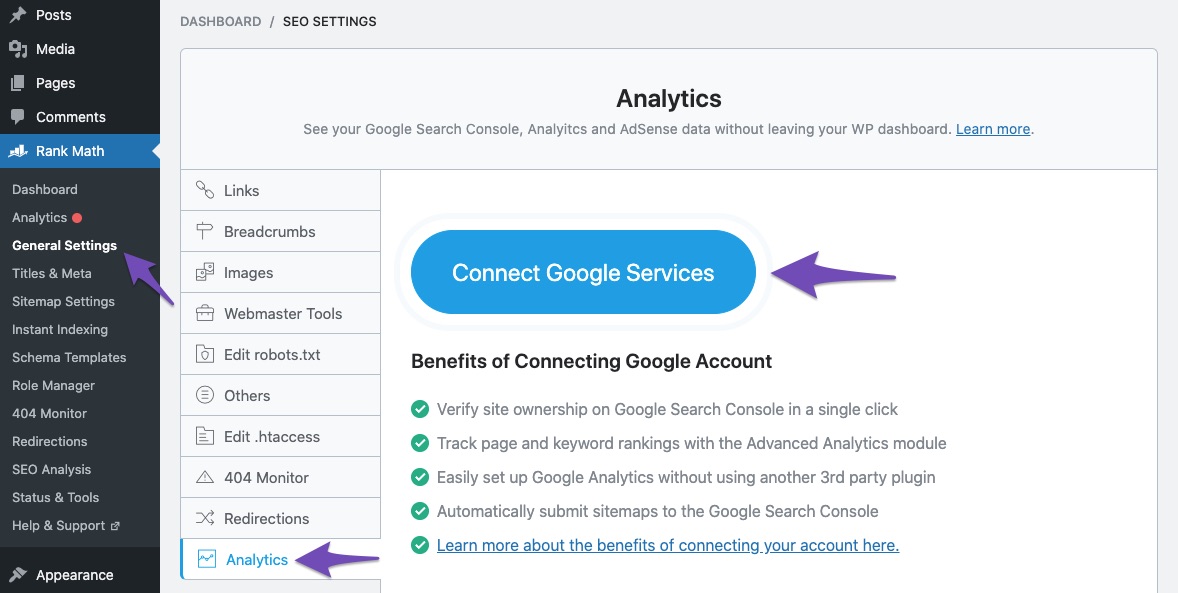
6. When redirected to the Google account page where the connection happens, please tick all checkboxes:
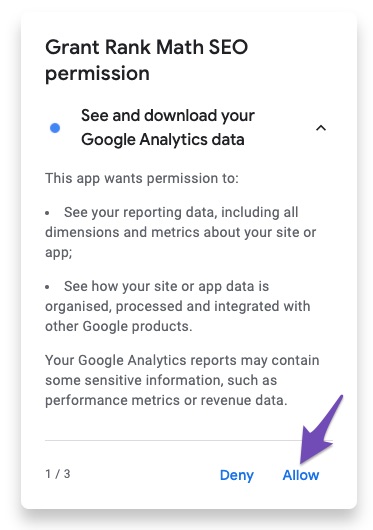
and
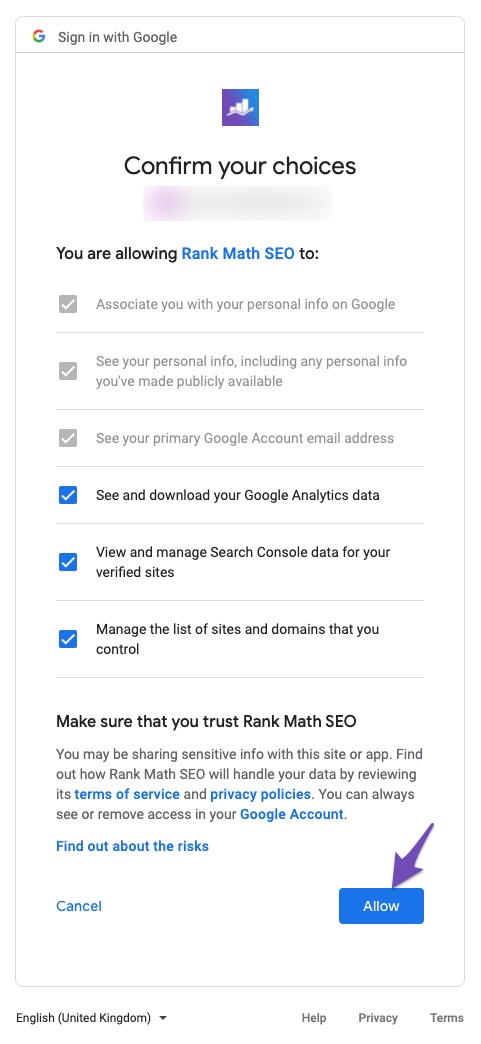
7. Once you do that, you will be redirected back to WordPress.
Please reply to this message once you follow the above steps.
Looking forward to helping you. Thank you.
Hello,
I have done the above directions. Please see if it is working now.Hello,
Since we did not hear back from you for 15 days, we are assuming that you found the solution. We are closing this support ticket.
If you still need assistance or any other help, please feel free to open a new support ticket, and we will be more than happy to assist.
Thank you.



The ticket ‘I have all 0’s, Rank Math not working’ is closed to new replies.