Hello,
We apologize for the issue you are facing with social sharing images. It sounds like there may be a few factors at play regarding why the image appears incorrectly on Threads and LinkedIn.
-
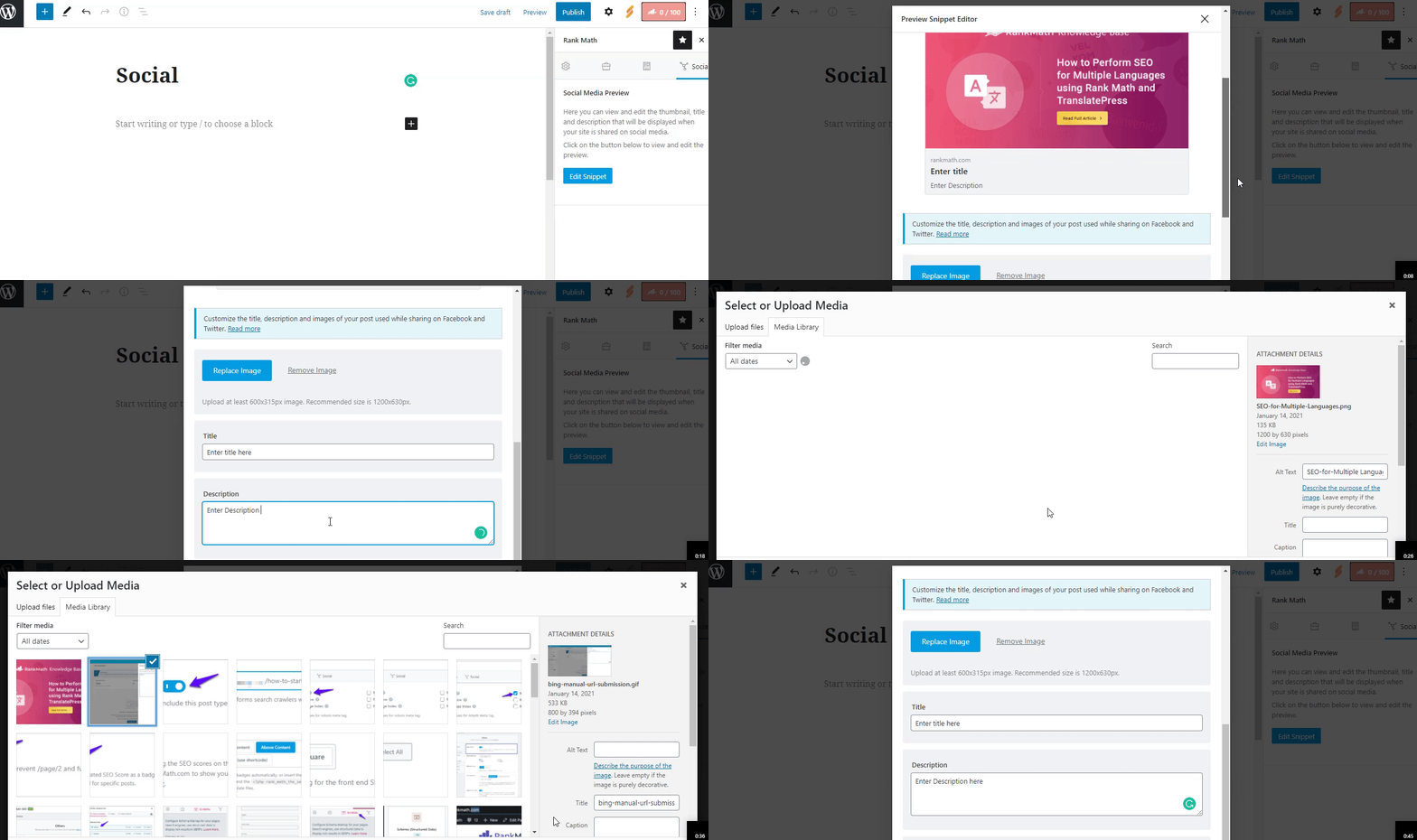
Image Configuration: First, ensure that you have correctly set the Facebook and Twitter sharing images through the Rank Math Meta Box. You can check this by navigating to the Social Tab in your post editor and confirming that the correct image is selected for sharing on these platforms.
-
Image Dimensions & Format: The recommended image size for social sharing is 1200px X 630px. If the image dimensions are too small or too large, social networks may not read your image correctly, leading them to select a different image instead. Additionally, ensure that the image format is supported; Facebook supports JPEG, PNG, GIF, and also WebP formats. If you’re using an unsupported format, it may cause issues.
-
Caching Issues: Sometimes, social media platforms cache images. If you’ve recently changed the image or settings, it might take some time for the new image to appear. You can use tools like Facebook’s Sharing Debugger to refresh the cache for your URL.
-
Platform-Specific Behavior: Each social media platform has its own way of handling shared content. If Threads or LinkedIn is pulling an unexpected image (like an Xbox logo), it could be due to how those platforms interpret the Open Graph tags or other metadata associated with your content.
For more detailed guidance on configuring social media options in Rank Math, you can refer to our documentation here: Social Media Options in Rank Math.
If you continue to experience issues, please reply to this ticket, and a human agent from the Rank Math Support team will assist you further. Thank you for raising this concern!
Sources:
Open Graph/Social Preview Image Is Not Displayed » Rank Math
Social Media Options in Rank Math
Hello,
Thank you for contacting us and sorry for any inconvenience that might have been caused due to that.
Could you please share the affected page URL with us so that we can check the issue further for you?
Looking forward to helping you.
Thank you.
hello. Thank you for your kind guidance.
I created a social graph using this link https://runtalk.kr/220773/, enlarged the image, and tested it on LinkedIn and
Likewise, the image does not appear.
So, it seems that these two media outlets themselves do not properly recognize Open Graph.
But I have a question. I inquired about images and text not appearing when sharing social media only on LinkedIn and x. Why are you talking about Facebook settings that work?
I’m a little curious about this. Facebook did well with KakaoTalk (Korean chat app) from the beginning.
Hello,
It seems that you are currently using the Rank Math PRO plugin, but the account you have used to open this ticket is a Free account.
Can you please search and forward a receipt from FastSpring.com so we can locate your account and verify it?
We look forward to hearing back from you.
Hello,
Since we did not hear back from you for 15 days, we are assuming that you found the solution. We are closing this support ticket.
If you still need assistance or any other help, please feel free to open a new support ticket, and we will be more than happy to assist.
Thank you.




