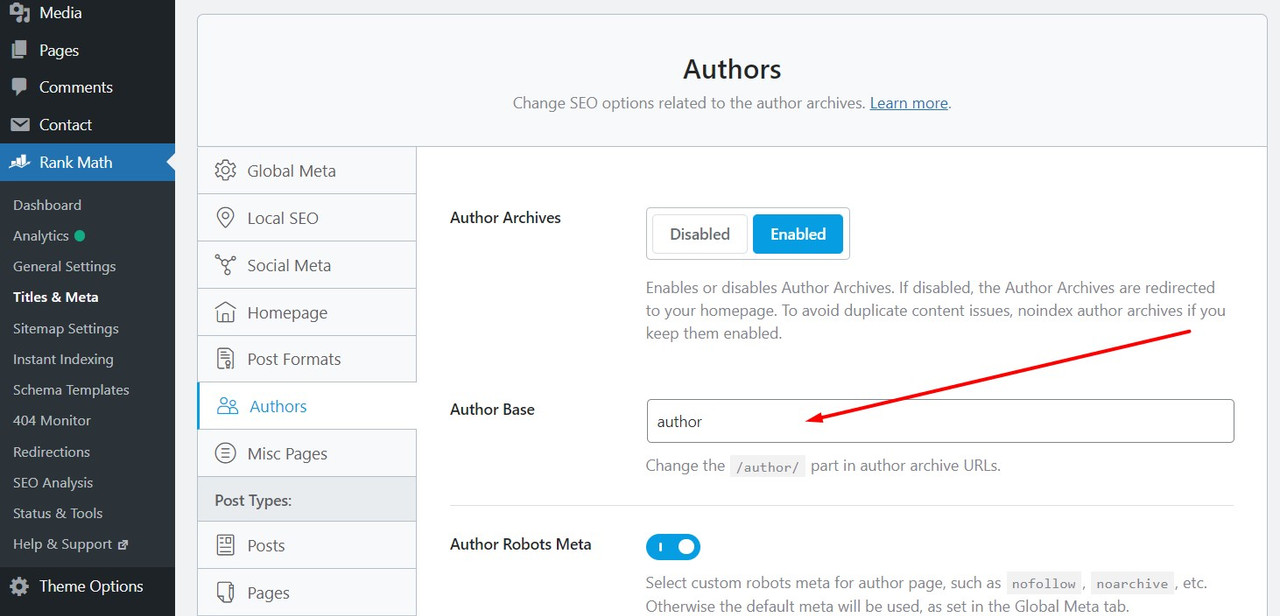
Hello,
Thank you for contacting Rank Math and sorry for any inconvenience that might have been caused due to that.
To remove the author base you can save the settings with a forward slash: /
That should help remove the base from our plugin and you can then control it from anywhere you want.
Don’t hesitate to get in touch if you have any other questions.
Hi Miguel,
I tried your suggestion but it does not work completely.
It does remove the /author/ from user’s profile URLs but it creates another problem.
After adding the slash / and saving, it creates multiple URLs for a same user for example all the custom URLs like /author/, /editor/, /contributor/ will start to work for a single user.
If I have created /editor/ for a single user, then that user’s profile should only open from /editor/ and not from any other URL like /author/.
This works fine when I deactivate Rank Math but not when it’s enabled.
Kindly fix this issue. Thanks
Hi Emma, Your reply is totally unrelated to my request, please read the previous messages in this case first. Thanks.
Hello,
When I tested the issue, it occurred when only the “Author Slug Editor” plugin was active. Screencast: https://i.rankmath.com/OJQxNS
However, it is completely fine for the other slugs to exist, as long as they are not publicly visible. So, whenever you use an author link as long as it has your preferred slug the other slugs will not be found by users or search engines.
If you still wish to have only your preferred slugs, please contact the “Author slug editor” team for further assistance.
Hope that helps. Please let us know if you have questions.
Hello,
Since we did not hear back from you for 15 days, we are assuming that you found the solution. We are closing this support ticket.
If you still need assistance or any other help, please feel free to open a new support ticket, and we will be more than happy to assist.
Thank you.