
-
i was want to index all products pages,but found few products no matter what i did,they cant be index,i would like to know why and how to solve it.
[moved to sensitive data section]

-
Hello,
We apologize for the issue you are facing with the noindex settings on your product pages. To remove the noindex tag and ensure that your product pages are indexed, you can follow these steps:
1. Check Rank Math’s Titles & Meta Settings
- Navigate to WordPress Dashboard → Rank Math SEO → Titles & Meta.
- Check each tab to ensure that the settings are configured correctly for your product pages. Make sure that they are set to Index instead of NoIndex.
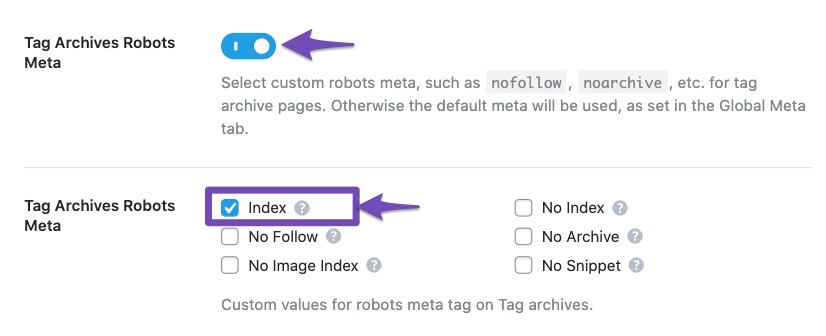
2. Update Individual Product Settings
- Go to the individual product edit page in your WordPress dashboard.
- Scroll down to the Rank Math meta box and ensure that the Robots Meta is set to Index.
3. Use Bulk Actions (if applicable)
If you have multiple products set to noindex, you can use the bulk actions feature:
- Go to the Posts menu in WordPress.
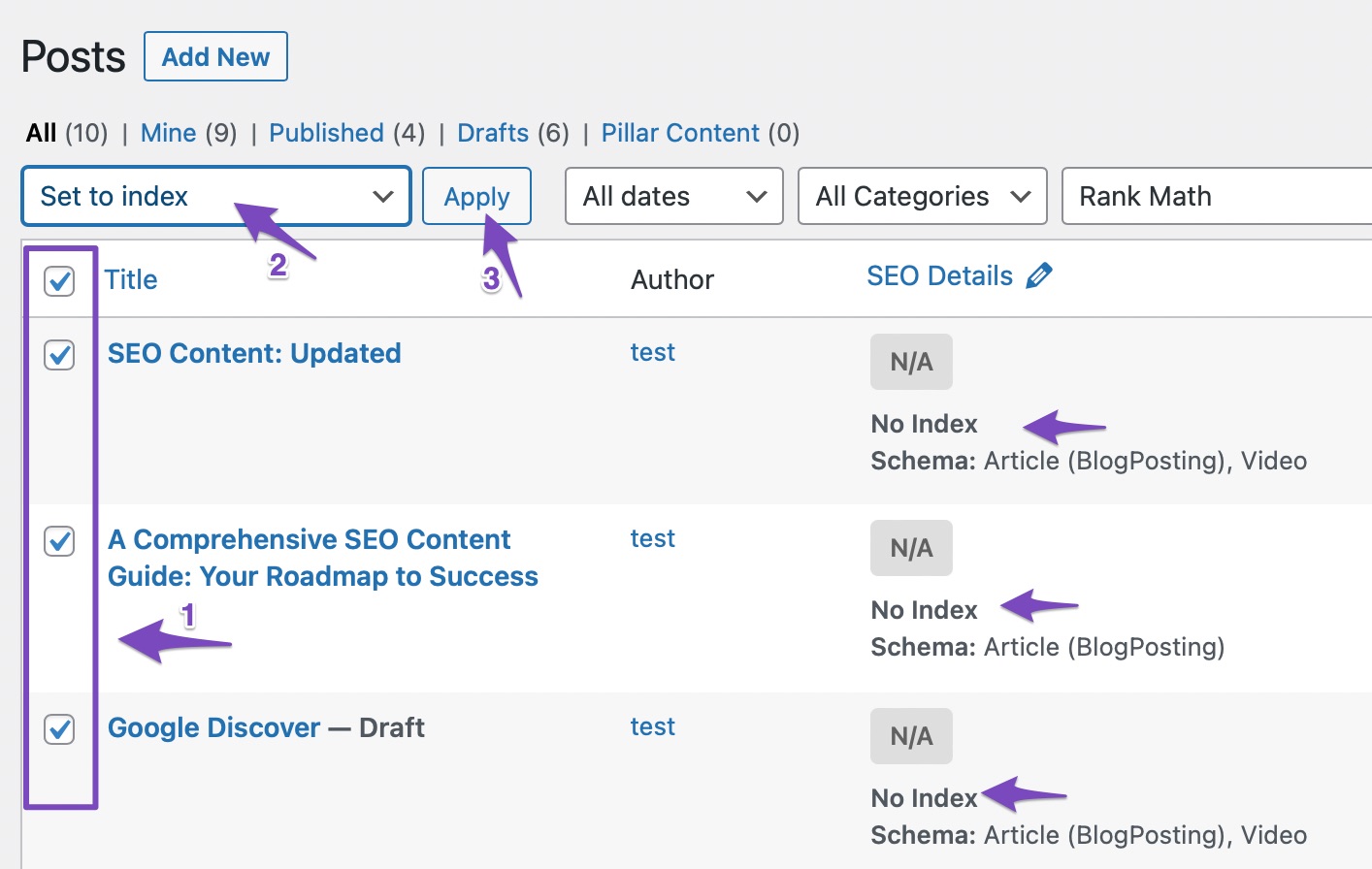
- Use the Rank Math filter to select Articles Noindexed and click Filter.
- Select all products you want to change, then choose Set to Index from the bulk actions drop-down and click Apply.
4. Check for Other Plugins or Settings
Sometimes, other plugins or settings might conflict with Rank Math. Ensure that there are no other SEO plugins or settings that might be overriding your Rank Math configurations.
5. Verify Changes
After making these changes, check the source code of your product pages to confirm that the noindex meta tag has been removed. You can do this by right-clicking on the page and selecting "View Page Source" and searching for
noindex.If you continue to experience issues after following these steps, please reply to this ticket, and a human agent from the Rank Math Support team will assist you further. Thank you for raising this concern!
Sources:
How to Fix Submitted URL Marked ‘NoIndex’ Error » Rank Mathit still no fixed.

Hello,
The URLs you have shared are already set to index. If they are still showing that status in the Analytics section, please follow the steps below to delete old analytics data and start a fresh import on your WordPress dashboard > Rank Math > Status & Tools > Database tool tab:

After rebuilding the analytics index of posts, go to Rank Math > General Settings > Analytics, and under “Analytics Database”, click “Update Data Manually”.
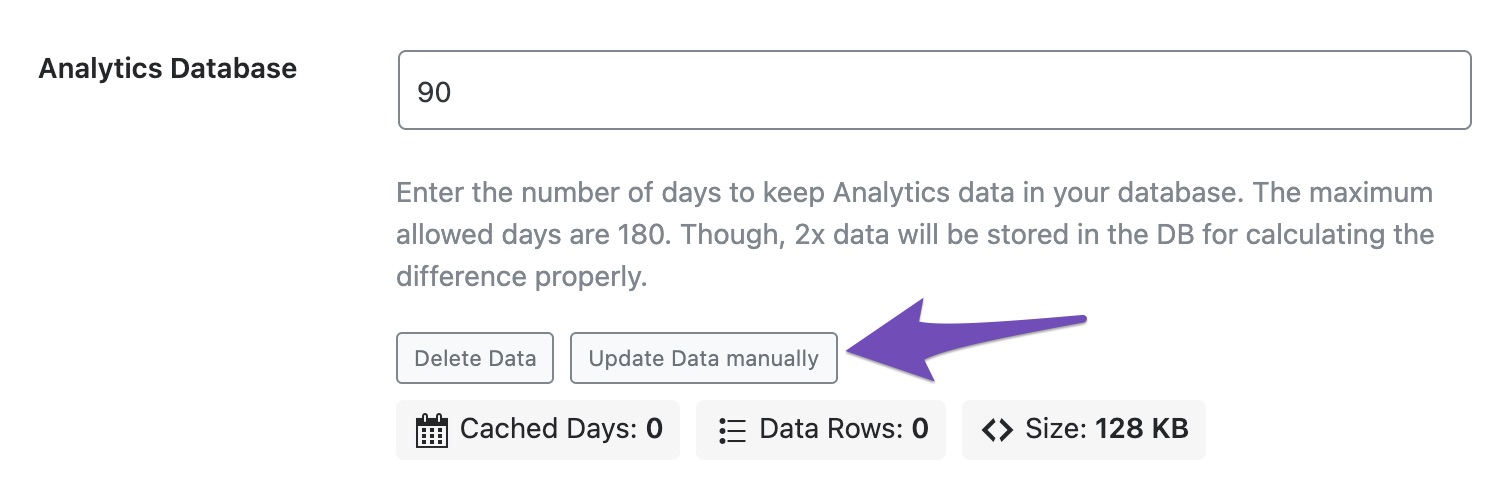
Your analytics data should be updated to the latest after that.
Also, it seems that you’re using Rank Math PRO but the account you have used to open this ticket is the Rank Math free version.
Can you please search and forward a receipt from FastSpring.com or the email address you used to purchase so we can locate your account and verify it?
Looking forward to helping you.
Hi,Reinelle
it still unavailable.
https://ustorefurniture.com/product/diamond-l-shaped-white-reception-desk/
https://ustorefurniture.com/product/minimalist-diamond-spa-receptionist-desk/
https://ustorefurniture.com/product/marble-finish-hotel-reception-desk-with-led/
https://ustorefurniture.com/product/j-light-black-office-reception-desk/
https://ustorefurniture.com/product/office-portable-half-round-reception-desk/
https://ustorefurniture.com/product/irregular-marble-cuts-led-i-shaped-reception-desk/
…
too much still in noindexHello,
We might need to take a closer look at the settings. Please edit the first post on this ticket and include your WordPress & FTP logins in the designated Sensitive Data section.
Please do take a complete backup of your website before sharing the information with us.
It is completely secure and only our support staff has access to that section. If you want, you can use the below plugin to generate a temporary login URL to your website and share that with us instead:
https://wordpress.org/plugins/temporary-login-without-password/
You can use the above plugin in conjunction with the WP Security Audit Log to monitor what changes our staff might make on your website (if any):
https://wordpress.org/plugins/wp-security-audit-log/
We really look forward to helping you.
how do i do like that? access this page like your image to send your account and password?
Hello,
We just looked at the pages and we can see that they are set to
indexalready so it seems that you were able to rectify the issue.If you have any other pages that you see with the
noindextag please share that list with us so we can debug and advise further.Thank you.
Hello,
Since we did not hear back from you for 15 days, we are assuming that you found the solution. We are closing this support ticket.
If you still need assistance or any other help, please feel free to open a new support ticket, and we will be more than happy to assist.
Thank you.



The ticket ‘how to remove noindex in metal?’ is closed to new replies.