Hello,
We apologize for the issue you are facing with the 404 errors on your website. Yes, having a lot of 404 errors can negatively impact your SEO ranking, as they can lead to a poor user experience and affect how search engines crawl your site.
To reduce the number of 404 errors logged in Rank Math, you can take the following steps:
-
Identify the Source of 404 Errors: First, check the 404 Monitor in Rank Math to see which URLs are causing the errors. This will help you understand if they are due to broken links or if users are searching for content that no longer exists.
-
Redirect Broken Links: If the URLs that are returning 404 errors are valid pages that have been moved or renamed, consider setting up 301 redirects to guide users to the correct pages. You can do this using the Redirections module in Rank Math.
- To set up a redirect, go to Rank Math SEO → Redirections and add the old URL and the new URL where you want to redirect users.
-
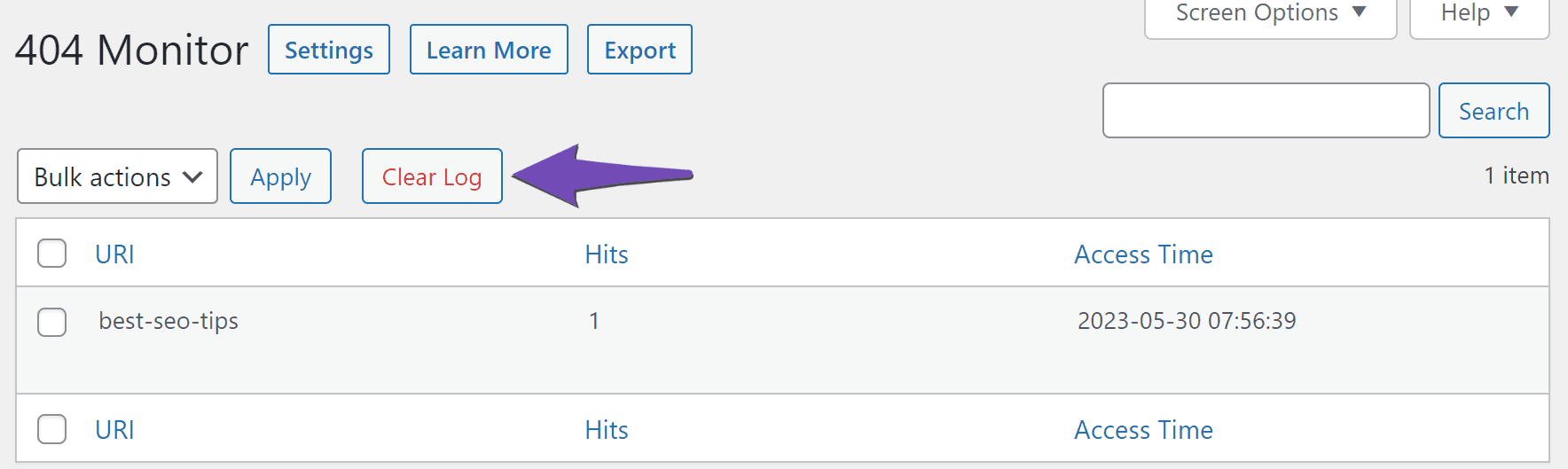
Clear the 404 Log: Once you have addressed the errors, you can clear the 404 log in Rank Math. To do this, go to Rank Math SEO → 404 Monitor and click on Clear Log to remove all entries from the log.
-
Monitor Regularly: Keep an eye on the 404 Monitor regularly to catch any new errors as they arise. This will help you maintain a clean log and improve your site’s SEO health.
-
Consider User Behavior: If certain URLs are frequently searched by users but do not exist, consider creating relevant content or pages that address those searches.
For more detailed instructions on fixing 404 errors, you can refer to our dedicated tutorial here.
If you have any further questions or need assistance, feel free to reply to this ticket, and a human agent from our support team will assist you further!
Sources:
How to Monitor 404 Errors with Rank Math SEO Plugin
How can I check the source of 404 errors?
Hello,
Please note that we only report 404s, and we do not have information on how or why they are generated.
You can get further insight into them by enabling the advanced monitor at WordPress Dashboard > Rank Math > General Settings > 404 Monitor:
https://rankmath.com/kb/monitor-404-errors/#advanced-404-monitor
That will give you more information like referrer and user-agent. You can use that information to track down the source or find out if it is just bots generating those errors.
You can also add them to the exclusion list at WordPress Dashboard > Rank Math > General Settings > 404 Monitor > Exclude Paths.
Looking forward to helping you.
I have turned on the redirects to my homepage if any page is not available. Why does it still showing it?
Hello,
We might need to take a closer look at the settings. Please edit the first post on this ticket and include your WordPress logins in the designated Sensitive Data section.
Please do take a complete backup of your website before sharing the information with us.

It is completely secure and only our support staff has access to that section. If you want, you can use the below plugin to generate a temporary login URL to your website and share that with us instead:
https://wordpress.org/plugins/temporary-login-without-password/
You can use the above plugin in conjunction with the WP Security Audit Log to monitor what changes our staff might make on your website (if any):
https://wordpress.org/plugins/wp-security-audit-log/
We really look forward to helping you.
Hello,
Since we did not hear back from you for 15 days, we are assuming that you found the solution. We are closing this support ticket.
If you still need assistance or any other help, please feel free to open a new support ticket, and we will be more than happy to assist.
Thank you.




