How Does RankMath Handle Canonical URLs for Duplicate Content?

#906880
  • Resolved Patronworks
    Rank Math free

    Hey everyone, I’ve been using RankMath for a while now and wanted to get some insights into how it handles canonical URLs for duplicate content. Specifically, when you have similar content across multiple pages (e.g., product variants, category pages, or blog posts with overlapping topics), how does RankMath help in setting the right canonical tags?

    Does it automatically suggest canonical URLs, or is it up to the user to manually configure them? Also, are there any best practices for avoiding issues with duplicate content in RankMath that I should keep in mind?

    For context, I run a service-based website, Patronworks, and I’m looking to ensure there are no SEO issues related to duplicate content. Any insights would be greatly appreciated!

    Looking forward to hearing your thoughts!

Viewing 1 replies (of 1 total)
  • Hello,

    We apologize for the issue you are facing regarding canonical URLs and duplicate content. Rank Math handles canonical URLs effectively to help prevent duplicate content issues across your website.

    How Rank Math Handles Canonical URLs:

    1. Automatic Canonical URLs: Once Rank Math is installed and set up, it automatically adds canonical URLs to most of your pages, including product pages, categories, tags, and attributes. This means that for many standard setups, you won’t need to manually configure them.

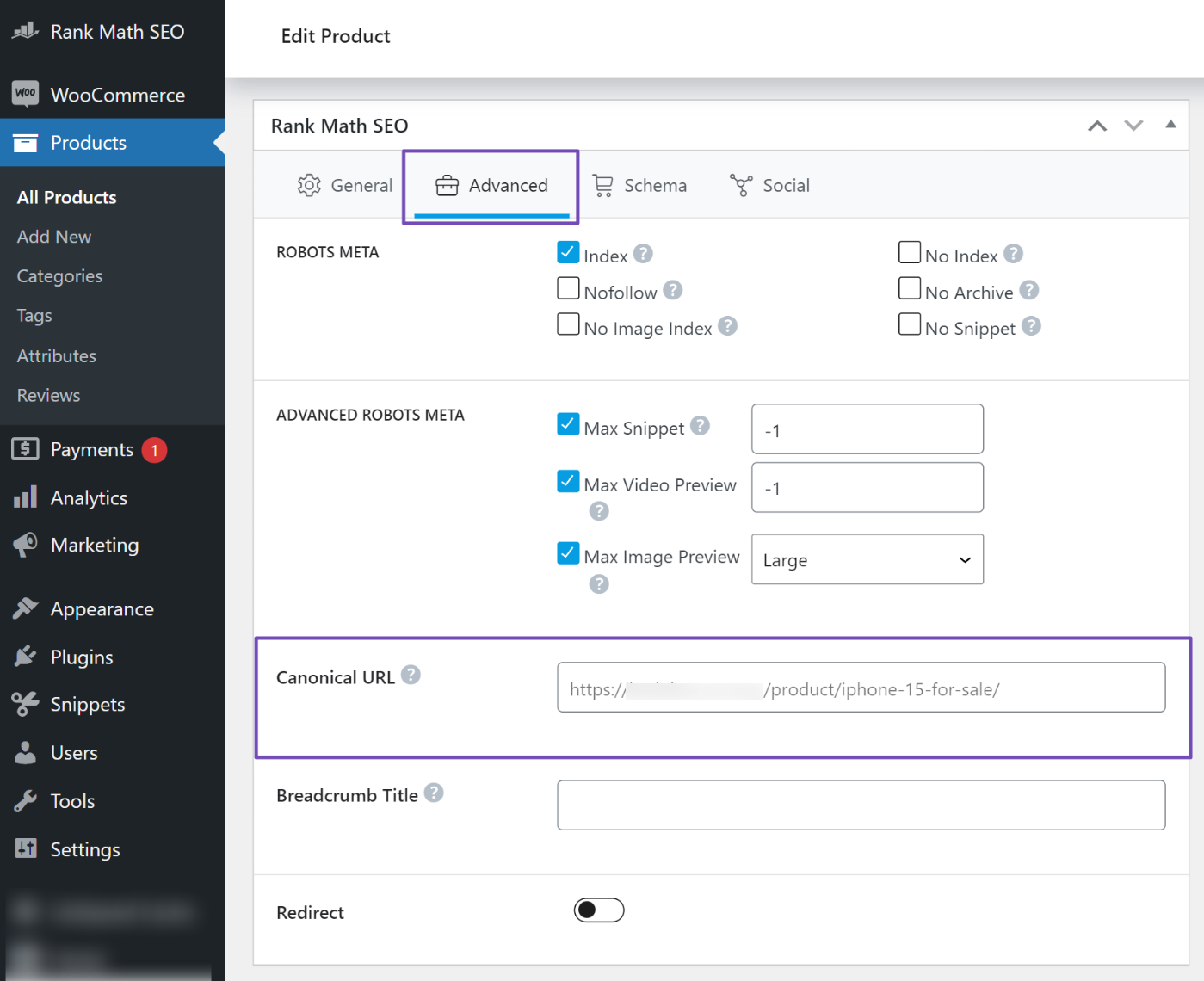
    2. Manual Configuration: In cases where you have multiple versions of similar content or when content is accessible through different URLs, you may need to set canonical URLs manually. To do this, you can visit the specific page you want to edit, scroll down to the Rank Math SEO Meta box, and navigate to Advanced → Canonical URL. Here, you can customize the canonical URL as needed.
      Rank Math meta box Advanced tab

    3. Best Practices: To avoid issues with duplicate content, consider the following best practices:

      • Ensure that each product variant or similar content has a unique meta title and description. Rank Math automatically sets unique meta titles and descriptions for each product and taxonomy.
      • Regularly check your Google Search Console for any duplicate content warnings and address them promptly by adjusting your canonical URLs or implementing 301 redirects where necessary.
      • Use the Content AI tool in Rank Math to generate unique meta titles and descriptions quickly, which can help differentiate similar content.

    By following these guidelines and utilizing Rank Math’s features, you can effectively manage canonical URLs and minimize duplicate content issues on your service-based website.

    If you have any further questions or need assistance with specific configurations, feel free to reply to this ticket, and a human agent from the Rank Math Support team will assist you further.

    Thank you for raising this concern!

    This is an automated reply from Rank Math Support Bot. If you need further assistance, please reply to this topic and a human support agent will reply to you shortly.

    Hello,

    Since we did not hear back from you for 15 days, we are assuming that you found the solution. We are closing this support ticket.

    If you still need assistance or any other help, please feel free to open a new support ticket, and we will be more than happy to assist.

    Thank you.

Viewing 1 replies (of 1 total)

The ticket ‘How Does RankMath Handle Canonical URLs for Duplicate Content?’ is closed to new replies.