Hello,
We apologize for the issue you are facing with your homepage being marked as noindex despite the settings in Rank Math being set to index. It can be frustrating when everything seems correct but the source code reflects otherwise.
Here are a few steps you can take to troubleshoot this issue:
-
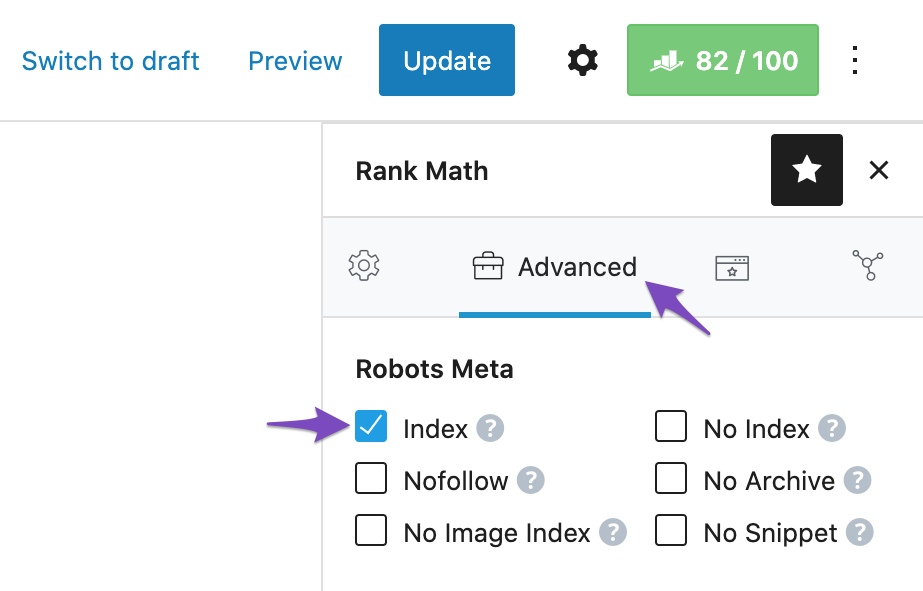
Check Rank Math Metabox: Ensure that the Rank Math Metabox is correctly configured for your homepage. Open the homepage in the WordPress Editor and check the Rank Math settings. Make sure the Robots Meta is set to Index.
-
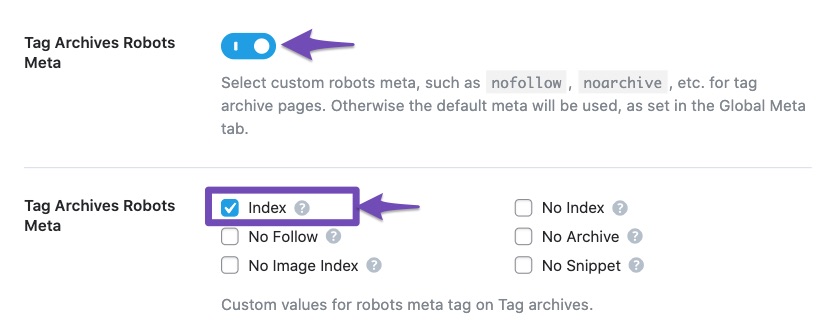
Titles & Meta Settings: Navigate to WordPress Dashboard → Rank Math SEO → Titles & Meta and confirm that the homepage settings are set to index. Sometimes, default settings can override individual post/page settings.
-
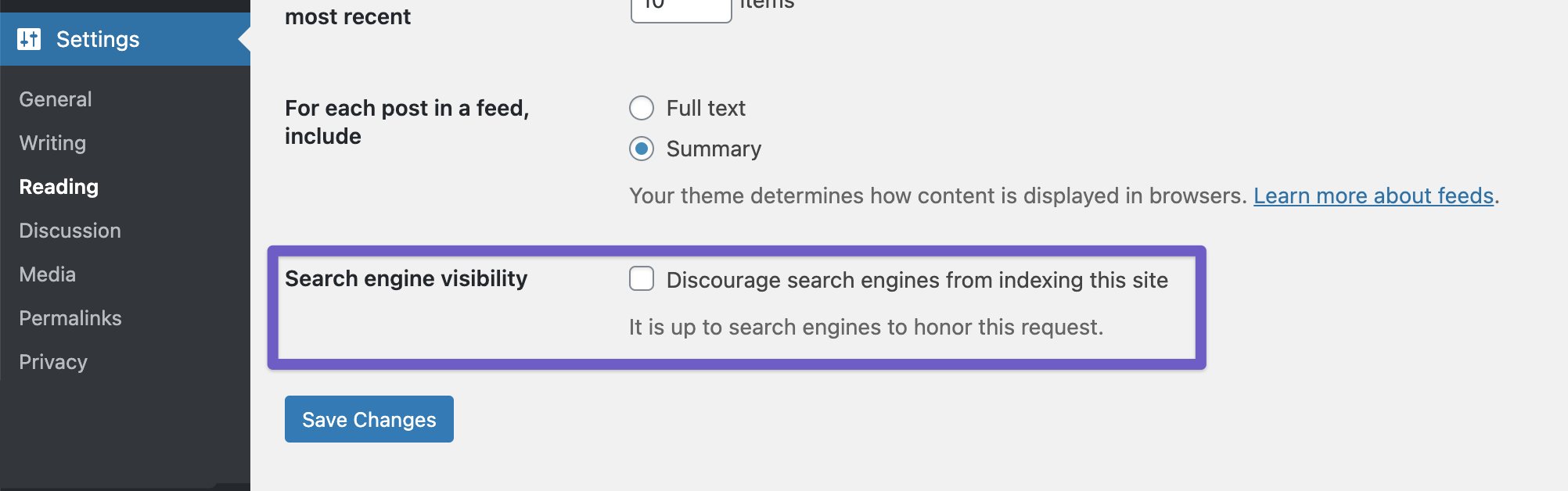
Global Settings: Check your global settings at WordPress Dashboard → Settings → Reading and ensure that the option to discourage search engines from indexing your site is not enabled.
-
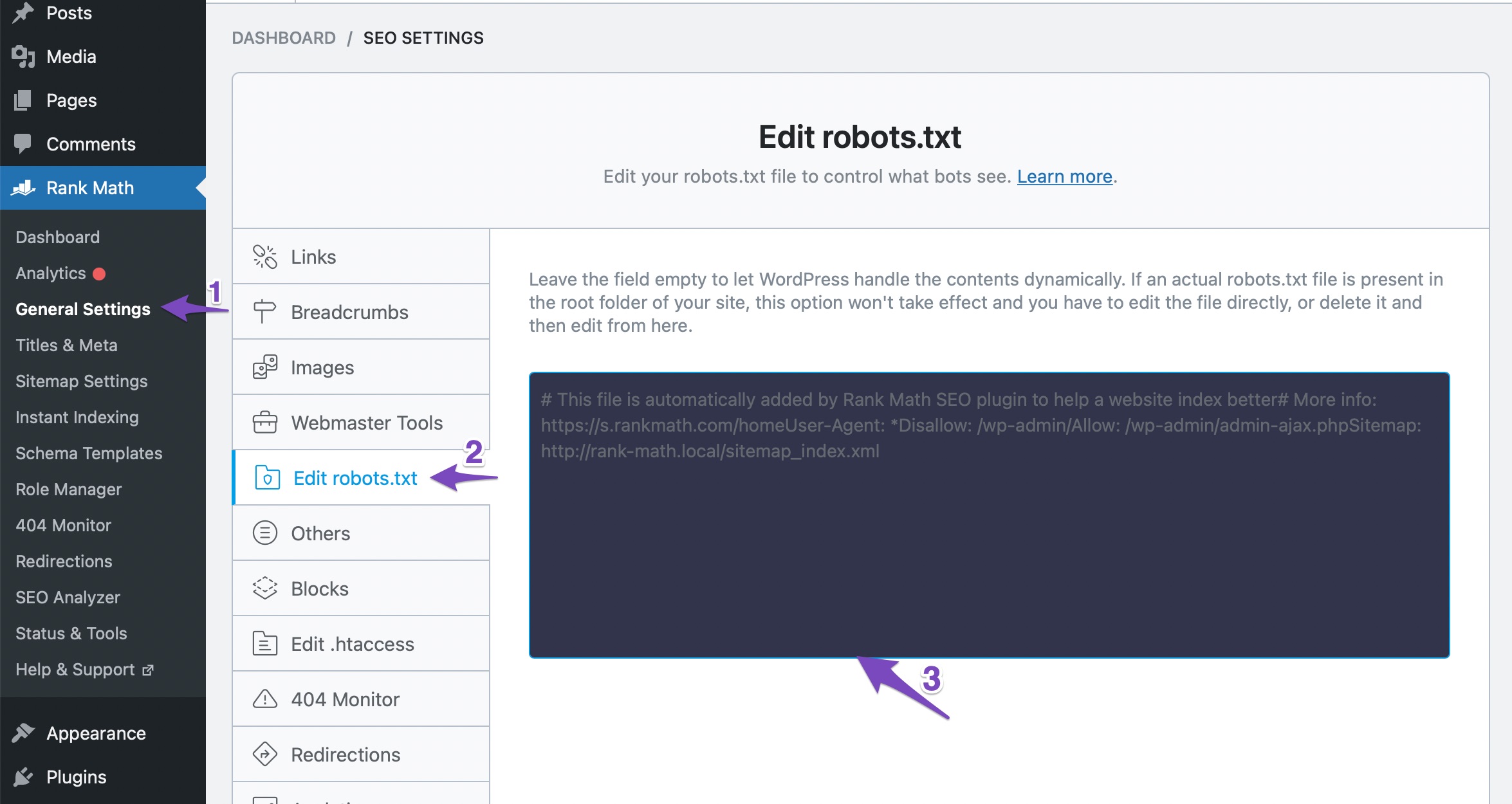
Robots.txt File: Ensure that your robots.txt file does not contain any rules that might be blocking indexing. You can check and edit this in Rank Math under WordPress Dashboard → Rank Math SEO → General Settings → Edit Robots.txt.
-
Caching Issues: If you are using any caching plugins, clear the cache after making changes to ensure that the latest settings are reflected.
If you have gone through all these steps and the issue persists, please reply to this ticket with your site URL so that a human agent from our support team can assist you further. Thank you for raising this concern, and we hope to resolve it for you soon!
Sources:
Why Google Hasn’t Indexed Your Post, Page, and/or Website? » Rank Math
Hello,
Thank you for your query and we are so sorry about the trouble this must have caused.
Please clear your website and browser cache after changing the robots meta.
If the issue persists, we might need to take a closer look at the settings. Please edit the first post on this ticket and include your WordPress login in the designated Sensitive Data section.
Please do take a complete backup of your website before sharing the information with us.

It is completely secure and only our support staff has access to that section. If you want, you can use the below plugin to generate a temporary login URL to your website and share that with us instead:
https://wordpress.org/plugins/temporary-login-without-password/
You can use the above plugin in conjunction with the WP Security Audit Log to monitor what changes our staff might make on your website (if any):
https://wordpress.org/plugins/wp-security-audit-log/
We really look forward to helping you.
thanks for the reply. i am not allowed to give outside access to admin. As mentioned, i already followed all of the guidelines and see nothing that would be causing this. I can share screenshots etc, but not admin access.
Is unfortunate that i cannot post a reply in the similar thread i linked to to ask the OP what the solution was since they did not post the fix there.
ok i finally sorted this out. I was pretty sure that it wasnt a Rankmath issue, since the strange noindex,follow still appeared in the head even when RM is disabled, thought maybe was a ghost setting from the early days before switching from Yoast, but that wasnt it either.
Finally discovered that the cause was, since our website also uses Woocommerce but doesnt have accounts etc, my choice to use the homepage as the “my accounts” page under Woocommerce settings was imposing this robots meta tag on the page, trumping all other settings in rankmath, on the page itself etc. Changing the my accounts page to something else took care of the issue.
Thanks for your time and assistance though, and maybe this will help someone else later in a similar ableit unusual situation like mine.
Hello,
We’re delighted to hear that this issue has been resolved. We appreciate your feedback.
This ticket will be closed now, but if you ever have another question or need any help in the future, please don’t hesitate to create a new forum topic. We’ll be more than happy to assist you.
Thank you.




