Hello,
We apologize for the issues you are facing with the Home URL/Site URL and the Rank Math Pro license.
Fixing the Home URL/Site URL Issue
Since you have cloned your installation and your Home URL and Site URL are different, you might encounter issues connecting Rank Math. To resolve this:
- Ensure both URLs match: Check that your WordPress URL and Site URL are the same. You can do this by navigating to WordPress Dashboard → Settings → General.
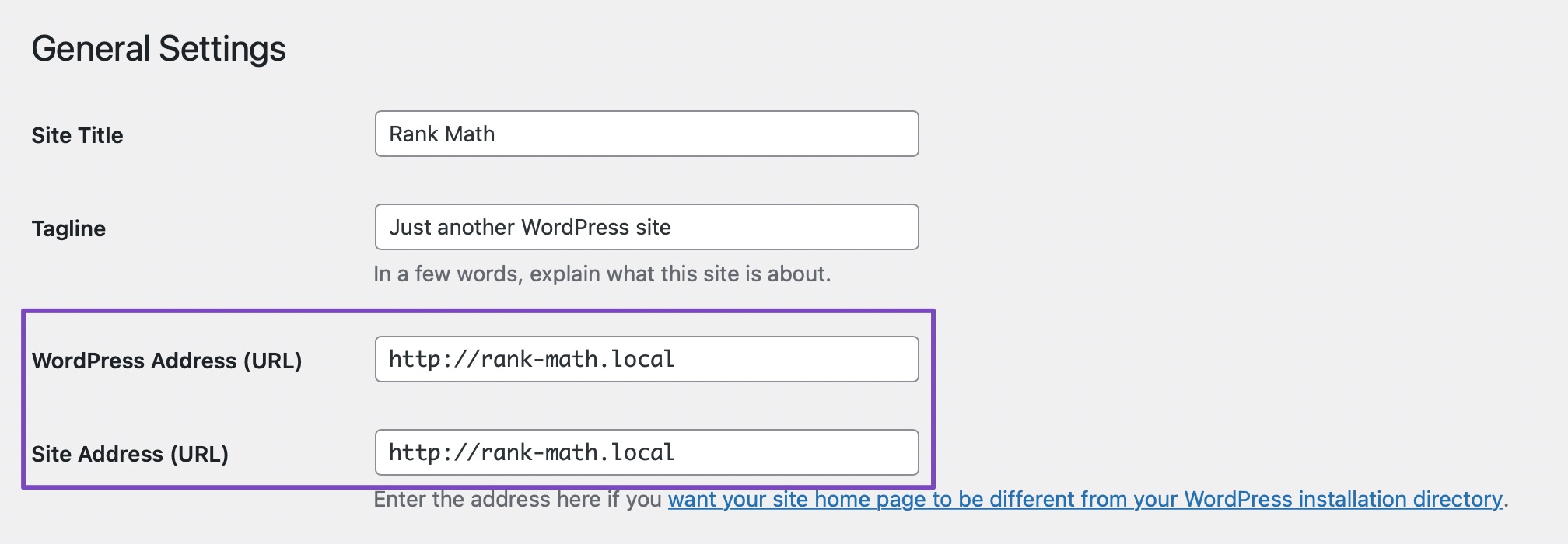
- If they do not match, you may need to adjust them accordingly.
- After ensuring they match, try disconnecting and reconnecting your Rank Math account again.
- If the warning still shows up, please disconnect your Rank Math account and clear your browser, website, and site-level cache before reconnecting.
- If the issue persists, you can add the following filter to your website to bypass the URL check:
/**
* Filter whether we need to check for URL mismatch or not.
*/
add_filter( 'rank_math/registration/do_url_check', '__return_false' );
Moving Rank Math Pro License
For moving your Rank Math Pro license to the new installation:
- You will need to log in to the Rank Math account associated with the old installation. If you do not know who it is registered to, you may need to check with your team or previous developers for access.
- Once you have access, you can deactivate the license from the old site and then activate it on the new installation by going to WordPress Dashboard → Rank Math SEO → Dashboard → Help and clicking on Connect Now.
If you still have questions or face any problems while connecting to your site, please feel free to reply to this ticket, and a human agent from the Rank Math Support team will assist you further.
Thank you for raising this concern!
Sources:
How to Fix Problems While Connecting Account Using Rank Math » Rank Math
Hello,
Thank you for contacting support.
If there’s a mismatch in the URL you need to follow the steps mentioned by the bot to add the filter to the website so that this mismatch can be skipped during the activation.
As for the PRO version on that website, we cannot check which account holds that because the website is now connected to this Free account which never had a PRO subscription.
We tried to look for other accounts under the same email domain but only this one exists in our system so for a valid purchase to exist it would need to be done using a completely different email address.
Don’t hesitate to get in touch if you have any other questions.
Hello,
Since we did not hear back from you for 15 days, we are assuming that you found the solution. We are closing this support ticket.
If you still need assistance or any other help, please feel free to open a new support ticket, and we will be more than happy to assist.
Thank you.



