Hello,
We apologize for the issue you are facing with the H tags not showing in the backend of your website. It can be frustrating when everything seems to be set up correctly but still doesn’t reflect as expected.
Here are a few steps you can take to troubleshoot this issue:
-
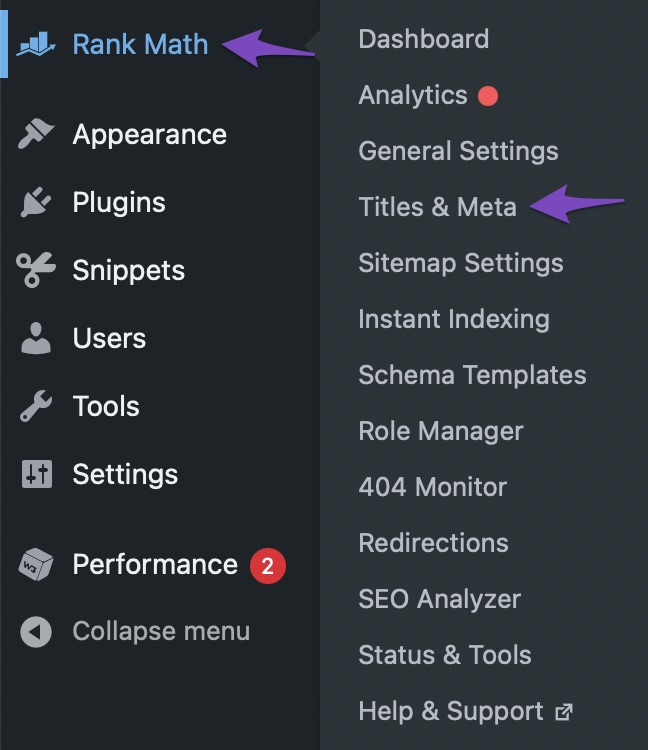
Check the Rank Math Meta Box: Ensure that the Rank Math Meta Box is enabled for the post types you are working on. You can do this by navigating to Rank Math SEO → Titles & Meta from your WordPress dashboard. If the Meta Box is disabled for certain post types, it won’t show the H tags.
-
Inspect Your Theme: Sometimes, the theme you are using may affect how H tags are displayed in the backend. Ensure that your theme supports proper HTML structure and that there are no customizations that might be hiding these tags.
-
SEO Audit Tools: If the SEO audit is indicating that H tags are missing, it might be worth checking if there are any caching plugins or settings that could be affecting how your content is rendered. Clear any caches and check again.
-
Image Alt Text: For the missing image alt text, ensure that you have added alt attributes to your images in the media library or directly in the post editor.
If these steps do not resolve the issue, we recommend replying to this ticket, and a human agent from the Rank Math Support team will take over and provide more specific guidance based on your website’s configuration.
Thank you for raising this concern, and we hope to help you resolve it soon!
Sources:
Why Rank Math’s Meta Box is Not Showing? » Rank Math
Hello,
Thank you for contacting us and sorry for any inconvenience that might have been caused due to that.
Please note that the heading tags are controlled by your theme or page builder, not by Rank Math. We suggest you get in touch with your theme support to fix these issues.
Regarding the image ALT text, you can use the Rank Math image SEO feature to add the ALT text automatically: https://rankmath.com/kb/set-alt-and-title-attributes-for-images/
However, Rank Math adds missing ALT attributes only for images added in post or page content, it will not do so for images added by your WordPress theme or page builder to various sections like your sliders, thumbnails, icons, headers, sidebars, footers, etc. as they only apply to images added directly on your content, and added on the fly.
Hope that helps and please don’t hesitate to let us know if you have any other questions.
Thank you.
Hello,
Since we did not hear back from you for 15 days, we are assuming that you found the solution. We are closing this support ticket.
If you still need assistance or any other help, please feel free to open a new support ticket, and we will be more than happy to assist.
Thank you.



