Hello,
We apologize for the issue you are facing with Google Search Console showing zero discovered URLs through your sitemap. Thank you for raising this concern.
Here are some steps you can take to troubleshoot this issue:
-
Validate Your Sitemap: Ensure that your sitemap is correctly configured by using the Validate XML Sitemap tool. If it’s properly configured, you should see a success message.

-
Ensure the Sitemap is Located in the Root Folder: Make sure your sitemap is in the root folder of your WordPress installation. The URL should look like this:
https://yourdomainname.com/sitemap_index.xml
-
Check Post Indexing Settings: Ensure that your posts are set to index. Go to Rank Math SEO → Titles & Meta and enable the Index checkbox in the Robots Meta settings.

-
Flush the Cache: If your sitemap appears outdated, navigate to Rank Math SEO → Sitemap Settings, increase the value of Links Per Sitemap by one, and save changes. Then, go to Settings → Permalinks and click Save Changes to apply the current settings.

-
Exclude the Sitemap From Caching: Ensure that your sitemap is not being cached. You can refer to this article on ensuring that your sitemaps are excluded from caching.
-
Add the Correct Sitemap to Google Search Console: Make sure you have added the correct version of your sitemap URL in Google Search Console without any spaces. If it still shows zero discovered URLs, try adding a forward slash before the sitemap URL and resubmit it.
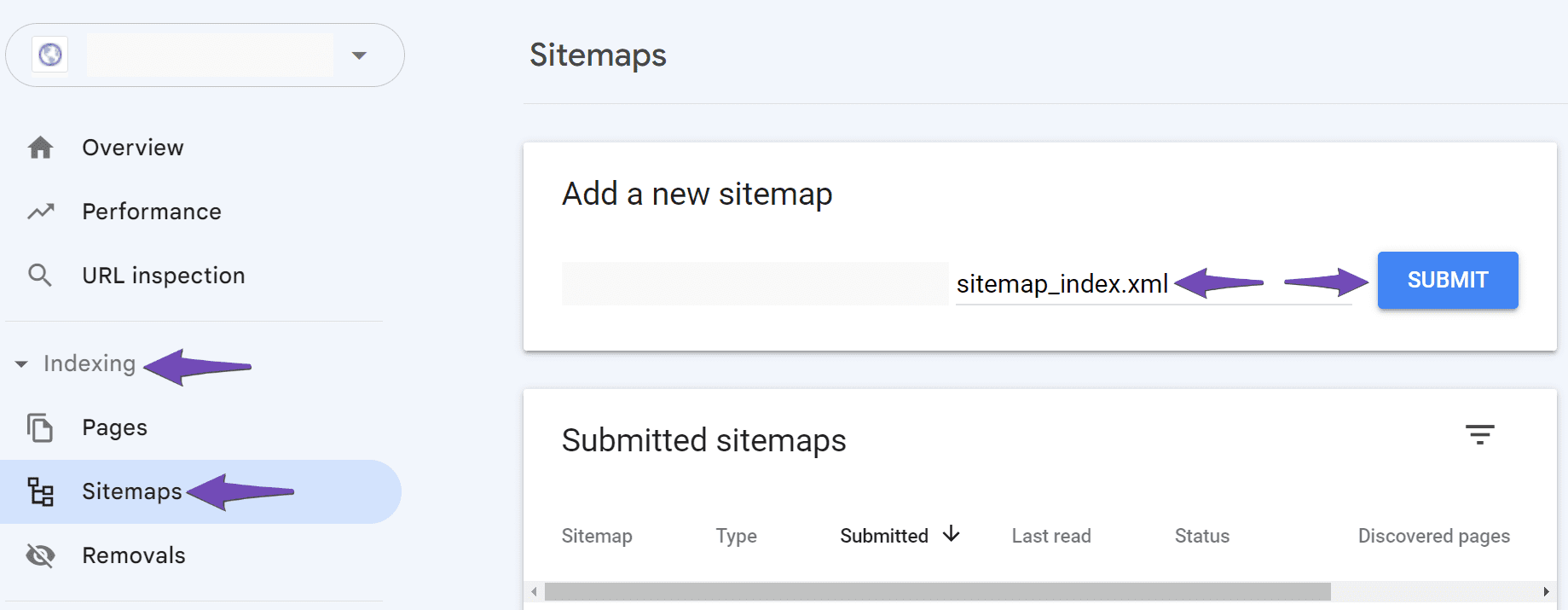
If after following these steps you still encounter issues, please reply to this ticket, and a human agent from our support team will assist you further.
We hope this helps you resolve the issue!
Sources:
Troubleshooting the “Couldn’t Fetch” Error in Google Search Console » Rank Math
Thank you for your previous suggestions. I have followed all the steps provided, including verifying the sitemap configuration, resubmitting the sitemap, and checking for any errors in the Google Search Console. Unfortunately, the issue persists, and the report still shows zero discovered URLs.
Could you please advise on any additional steps I can take or look into this matter further? I appreciate your continued support in resolving this issue.
Hello,
Please note that each time Google uses a sitemap to find a URL, the count of the Discovered URLs increases by one. Sitemaps is only one of the few methods Google uses to discover your URLs.
When the count of the Discovered URLs is zero or does not match your actual sitemap in your Google Search Console, it means Google didn’t use the sitemap to find the URLs.
Here’s a link for more information:
https://rankmath.com/kb/zero-discovered-urls-through-sitemap/
Looking forward to helping you.
I understand. But I have several sites and they all show the normal page amount, as it should be.
This is the only one that isn’t showing.
How to fix this?
Hello,
Thank you for contacting Rank Math support and we apologize for the inconvenience.
Having zero or a low number of discovered pages does not mean that Google is ignoring your sitemap or that your pages are not being indexed. It simply means that Google has already found your pages from another source, such as a link from another site or a social media post.
Your sitemap is just one of the ways that Google can discover your pages, but it is not the only one. As long as your pages are being indexed, you don’t need to worry about how they are discovered. Your sitemap is still useful because it helps Google find your new or updated content faster.
You can read more about this issue here.
We hope this helps you understand the issue better. If you have any other questions or concerns, please let us know.
Thank you for choosing Rank Math.
Hello,
Since we did not hear back from you for 15 days, we are assuming that you found the solution. We are closing this support ticket.
If you still need assistance or any other help, please feel free to open a new support ticket, and we will be more than happy to assist.
Thank you.




