
-
Hi!
It’s been a month so I just received my Google analytics data mail from Rankmath. It seems there is still a problem. In the email it says that rankmath is unable to give me data, maybe because my google analytics is not connected correctly.
I did disconnect and reconnect and the button is no green anymore.
I did what you told me about the Jcron, any clue why it’s still not working ? Thanks !
(old post : https://support.rankmath.com/ticket/google-analytics-not-green/)

-
Hello,
Thank you for contacting us, and sorry for any inconvenience that might have been caused due to that.
Could you please confirm if the data is available on your Rank Math Analytics Dashboard? If so, please trigger the email report and see if you’re still receiving the same error (update the link with the actual domain name)?
https://yourdomain.com/?rank_math_analytics_report_preview=1&send=1Once you’ve received the email, please head over to WordPress dashboard > Tools > Scheduled Actions > Pending.
or you can try visiting the following URL:
https://yourdomain.com/wp-admin/tools.php?page=action-scheduler&status=pendingRun the
rank_math/analytics/email_report_eventscheduled action,This is how it should look like:
This will force the site to send an Analytics report to the desired email address.
After that, observe if the issue persists in the next schedule.
Let us know how it goes. Looking forward to helping you.
Thank you
Hi,
Could you please confirm if the data is available on your Rank Math Analytics Dashboard?
I don’t have any data.
I don’t know why.
Thank you !
Hello,
Thanks for contacting us, and sorry for any inconvenience that might have been caused due to that.
Please head over to WordPress dashboard > Tools > Scheduled Actions > Pending.
or you can try visiting the following URL:
https://yourdomain.com/wp-admin/tools.php?page=action-scheduler&status=pendingRun the
rank_math/analytics/data_fetchscheduled action and wait for the data fetch to complete.This is how it should look like:
After that, please allow Rank Math a while to fetch data from Google Analytics and you should be able to see the updated data on Rank Math Analytics dashboard.
Let us know if the issue persists. Looking forward to helping you.
Thank you.
Ok i will but don’t you think there is an issue about the fact that the Google analytics is not “green” anymore ? Don’t you have a way to check if the google analytics code is present on my website ?
thank you !
Hello,
If the Analytics button color is green, it means that your website is connected to your Google account. If it’s showing red, then you may need to connect your site again.
Regarding the Analytics code, you can confirm it on your site by using this tool:
https://tagassistant.google.com/Let us know how this goes.
Thank you.
It seems that there is a problem with the Google tag. The tag assistant you provided could not connect to my website.
I really don’t know what I did wrong.
I follow guide and YouTube guide, I did what you told me about the jcron job, I create a new G4 property.
Thanks!
Hello,
We are glad we could help. If you created a new GA4 property, it may take 24 hours for the data to start showing on your Google Analytics dashboard. Please note, for the Rank Math Free plugin, we only show stats for Google Search Console on your website dashboard. If WP Cron is now working and you your website is correctly connected to Google, your stats should start showing on your WordPress dashboard now.
If your stats are not updating, please do the following to create a troubleshooting log so we can see what the issue may be.
Add the filter below to your website:
add_filter( ‘rank_math/analytics/log_response’, ‘__return_true’ );After adding the filter, please run the pending Scheduled Action on your WordPress Dashboard > Tools > Scheduled Actions > Pending
Hope that helps. Please let us know if you have questions.
Hello there,
I have completed the requested task of running the Rank Math data fetch. To clarify, I have another website where I also use Rank Math, and everything works well since I use the ‘Site Kit’ plugin from Google. However, I don’t want to download a plugin just for one purpose on my new website.
I have read that I can manually add the Google Analytics code to my website’s function.php file to track data. But I am confused because when I connect Google to Rank Math, it does not seem to add any code.
Can you confirm where I should add the code and what the impact would be if I do not connect Google to Rank Math? My Search Console is green and well-connected, and I can see all the information in Google Analytics. So maybe the code I added to my function.php file is working, but not with Rank Math.
I created the GA4 account a month ago, and I find it strange that I am having difficulty connecting Google to Rank Math.
Thank you for your help!
Hello,
If you’re not using any plugin or theme to add the code, then you can enable this option in Rank Math > General Settings > Analytics
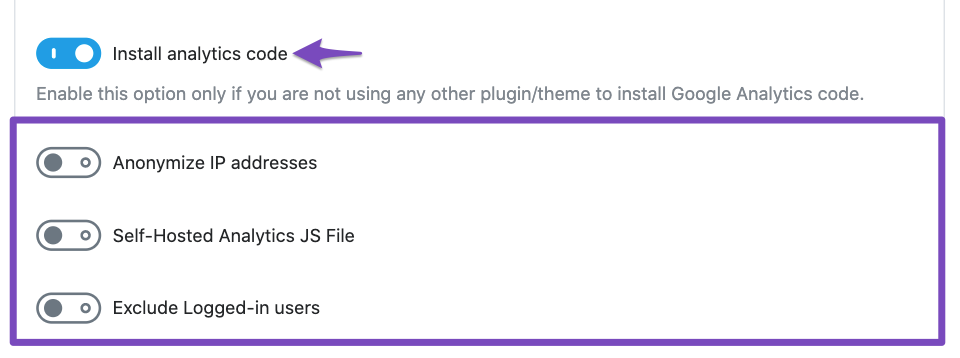
Also, if you don’t connect your website to your Google account, Rank Math would be unable to fetch the data coming from your Search Console.
Let us know how this goes.
Thank you.
Hum okay… As I said, I tried enabling the “install analytics code” but it doesn’t do anything. Could you help me with that? I tried adding myself the code to my function.php but still, rankmath not connected.
Also, if you don’t connect your website to your Google account, Rank Math would be unable to fetch the data coming from your Search Console.
The search console is green (in rankmath), so I suppose it is connected…
Again, what is the goal of connecting rankmath to google ? I mean, if it’s just to see the traffic on my website, I’m ok not having it connected since I can track the traffic with google.
Thanks
If your stats are not updating, please do the following to create a troubleshooting log so we can see what the issue may be.
Is it ok ? Where is the troubleshooting log ?
Thanks !
Hello,
After you add the below line to your theme’s functions.php and run the pending actions, the log file will appear in the following folder:
wp-content/uploads/rank-mathYou can upload it to wetransfer.com or share the contents here.
We look forward to hearing back from you.
Hello,
We might need to take a closer look at the settings. Please edit the first post on this ticket and include your WordPress & FTP logins in the designated Sensitive Data section.
Please do take a complete backup of your website before sharing the information with us.
It is completely secure and only our support staff has access to that section. If you want, you can use the below plugin to generate a temporary login URL to your website and share that with us instead:
https://wordpress.org/plugins/temporary-login-without-password/
You can use the above plugin in conjunction with the WP Security Audit Log to monitor what changes our staff might make on your website (if any):
https://wordpress.org/plugins/wp-security-audit-log/
We really look forward to helping you.
Hello,
I have updated the sensitive data as requested. Can you please check further?
Thank you.
Hello,
Since we did not hear back from you for 15 days, we are assuming that you found the solution. We are closing this support ticket.
If you still need assistance or any other help, please feel free to open a new support ticket, and we will be more than happy to assist.
Thank you.



The ticket ‘Google Analytics not “Green” 2’ is closed to new replies.