
-
I’m trying to connect the Google Analytics property for my website. The account name has the correct number in parentheses (although I renamed the account this morning, and the new name change is not reflected), but the property name does not appear in the drop-down menu. I’ve followed the steps in your blog directions. I’ve tried reconnecting to the site many times. Nothing is working. Please advise.

-
Hello,
I’m sorry to hear that you’re facing issues connecting your Google Analytics property. It sounds frustrating, and we appreciate you bringing this to our attention.
Here are a few steps you can try to resolve the issue:
- Reconnect Your Google Account: Sometimes, disconnecting and reconnecting your Google account can help refresh the properties listed. Make sure to follow the steps outlined in our guide on Connecting Your Google Account with Rank Math.
- Check for GA4 Properties: Ensure that you are looking for Google Analytics 4 properties, which will have a suffix
-GA4. If you don’t see your property, you may need to create a new GA4 property directly from Rank Math by selecting the Create new GA4 property option in the dropdown.
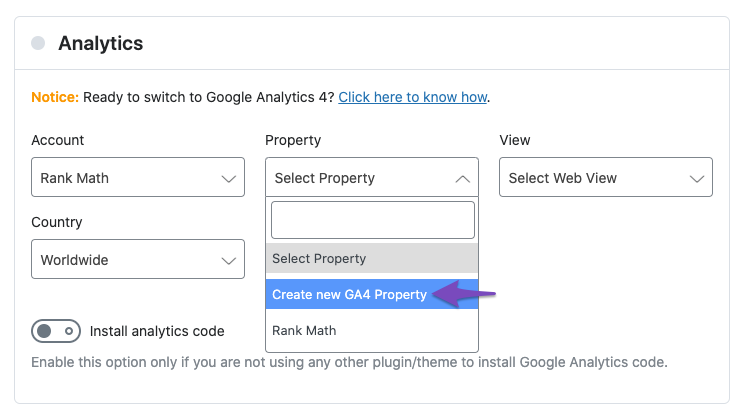
- Browser Issues: If the options are still unresponsive or missing, consider switching to a Chromium-based browser like Google Chrome, as this can sometimes resolve display issues.
- Clear Cache: Clear your browser cache or try accessing the settings in an incognito window to rule out any caching issues.
If you’ve tried all these steps and are still having trouble, please reply to this ticket with your website URL so that a human agent from our support team can assist you further. Thank you for your patience!
Sources:
How to Connect Your Google Account With Rank Math SEO » Rank MathHello,
I have updated the sensitive data as requested. Can you please check further?
Thank you.
Hello,
Thank you for your query and we are so sorry about the trouble this must have caused.
Try removing RankMath’s app from your Google apps permissions: https://myaccount.google.com/permissions
Then, head over to your WordPress Dashboard > Rank Math > General Settings > Analytics and reconnect the Google service and this time, ensure that all permissions are checked:
Let us know how that goes. Looking forward to helping you.
Hello,
I have updated the sensitive data as requested. Can you please check further?
Thank you.
I had tried this in the past and it did not resolve the issue. I just tried again and it still did not work.
Hello,
We apologise for the experience you are having using our plugin.
We would like to look at this further,
Please add our developer’s email address m*******@r*********** to your Google Search Console account to investigate and debug the issue on the connection.
You can follow this guide to add a user in Google Analytics: https://rankmath.com/kb/add-user-to-google-analytics/
Lastly, we might need to take a closer look at your website to investigate this further. Please edit the first post on this ticket and include your WordPress & FTP logins in the designated Sensitive Data section.
Please do take a complete backup of your website before sharing the information with us.
It is completely secure and only our support staff has access to that section. If you want, you can use the plugin below to generate a temporary login URL to your website and share that with us instead:
https://wordpress.org/plugins/temporary-login-without-password/
You can use the above plugin in conjunction with the WP Security Audit Log to monitor what changes our staff might make on your website (if any):
https://wordpress.org/plugins/wp-security-audit-log/
We really look forward to helping you.
Hello,
I have updated the sensitive data as requested. Can you please check further?
Thank you.
I added the developer’s email address, m*******@r***********, to the Google Search Console and Google Analytics account. I also added a temporary login link to the sensitive data section. Please let me know if there’s anything else I need to do.
Hello,
Sorry for the delay in response.
We would like to check this on your website but the temporary login URL you shared is no longer active. Can you please renew and extend it so our team can debug the issue further?
Looking forward to hearing back from you.
Hello,
I have updated the sensitive data as requested. Can you please check further?
Thank you.
I just renewed the link and added it to the sensitive data.
Hi, can I get an update on this ticket? I can see that m*******@r*********** has made changes to the site. I’d love to know what the current status is.
I’d like to know how the issue was resolved yesterday. I can see the Rank Math Analytics section is correct now (account, property, and data stream are showing). What was done in case I experience this problem in the future?
I used Code Snippets to install the Google Analytics tag in the header of the website. Should the “Install analytics code” be turned on or off?
If I go to users to remove Mahesh as an administrator on the WordPress site, what should I select on the Delete Users window that pops up? It says, “Seems like your site URL has changed since you connected Rank Math. Click here to reconnect.” Do I click to reconnect?
Then it says, “What should be done with content owned by this user?” Do I “delete all content” or do I “attribute all content to:_______.”Hello,
Sorry for the delay. Yes, our developers have applied some changes and fixes to your website, which is why it is now working.
We simply reconnected your Google account to the plugin with the correct accounts, properties and views.
I used Code Snippets to install the Google Analytics tag in the header of the website. Should the “Install analytics code” be turned on or off?
If the tag you manually added using Code Snippet is working as intended, you don’t have to turn on that option in our plugin.
If I go to users to remove Mahesh as an administrator on the WordPress site, what should I select on the Delete Users window that pops up? It says, “Seems like your site URL has changed since you connected Rank Math. Click here to reconnect.” Do I click to reconnect?
Then it says, “What should be done with content owned by this user?” Do I “delete all content” or do I “attribute all content to:_______.”Since the issue with the analytics has been resolved, you can now revoke or delete the user data of our developer.
As for the connection issue you experienced, please head over to WordPress Dashboard > Settings > General and make sure there are no mismatches in the WordPress URL and Site URL in those options.
If you have different website URLs in there, that would explain the issue as they need to match for the connection to happen correctly.
To remedy that, you need to add a filter code to your website that will bypass the URL check when you connect your Rank Math account to your website. This might help if there is some issue with your server configuration or DNS settings.
To add the filter code, please follow this guide: https://rankmath.com/kb/wordpress-hooks-actions-filters/
Here’s the filter code you need to add to your website.:
add_filter( 'rank_math/registration/do_url_check', '__return_false' );You can add it to your theme’s functions.php file or use a plugin like Code Snippets.
For more information on why this issue happens and how to fix it, you can check this page: https://rankmath.com/kb/problems-while-connecting-account/
Let us know how that goes. Looking forward to helping you.
Hello,
Since we did not hear back from you for 15 days, we are assuming that you found the solution. We are closing this support ticket.
If you still need assistance or any other help, please feel free to open a new support ticket, and we will be more than happy to assist.
Thank you.



The ticket ‘Google Analytics Connection Trouble’ is closed to new replies.