gogole indexing my image as seprate link without post content

#888566
Viewing 4 replies - 1 through 4 (of 4 total)
  • Hello,

    We apologize for the issue you are facing with Google indexing your images as separate links without any content. This can happen for a few reasons, and we appreciate you sharing the samples for better understanding.

    To address the issue of images being indexed separately, you can consider the following steps:

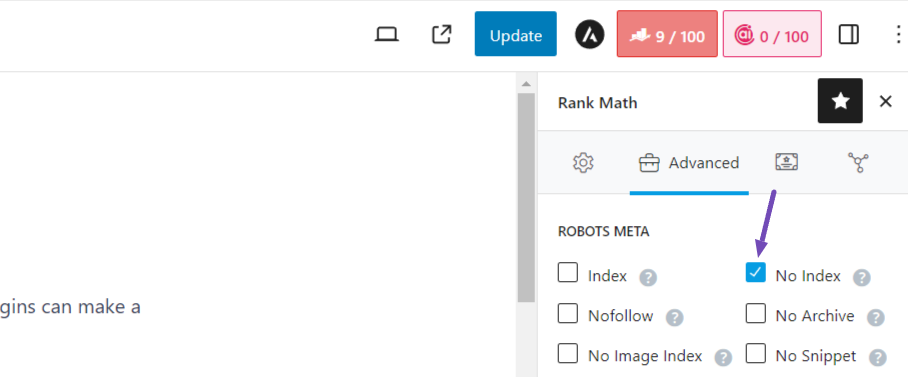
    1. Use Noindex Meta Tag: If you want to prevent Google from indexing specific pages (like attachment pages), you can use a noindex meta tag. This tells search engines not to index those pages. You can set this up using the Rank Math SEO plugin by navigating to the page or post with the image and switching the ROBOTS META to No Index. Here’s how it looks:
      check the Rank Math noindex option

    2. Check Image Relevance: Ensure that your images are relevant to the content they are associated with. Google may index images separately if it finds them more relevant than the content on the page.

    3. Submit Your Sitemap: Make sure you have submitted your sitemap to Google Search Console. This helps Google understand the structure of your site and index it properly. Rank Math automatically creates a Sitemap Index for your website, which you can submit.

    4. Review Google Search Console: Check for any manual actions or penalties in your Google Search Console account that might be affecting your site’s visibility. If there are issues, follow Google’s guidelines to resolve them.

    5. Content Quality: Ensure that your content is original and not duplicated across multiple pages, as duplicate content can lead to penalties and affect indexing.

    Regarding your concern about keywords and visibility, it’s possible that recent algorithm updates from Google may have impacted your rankings. We recommend reviewing our guide on Google Algorithm Update Recovery for more insights.

    If you continue to experience issues, please reply to this ticket, and a human agent from the Rank Math Support team will assist you further.

    Thank you for raising this concern!

    Sources:
    How to Remove Images From Google Search Results » Rank Math
    Why Did My Website Disappear From Google Search? » Rank Math

    Hello,

    Thank you for contacting us and sorry for any inconvenience that might have been caused due to that.

    Please note that ranking on Google depends on so much more than just your on-page optimization. Here are some reasons why your site might be experiencing a decline in ranking on Google.

    1. Seasonal Fluctuations: Certain industries or topics experience natural fluctuations in search volume throughout the year. If your website or content is related to a specific seasonal trend or event, the decline in ranking and impressions may be due to a decrease in search interest during this period.

    2. Algorithm Updates: Google frequently updates its search algorithms, which can impact the visibility of websites in search results. If there have been recent algorithm changes, it’s possible that your website’s ranking has been affected, leading to a decline in impressions.
    https://rankmath.com/blog/google-algorithm-update-recovery/

    3. Technical Issues: It’s important to ensure that your website is properly indexed by search engines and that no technical issues are preventing Google from crawling and indexing your pages. Check for any errors or warnings in the Google Search Console that could be affecting your site’s visibility.

    4. Competitor Activity: Increased competition from other websites or changes in their SEO strategies can impact your ranking and impressions. If competitors are optimizing their content better or generating more relevant backlinks, it could lead to a decline in your own ranking and impressions.

    To identify the specific reason for the decline in ranking and impressions, it’s essential to analyze your website’s performance, conduct a thorough review of your SEO strategy, and monitor changes in search trends and competitors.

    You can use this guide to run an SEO audit on your site: https://rankmath.com/blog/seo-audit/

    Regarding the attachment URLs, you can use the URL inspection tool of your GSC account to check the URL and view the referring page to make sure from where it is coming.

    Once you know the referring page, you can unlink or remove it so Google won’t discover it again.

    Let us know how it goes. Looking forward to helping you.

    Thank you.

    hello, thanks you for your valuable reply, I have checked SEO audit getting almost 87/100, but there is few errors, most important google not crawling my website last few weeks, is there any way to continew crawling my website and ranking keywords, there is no keywords in google according to rank math analyse, it dropped sudden

    Hello,

    You should check your Google Search Console > Indexing > Pages section to determine any issues reported on your URLs that may have prevented your site from being indexed:
    https://support.google.com/webmasters/answer/7440203?hl=en

    To better understand the status reported, you may refer to our guide here:
    https://rankmath.com/kb/url-inspection-api-integration/#not-indexed

    Looking forward to helping you.

    Hello,

    Since we did not hear back from you for 15 days, we are assuming that you found the solution. We are closing this support ticket.

    If you still need assistance or any other help, please feel free to open a new support ticket, and we will be more than happy to assist.

    Thank you.

Viewing 4 replies - 1 through 4 (of 4 total)

The ticket ‘gogole indexing my image as seprate link without post content’ is closed to new replies.