Hello,
We apologize for the issue you are facing with connecting your Rank Math account to Google Services. It can be frustrating when things don’t work as expected.
To troubleshoot this issue, we recommend testing the connection to ensure that Rank Math is properly linked to your Google account. Here’s how you can do that:
- Go to Rank Math SEO → General Settings → Analytics.
- Click on the Test Connections option at the top right of the Analytics settings.
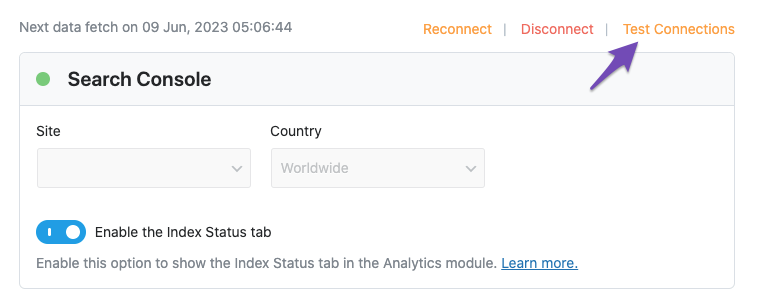
- A green signal indicates a valid connection, while a red signal indicates a glitch in the connection.
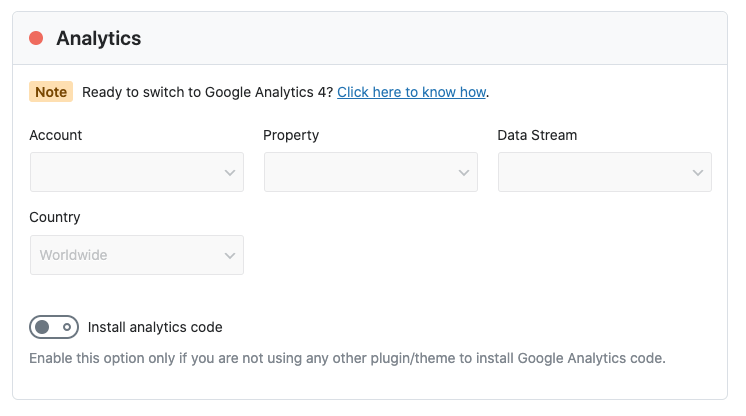
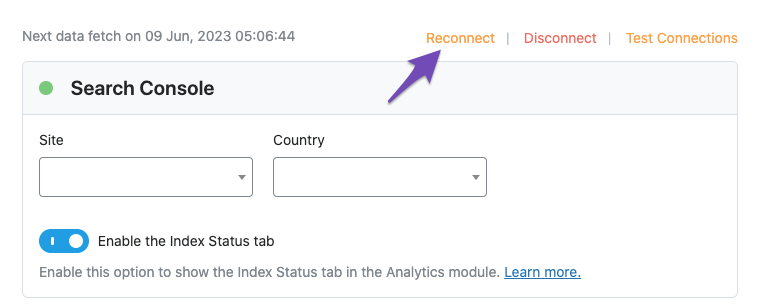
If you see a red signal, try reconnecting your Google account by clicking the reconnect option.
If the problem persists even after reconnecting, please reply to this ticket, and a human agent from the Rank Math Support team will assist you further. Thank you for your patience, and we appreciate you bringing this concern to our attention!
Sources:
Resolving Rank Math Analytics Related Issues » Rank Math
Hello,
Thank you for contacting us and sorry for any inconvenience that might have been caused due to that.
Please try to follow the steps below and see if that works for you:
1. Make sure that you have verified your website on Google Search Console, if not, follow this guide: https://rankmath.com/kb/google-site-verification/
2. Please make sure that you are not connecting to Google Search Console via a domain property but rather a URL prefix and that you have verified the correct version of your website on the Google Search Console (HTTP or HTTPS, www or non-www).
3. Please remove RankMath’s app from your Google apps permissions: https://myaccount.google.com/permissions
4. Once done, reconnect the Google account again from WordPress Dashboard > Rank Math > General Settings > Analytics and configure the Search Console and Analytics settings again.
Kindly check all necessary checkboxes to allow Rank Math to access some of the Google Services.
Let us know how it goes. Looking forward to helping you.
Thank you.
Hello,
Since we did not hear back from you for 15 days, we are assuming that you found the solution. We are closing this support ticket.
If you still need assistance or any other help, please feel free to open a new support ticket, and we will be more than happy to assist.
Thank you.



