Hello,
Thank you for contacting Rank Math support today and bringing your concern to our attention.
I would suggest marking it as noindex while on published status to completely hide it from the SERP.
When marking it as noindex, the page/post will be automatically removed from the sitemap.
However, if you would need to test the page with index robots set, you can head over to your WordPress Dashboard > Rank Math > Sitemap Settings > General Settings and exclude your page by inserting the ID here:

Hope that helps and please do not hesitate to let us know if you need our assistance with anything else.
I do not have that setting on the page you describe nor can I find it anywhere else.
Hello,
Some options are only available when Advanced Mode is enabled in Rank Math:
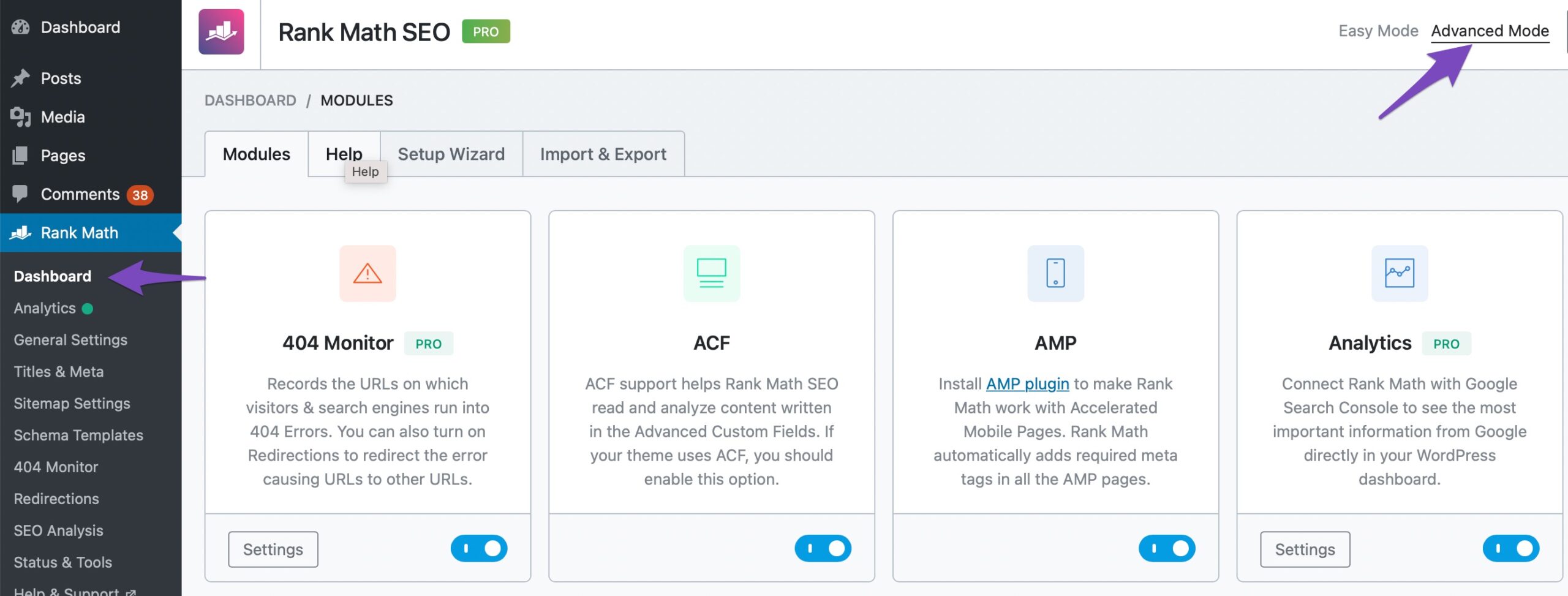
Hope this helps.
Thank you.
That made a big difference in usability, THANK YOU!
Hello,
Glad that helped.
Please feel free to reach out to us again in case you need any other assistance.
We are here to help.
Thank you.



