Hello,
We apologize for the issue you are facing with the error message regarding your site URL. This message typically appears when there is a discrepancy between the URL of your website and the URL that Rank Math has on file for your account. To resolve this, you will need to disconnect and then reconnect your website to Rank Math. Here’s how you can do that:
1. Disconnect Your Website
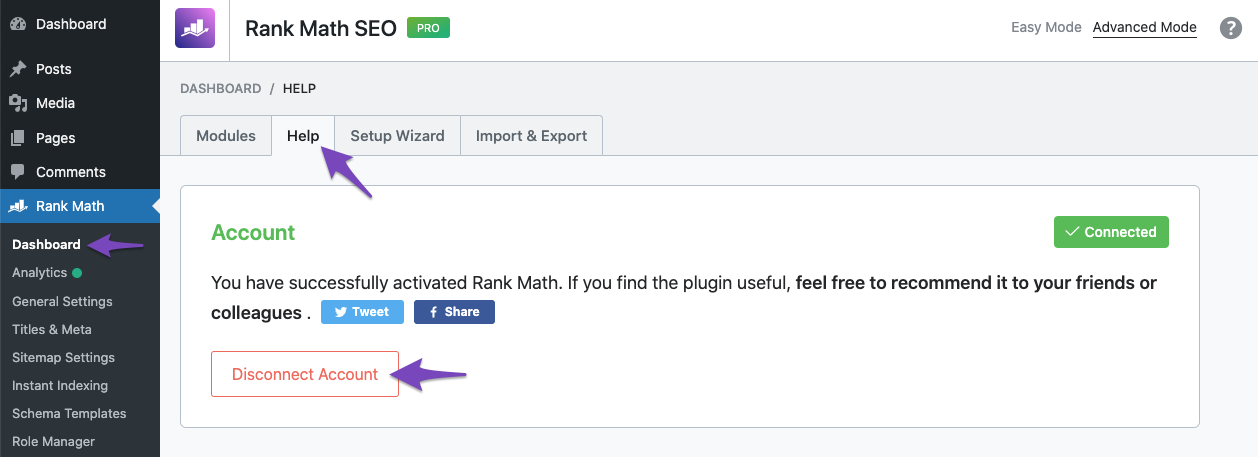
- Go to Rank Math SEO → Dashboard → Help in your WordPress admin area.
- Click on Disconnect Account.
2. Connect Your Website Again
- After disconnecting, you will see a prompt to activate your license. Click the Connect Now button.
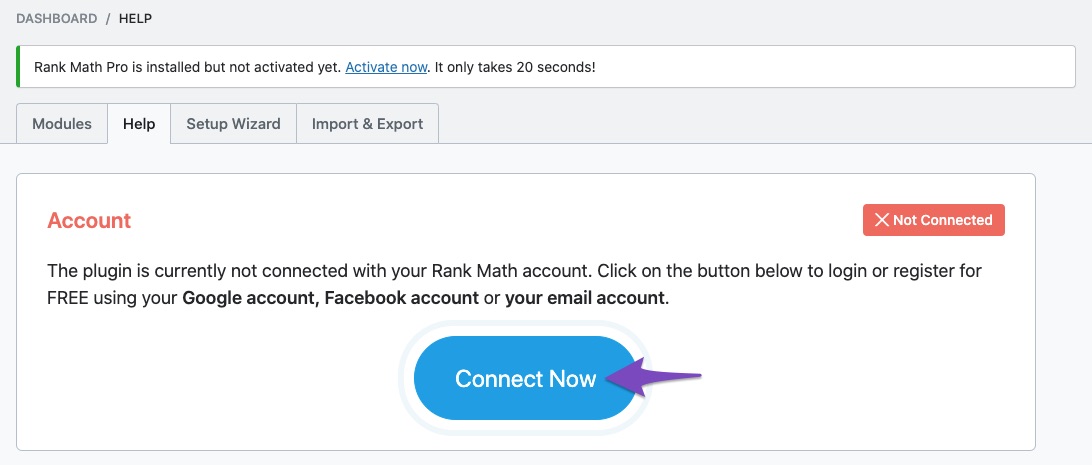
- Follow the instructions to reconnect your website, ensuring that you are using the correct Rank Math account associated with your subscription.
Once you have reconnected, the error message should disappear. If you continue to experience issues, please reply to this ticket, and a human agent from our support team will assist you further.
Thank you for raising this concern!
Sources:
How to Get Rid of "No Connected Websites Found" Message » Rank Math
This is an automated reply from Rank Math Support Bot. If you need further assistance, please reply to this topic and a human support agent will reply to you shortly.
Hello,
Since we did not hear back from you for 15 days, we are assuming that you found the solution. We are closing this support ticket.
If you still need assistance or any other help, please feel free to open a new support ticket, and we will be more than happy to assist.
Thank you.


