Hello,
We apologize for the issue you are facing with your embedded YouTube videos not being indexed.
When it comes to SEO, having your videos indexed can indeed impact your rankings, especially if they are relevant to the content on your page. While the page itself may be indexed, if the video is not, it could mean that you are missing out on potential traffic and visibility in video search results.
To help with indexing your embedded YouTube videos, you can utilize the Video Schema. By implementing Video Schema markup, you can provide search engines with explicit information about your videos, such as the description, thumbnail URL, upload date, and duration. This can enhance the chances of your videos appearing in search results.
Here’s how you can add Video Schema to your posts:
- Ensure that the Schema module is enabled in Rank Math by navigating to Rank Math SEO → Dashboard.

- Edit the post or page where your video is embedded by clicking Edit.
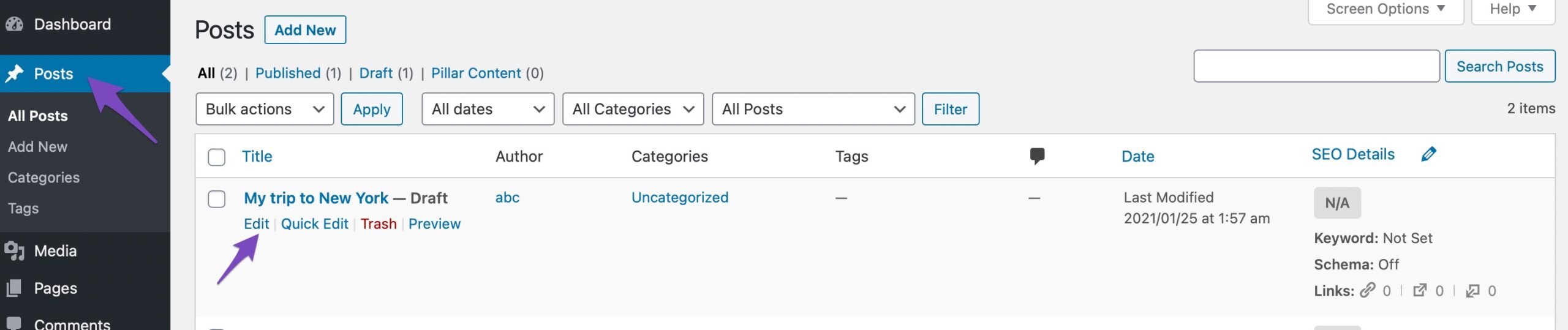
- Open Rank Math in the Gutenberg sidebar or through the Plugins section.
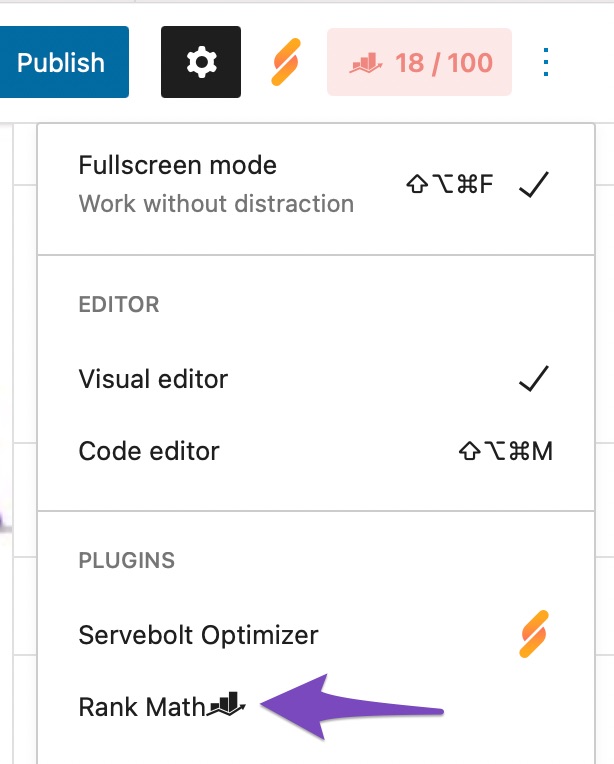
- Add the Video Schema type and fill in the necessary details.
For more detailed instructions on using Video Schema, you can refer to our guide on Video Schema Type.
If you have any further questions or need assistance with this process, please feel free to reply to this ticket, and a human agent from our support team will assist you further. Thank you for raising this concern!
Sources:
Video Schema Type » Rank Math
This is an automated reply from Rank Math Support Bot. If you need further assistance, please reply to this topic and a human support agent will reply to you shortly.
Hello,
Since we did not hear back from you for 15 days, we are assuming that you found the solution. We are closing this support ticket.
If you still need assistance or any other help, please feel free to open a new support ticket, and we will be more than happy to assist.
Thank you.


