Hello,
Thank you for contacting the support and we regret the inconvenience caused.
Could you please share the exact affected URLs so that we can have a closer look?
Also, please confirm if you’re using the Product Schema or the WooCommerce Product Schema of Rank Math.
Looking forward to helping you.
Thank you.
Hello,
I have updated the sensitive data as requested. Can you please check further?
Thank you.
Yes we are using product schema
Hello,
Google recommends disabling the schema to your product category archives. The Product Schema is only for the actual product, and not for anything else. You can check this link for more information:
https://developers.google.com/search/docs/data-types/product#guidelines
In this case, you may need to enable the Remove Schema Markup on Shop Archives option in Rank Math > General Settings > WooCommerce as that removes the product schema only from your shop pages.
I hope that helps.
Thank you.
Enabled the Remove schema markup on shop archives, and tried validate fix in google search console, i am still getting this error,
Cannot continue validation process
Affected pages were found. Fix the issue and run validation again
Brightening Body Serum – 3% Niacinamide + 5% Mandelic Acid + 0.5% Cysteine Complex
https://www.thedeconstruct.in/product-ingredients/niacinamide/
Brightening Serum & Pore Control Serum Combo
https://www.thedeconstruct.in/product-ingredients/niacinamide/
Buy Salicylic Acid Face Wash For Oily Skin Online In India @ Best Prices
https://www.thedeconstruct.in/product-ingredients/niacinamide/
Hello,
The pages you have shared seem product categories, and the product schema was applied to them.
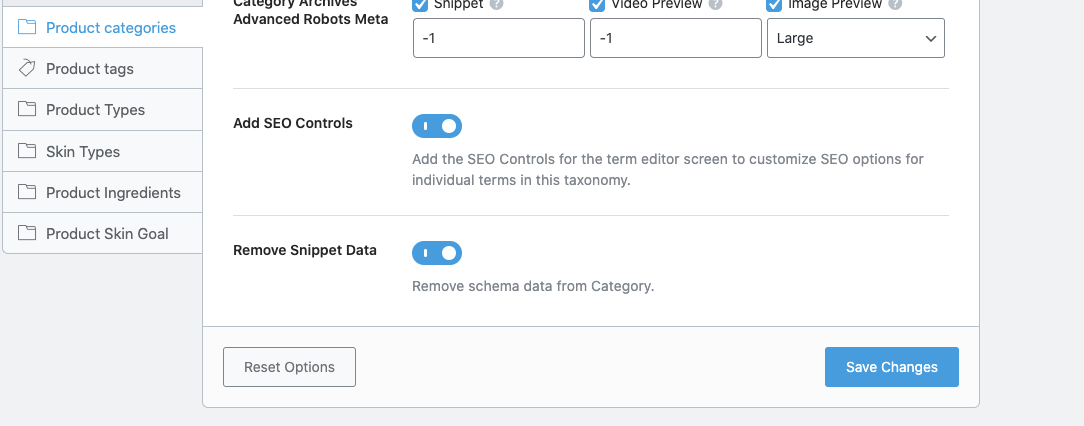
In this case, please also enable the Remove Snippet Data option in Rank Math > Titles & Meta > Product Categories/Brands as that removes the product schema only from your category pages:
https://rankmath.com/kb/titles-and-meta/#remove-snippet-data-4
Once done, revalidate the error in your Google Search Console and give Google some time to recrawl your site.
I hope that helps.
Thank you.
https://i.postimg.cc/8zvdKY3s/Screenshot-2022-07-20-at-10-58-54-AM.png
It is already enabled earlier.
Please help, why i am seeing this error then?
Hello,
From your screenshot, could you please click the Product Ingredients section? Then check if the Remove Snippet Data option is disabled.
Also, ensure that option is enabled on all the other product categories.
Once done, clear your website’s cache and check again using Google’s Rich Results test.
Let us know how this goes.
Thank you.
Hello,
Since we did not hear back from you for 15 days, we are assuming that you found the solution. We are closing this support ticket.
If you still need assistance or any other help, please feel free to open a new support ticket, and we will be more than happy to assist.
Thank you.