Hello,
We apologize for the issue you are facing with the SEO Admin role not being able to access updating Meta Titles and Meta Descriptions in Rank Math.
To resolve this, please check the following:
-
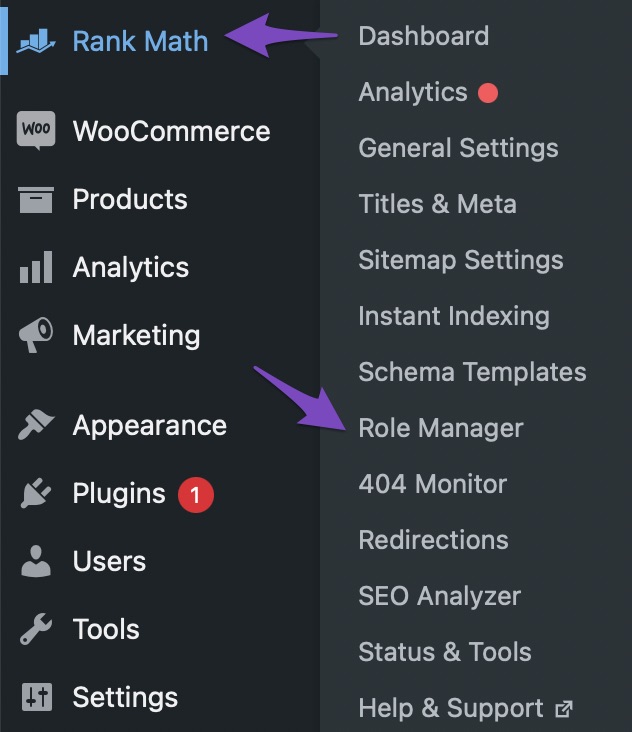
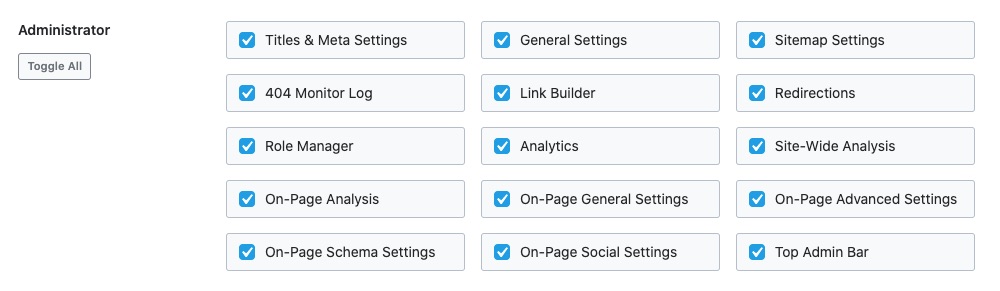
Access Role Manager: Ensure that the SEO Admin role has been granted all the required user capabilities in the Rank Math Role Manager. You can do this by navigating to Rank Math SEO → Role Manager in your WordPress dashboard. Make sure to enable the necessary capabilities for the SEO Admin role and click on the Update Capabilities button to save the changes.
-
Check User Capabilities: After updating, verify that the SEO Admin role has access to the relevant settings. If any capabilities are missing, enable them and save again.
If you have followed these steps and the issue persists, please reply to this ticket, and a human agent from the Rank Math Support team will assist you further. Thank you for raising this concern!
Sources:
How to Use the Role Manager Feature of Rank Math SEO Plugin
Sorry, You Are Not Allowed to Access This Page » Rank Math
Hi, I have followed the steps and the issue still persists.
Hello,
Thank you for contacting us and sorry for any inconvenience that might have been caused due to that.
This issue is usually caused by some sort of blockage on the route to save the metadata on the website, a conflict with plugins, a javascript error, or a firewall-related issue.
Here is how you can fix it:
- Firstly, ensure that you have the latest version of Rank Math installed on your site.
- Check if your firewall or security plugin is blocking access to Rank Math’s files. You can do this by looking at your firewall logs and seeing if there are any blocked requests to these files:
/wp-json/rankmath/v1/updateMeta
/wp-json/rankmath/v1/updateSchemas
/wp-json/rankmath/v1/updateRedirection
/wp-json/rankmath/v1/getFeaturedImageId
/wp-json/rankmath/v1/getHead
If you see any blocked requests, you need to whitelist Rank Math and its files in your firewall or security plugin settings.
Learn more about troubleshooting this issue here: https://rankmath.com/kb/meta-data-not-saving/
We hope these steps help you solve the problem. If you still can’t update the metadata, please let us know. We’re always happy to help.
Thank you for choosing Rank Math.
Hello,
Since we did not hear back from you for 15 days, we are assuming that you found the solution. We are closing this support ticket.
If you still need assistance or any other help, please feel free to open a new support ticket, and we will be more than happy to assist.
Thank you.



