
-
My wordpress site is setup. I tried everything but still google couldn’t fetch the sitemap.
I used Google inspector and it said that couldn’t fetch because:“noindex’ detected in ‘X-Robots-Tag’ http header”

-
Hello,
We apologize for the issue you are facing with the "Couldn’t fetch" error in Google Search Console. It seems like the error is related to the
noindexdirective in theX-Robots-TagHTTP header, which can prevent Google from accessing your sitemap.Here are some steps you can take to resolve this issue:
-
Ensure Your Posts Are Set to Index:
- Navigate to Rank Math SEO → Titles & Meta in your WordPress dashboard.
- In the Robots Meta settings, make sure the Index checkbox is enabled for your posts. This will ensure that your posts are indexed by search engines.

- After making changes, scroll down and click Save Changes.

-
Check Your Sitemap Configuration:
- Validate your sitemap using the Validate XML Sitemap tool to ensure there are no issues with it.

- Validate your sitemap using the Validate XML Sitemap tool to ensure there are no issues with it.
-
Flush the Cache:
- If you have caching enabled, make sure to flush the cache. You can do this by navigating to Rank Math SEO → Sitemap Settings, increasing the value of Links Per Sitemap by one, and then saving your settings.
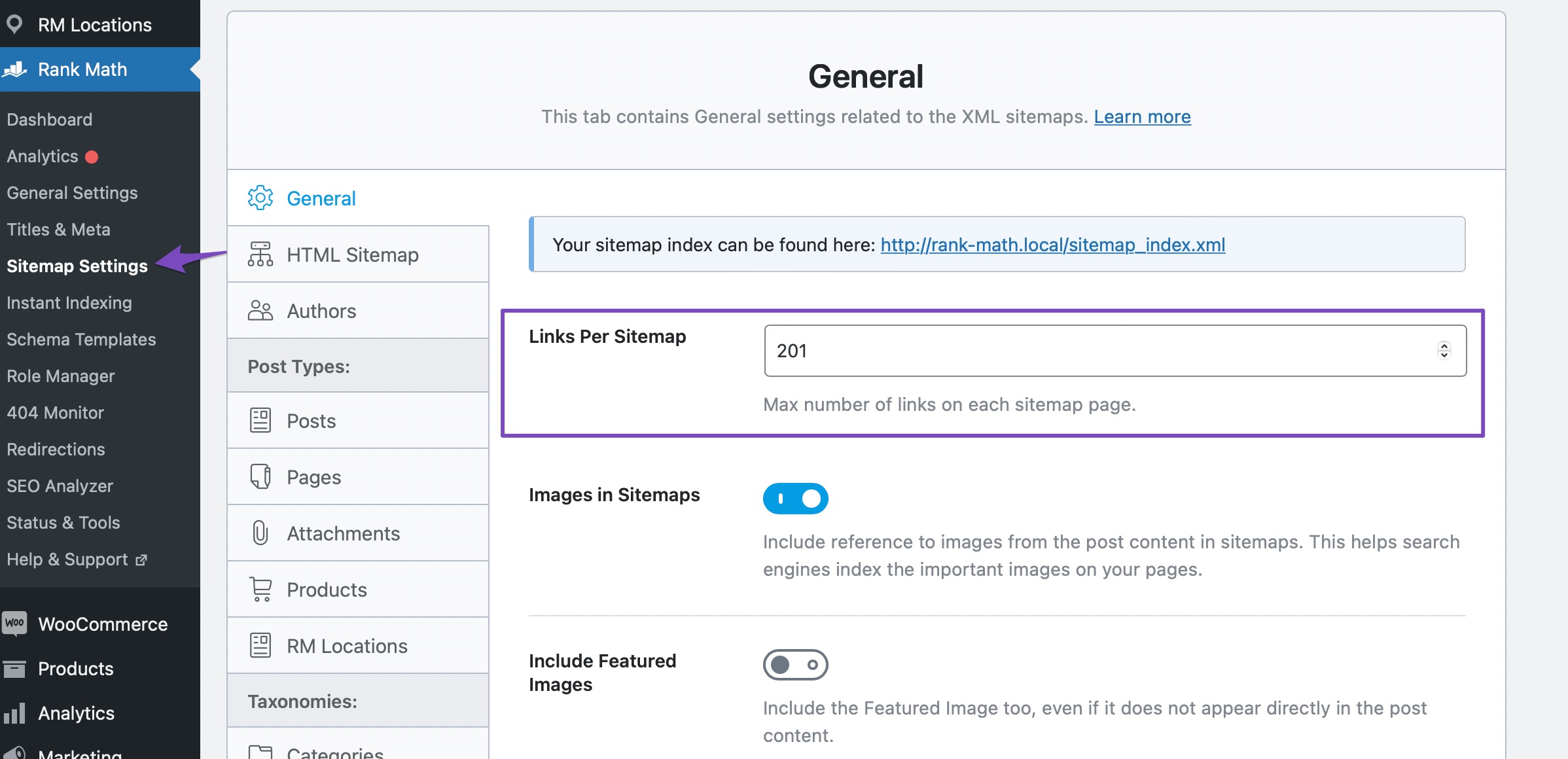
- Also, navigate to Settings → Permalinks and click Save Changes to ensure current settings are applied.

- If you have caching enabled, make sure to flush the cache. You can do this by navigating to Rank Math SEO → Sitemap Settings, increasing the value of Links Per Sitemap by one, and then saving your settings.
-
Exclude Sitemap from Caching:
- Ensure that your sitemap is not being cached by any caching plugins. You can refer to this knowledgebase article on ensuring that your sitemaps are excluded from caching.
-
Check for Security Restrictions:
- Sometimes, security plugins or web host settings may restrict access to your sitemap. Make sure that your sitemap is accessible and not blocked by any security measures.
If you have followed these steps and are still experiencing issues, please reply to this ticket, and a human agent from the Rank Math Support team will assist you further. Thank you for raising this concern!
Sources:
Troubleshooting the “Couldn’t Fetch” Error in Google Search Console » Rank MathHello,
By default, sitemaps are set to noindex as the posts inside them are meant to be crawled and shown on the search results pages, and not the actual sitemaps.
Sitemaps should only be submitted to your Google Search Console as we have mentioned in our guide here:
https://rankmath.com/kb/submit-sitemap-to-google/Regarding the error, you should follow this guide for troubleshooting:
https://rankmath.com/kb/couldnt-fetch-error-google-search-console/Looking forward to helping you.
Hello,
I have set my sitempas to index, I did everything right but still it couldn’t be submitted
Hello,
The information in the rich result test showed that the sitemap can be crawled and fetched by Google:

We cannot see any error when we checked your sitemap as shown in the image below:

In this case, please try to clear your website cache including any server-level cache, remove all the submitted sitemap, and resubmit
/?sitemap=1and see if that works for you.Let us know how it goes. Looking forward to helping you.
Thank you.
I cleared the cache but still does not work, can you tell me what else I should use?
Hello,
You can click on the sitemap on Google Search Console and should able to see more details about the error. You can share a screenshot of the error with us by using a tool like https://imgur.com/upload so that we can check this further for you.
Also, please make sure you’re submitting the correct version of your sitemap on Google Search Console. For more details, please check this URL: https://rankmath.com/kb/couldnt-fetch-error-google-search-console/#add-sitemap-to-Google-Search-Console
Let us know how it goes. Looking forward to helping you.
Thank you.
They say that the reason is “no index” detected in Meta Robot tag
Hello,
As we mentioned above the
noindexon the sitemap is normal and it’s how all sitemaps on the web work.If you tried to submit the sitemap to Google Search Console following the steps on the tutorial we shared and you got an error, please let us know the exact error message you got upon submitting it.
It’s important to note that you should submit the sitemap only on the sitemap section of GSC as mentioned in the tutorial.
Looking forward to hearing back from you.
Yes I did the same steps you showed but still the same error
Hello,
Kindly share screenshots of the error shown on the Google Search Console.
You can use this tool to share screenshots with us: https://imgur.com/upload
We look forward to hearing back from you.
Thanks.
They say couldn’t fetch and they say Sitemap could not be read
Hello,
According to John Mueller, if the sitemaps are valid and still aren’t functioning or couldn’t be read, then changing the name of the sitemap file can do the magic.
In Google Search Console, head over to Indexing → Sitemaps. In the Add a new sitemap setting, paste the below sitemap URL and click SUBMIT.
https://yourdomain.com/?sitemap=1
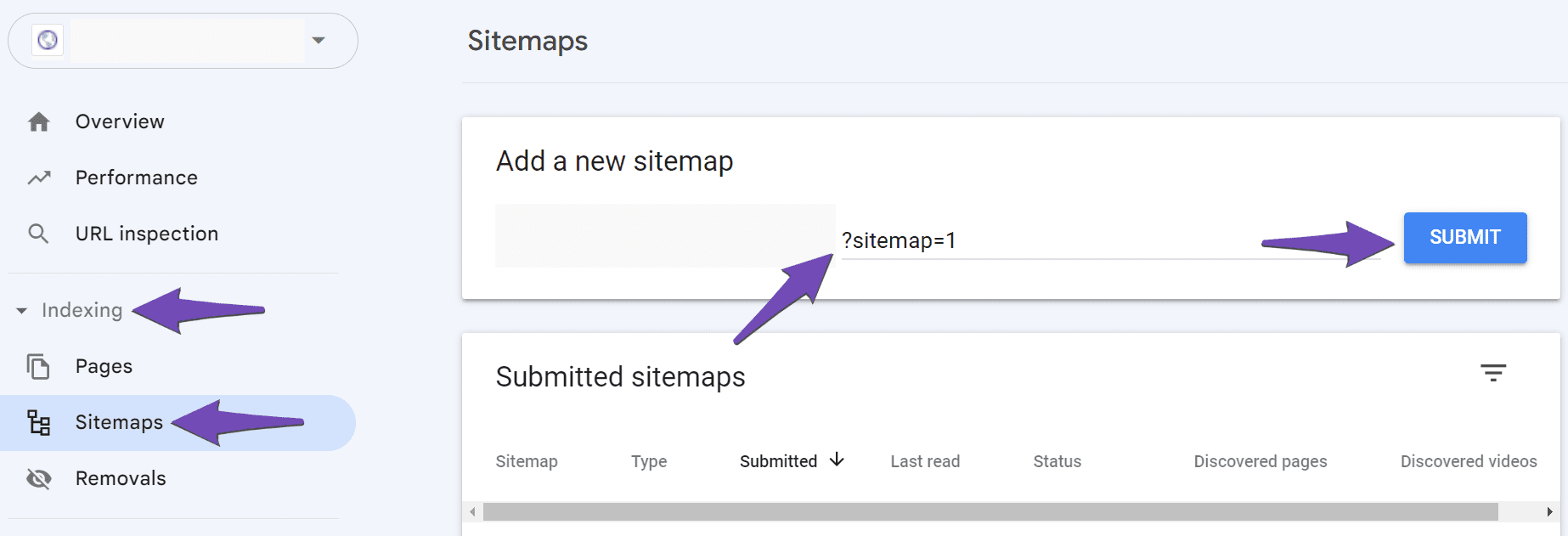
Hope that helps, and please do not hesitate to let us know if you need our assistance with anything else.
I already solved the issue,
It appeared that the sitemap couldn’t be read because I copied and paste it as it is put on rank math,
In order for it to be read, you have to submit as a “sitemap.xml” not as a “index_sitemap.xml”
Please if anyone face this problem let them know
Hello,
Thank you for the update and for sharing your solution! We’ll be sure to let others know if they face a similar issue. We’re glad to hear it’s resolved now. If you need any further assistance, feel free to reach out.
-



You must be logged in to reply to this ticket.