Hello,
I’m sorry to hear that you are facing issues with connecting your website to Rank Math and the Content AI feature.
To resolve this issue, please follow these steps:
- Make sure you have an active Content AI plan. If you recently purchased a plan, ensure that the purchase is reflected in your account.
- Log into your Rank Math account from your WordPress dashboard by clicking on Connect Now as shown in the screenshot below:
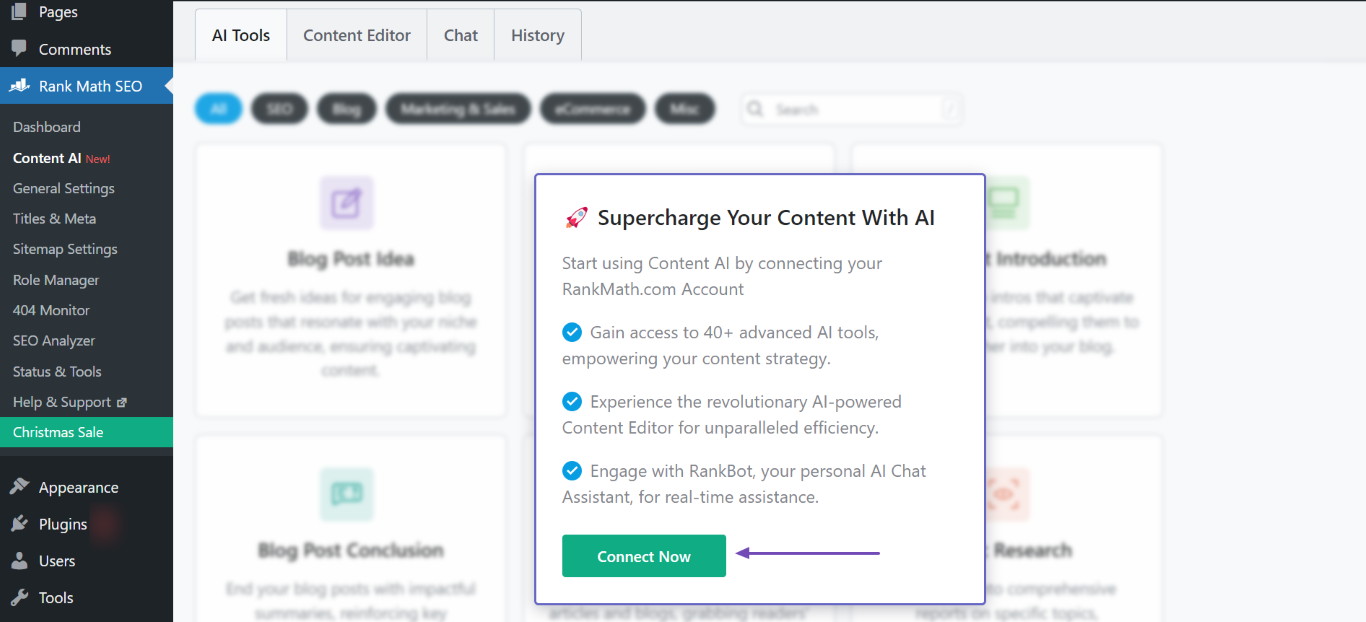
- Once connected, ensure that you have enabled the Content AI module from WordPress Dashboard → Rank Math SEO → Dashboard → Modules.
- Head over to WordPress Dashboard → Rank Math SEO → General Settings → Content AI and click the Refresh icon to update the credits.
If after following these steps the issue persists, please reply to this ticket, and a human agent from the Rank Math Support team will assist you further.
Thank you for your understanding and patience.
Sources:
Resolving Content AI Related Issues » Rank Math
How to Connect/Disconnect Your Website From Content AI
I do all of this but it’s still doesn’t work. I really need it please fix that.
Hello,
Thank you for reaching out to us.
We regret to inform you that due to legal restrictions and compliances, we are no longer accepting users from sanctioned countries.
We understand that this may be inconvenient for you and we apologize for any frustration or disappointment this may have caused.
We value your interest in our platform and we hope that you will check back with us in the future to see if the situation has changed. If you have any further questions or concerns, please don’t hesitate to reach out to us.
We can offer to refund you the full amount of the purchase you’ve made since you won’t be able to use it on your website which has an Iranian IP address, thus being blocked.
Please confirm if you want to receive this refund so we can do the needful.
Thank you.
Thanks.
Yes, please refund my amount.
Hello,
As requested, we have initiated a refund on your requested transaction. You should see a credit for the refund appear on your credit card statement anytime between now and the next 5 to 7 business days.
If you used a debit card for the payment, the refund might take up to 30 days to appear on your statement. Please note that refunds for international transactions can take up to 10 days to appear for credit cards or up to 60 days for debit cards.
For PayPal, it’s always almost instant.
Thank you.
Hello,
Since we did not hear back from you for 15 days, we are assuming that you found the solution. We are closing this support ticket.
If you still need assistance or any other help, please feel free to open a new support ticket, and we will be more than happy to assist.
Thank you.



