
-
Hello there,
I’m facing an issue when Rank Math is active on my website.
Users can register through Ultimate Member plugin. Without Rank Math the form is bland and ready to be filled, with Rank Math the form is already filled with my information (admin) like first name, last name and email.
This is a big problem, not only for the user experience but about privacy.
Can you help me fix it please?

-
Hello,
We apologize for the issue you are facing with the Ultimate Member plugin while using Rank Math. It seems like there might be a conflict between the two plugins that is causing the registration form to auto-fill with your admin information.
To confirm if this is indeed a plugin conflict, we recommend performing a conflict check using the Health Check plugin. Here’s how you can do it:
-
Install the Health Check Plugin:
- Log into your WordPress Administrator account and navigate to the dashboard.
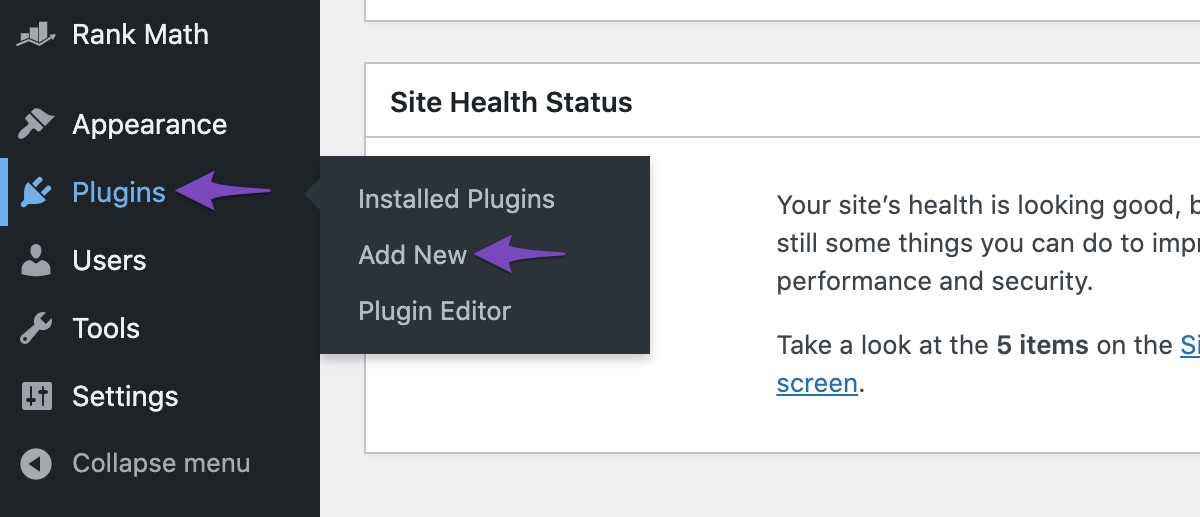
- Go to Plugins > Add New.
- Search for ‘Health Check’ and click Install Now.
- Activate the Health Check plugin.
-
Use Troubleshooting Mode:
- Once activated, go to Tools > Site Health in your WordPress menu.
- Enable Troubleshooting Mode from the top bar.
- This will allow you to disable all plugins except for Rank Math and Ultimate Member without affecting your visitors.
-
Test the Registration Form:
- With only Rank Math and Ultimate Member active, check if the registration form still auto-fills with your admin information.
- If it does not, then one of the other plugins is likely causing the conflict. You can enable them one by one to identify which one is causing the issue.
If you find that the issue persists even when only Rank Math and Ultimate Member are active, please let us know directly at our support forum so that we can inform you about further steps.
Thank you for raising this concern, and we’re here to help you resolve it!
I can’t do that kind of test because registration form doesn’t work if I’m logged in. Obviously if I’m logged out I’m not in troubleshooting mode.
Hello,
In this case, we might need to take a closer look at the settings. Please edit the first post on this ticket and include your WordPress & FTP logins in the designated Sensitive Data section.
Please do take a complete backup of your website before sharing the information with us.
It is completely secure and only our support staff has access to that section. If you want, you can use the below plugin to generate a temporary login URL to your website and share that with us instead:
https://wordpress.org/plugins/temporary-login-without-password/
You can use the above plugin in conjunction with the WP Security Audit Log to monitor what changes our staff might make on your website (if any):
https://wordpress.org/plugins/wp-security-audit-log/
We really look forward to helping you.
Hello,
I have updated the sensitive data as requested. Can you please check further?
Thank you.
Please be careful for any edit to the website since it’s live and users are using it.
Ask for any need.
ThanksHello,
If you are concerned about debugging this on your live site, can you create a staging site where you can replicate this issue and fully debug it?
Please create one, and share the login access here, this will allow us to investigate the issue and resolve it without worrying about touching the live website.
You can follow this article to create the staging website: https://rankmath.com/blog/how-to-create-staging-site/
We look forward to hearing back from you.
Thank you.
Hello again,
my website is a multisite. My hosting doesn’t support multisite in staging.
Do you know if the linked plugins do this?Thanks
Hi anyone, can I have an update on this please?
Hello,
It appears the temporary login URL has expired. Please reactivate it.
Please check and confirm that you did not add those details as placeholders while creating that form.
If that is not the case you can try to disable the browser autofill feature using this plugin https://wordpress.com/plugins/disable-autocomplete
We look forward to helping you.
Thanks.
Hi Ike,
I’ve extended the link duration.
Obviously I didn’t enter those details as placeholder.
I’d prefer first you to take a look over this before installing other plugins.
As you well know, plugins slow down website.Thanks
Hello,
We can see that the name and surname fields already have the name shown as the placeholder.
We would like to debug this by disabling/enabling the plugins on your website (following this guide) via troubleshooting mode. This troubleshooting mode will only affect the admin, not the users but we don’t have access to your plugin pages.
For us to resolve this further, we may need to access your plugin page in your WP dashboard.
You can also conduct a full backup of your website so that if something breaks while troubleshooting, you can always revert to a working state of the website.
Looking forward to hearing back from you.
Hi Jeremy, I know about the placeholder and this is ok, but the problem was that the fields were already filled with admin information (name and email).
I’ve installed WP Disable Autofill to fix it. But I think it would be better if you check this compatibility issue between RankMath and Ultimate Member.Hello,
Can you please make sure that the credentials allow us to make modifications to the plugins so we can check this compatibility by disabling the plugin you added to solve the issue?
Looking forward to hearing back from you.
Hello,
Since we did not hear back from you for 15 days, we are assuming that you found the solution. We are closing this support ticket.
If you still need assistance or any other help, please feel free to open a new support ticket, and we will be more than happy to assist.
Thank you.
-



The ticket ‘Conflict with Ultimate Member’ is closed to new replies.