changing permalink structure for entire website

#205108
  • Hello-

    Right now my permalinks are set-up with both categories. (Domain/%postname%/%category%/) As my blog continues to grow, I want to change the permalinks to just the blog post title. Is there a way to complete the redirects in one large batch instead of redirecting every single link. I have every single link documented, but I want to save time by doing one large batch for my permalink structure.

    I am using Redirection.

    Thank you so much,

    Megan

Viewing 1 replies (of 1 total)
  • Ankit
    Rank Math business

    Hello,

    Thank you for contacting the support and sorry for any inconvenience that might have been caused due to that.

    If you’re changing your blog post’s slug, then WordPress will automatically redirect the URL of your old post to the new one without any extra effort from your side. If for some reason, WordPress doesn’t automatically redirect your old URLs to the new ones You can do that with the help of Rank Math redirection module,

    Activate the Redirections module by navigating to WordPress Dashboard > Rank Math.

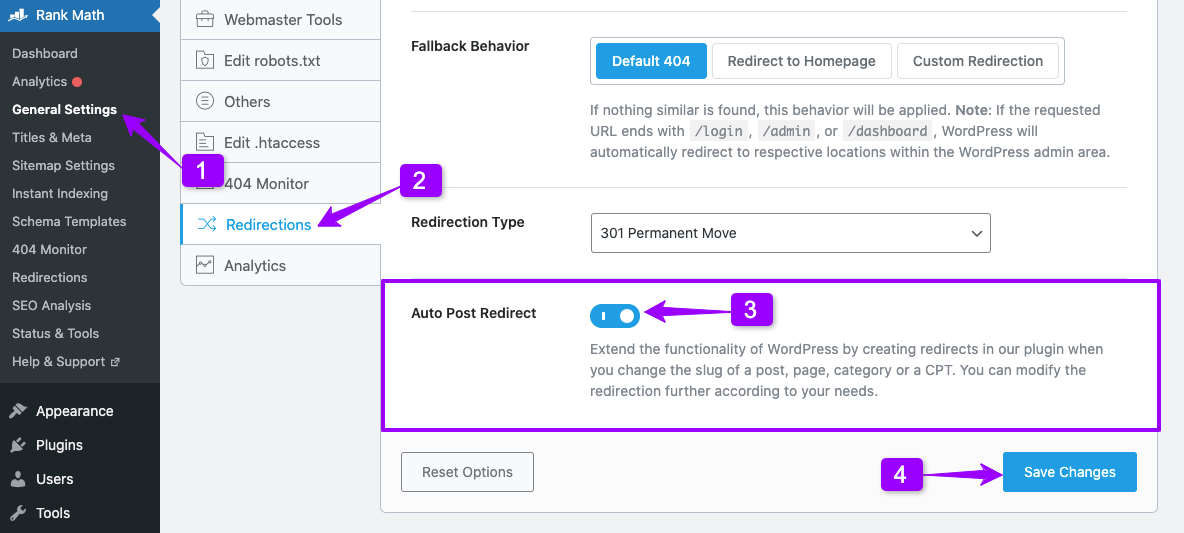
    Once you’ve activated the Redirection module, head over to the WordPress Dashboard > Rank Math > General Settings > Redirections > Auto Post Redirect and enable the option.

    auto-post-redirect

    Hope that helps and please do not hesitate to let us know if you need our assistance with anything else.

    Hello,

    Since we did not hear back from you for 15 days, we are assuming that you found the solution. We are closing this support ticket.

    If you still need assistance or any other help, please feel free to open a new support ticket, and we will be more than happy to assist.

    Thank you.

Viewing 1 replies (of 1 total)

The ticket ‘changing permalink structure for entire website’ is closed to new replies.