Hello,
We apologize for the issue you are facing with changing the middle part of your URL. To change the slug (the part of the URL that comes after your domain name), you can follow these steps:
Changing the URL Slug for an Individual Post/Page
- Edit the Post/Page: Go to the post or page you want to edit in your WordPress dashboard.
- Classic Editor: If you are using the Classic Editor, you will find the permalink just below your post. Click on Edit and change the end of the URL as needed.

- Gutenberg Editor: If you are using the Block Editor (Gutenberg), you will find the URL slug in the Article → Permalink section on the right side of the editor. You can type your desired slug there.
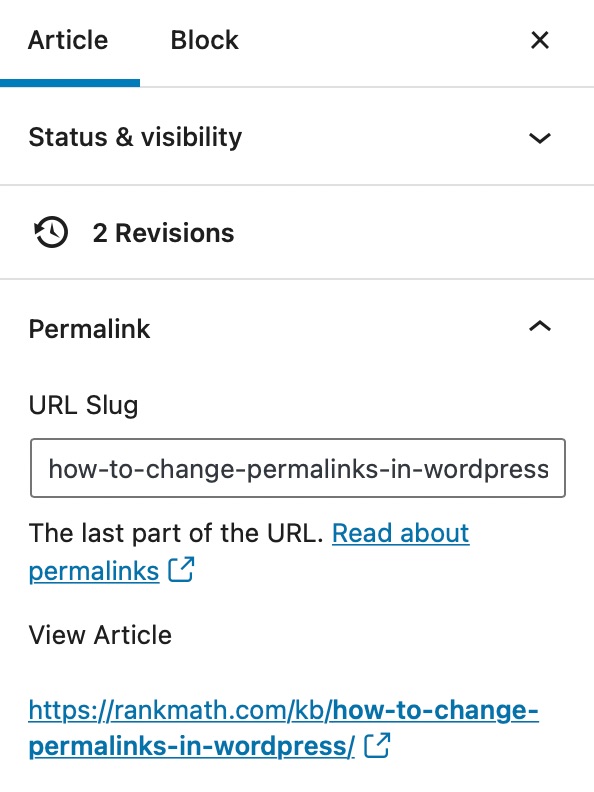
- Save Changes: Once you have made your changes, click the Publish or Update button to save them.
This will allow you to change the middle part of your URL as needed. If you have any further questions or need additional assistance, please feel free to reply to this ticket, and a human agent from the Rank Math Support team will assist you further.
Thank you for raising this concern!
Sources:
WordPress Permalink Structure & Changing Individual URLs » Rank Math
Hi, I can attach a photo, but there is just no where for me to edit that part anywhere , i cant see!
Hello,
Thank you for contacting Rank Math and bringing your concern to our attention.
For the URL you shared, you need to change the slug of the following page https://earluxe.co.uk/3-comfortable-earwax-removal-north-east-our-services/.
You can refer to the steps shared by RankBot or this article: https://rankmath.com/kb/wordpress-permalinks/
You can share screenshots using this tool: https://imgur.com/upload
Let us know how it goes. Looking forward to helping you.
Thank you.
Hello,
Since we did not hear back from you for 15 days, we are assuming that you found the solution. We are closing this support ticket.
If you still need assistance or any other help, please feel free to open a new support ticket, and we will be more than happy to assist.
Thank you.



