Hello,
We apologize for the issue you are facing with accessing your AI tools and the update error with your Pro version plugin.
To resolve the issue with the "Super Charge your content with AI" screen, please try refreshing your credits. You can do this by navigating to your WordPress Dashboard → Rank Math → General Settings → Content AI and refreshing the credits. Here’s a screenshot for reference:
If you are still unable to access the AI tools after refreshing the credits, please ensure that you are using the latest version of Rank Math. You can update it by going to your WordPress Dashboard → Plugins and clicking on Update Now next to Rank Math if an update is available. Here’s how it looks:
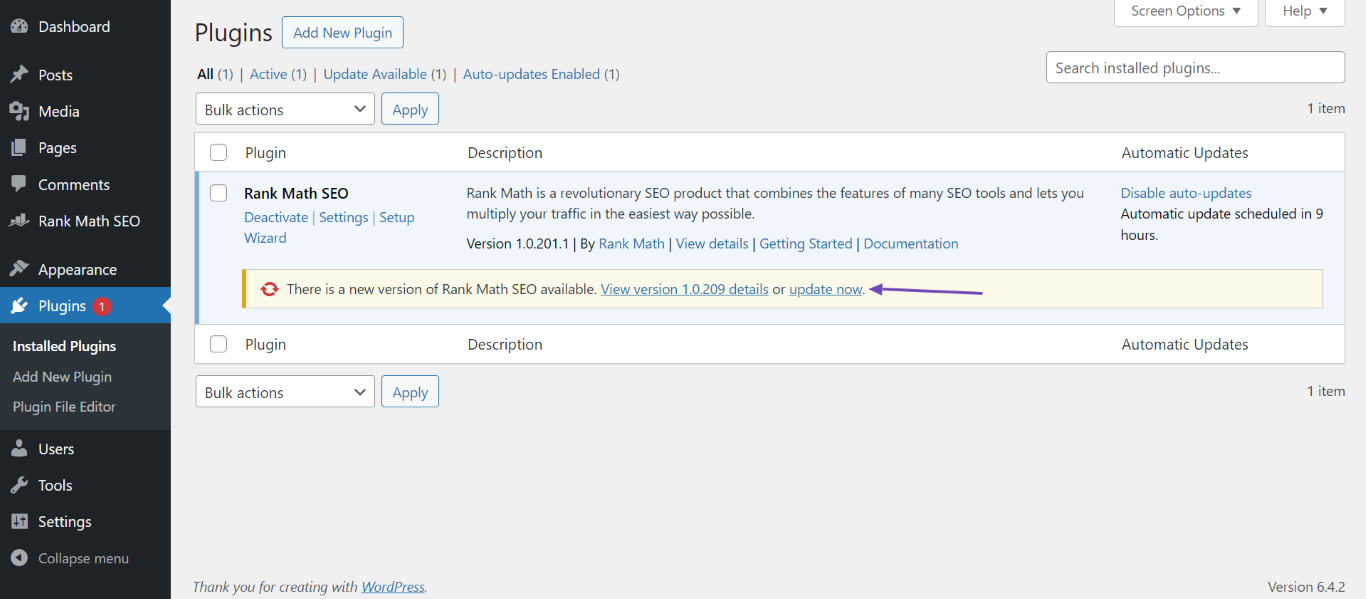
If the problem persists, please reply to this ticket with your screenshot, and a human agent from the Rank Math Support team will assist you further.
Thank you for raising this concern, and we hope to resolve it quickly for you!
Hello,
Thank you for your query and we are so sorry about the trouble this must have caused.
Your Rank Math PRO subscription has expired already. You will have to make a new purchase:
– Rank Math PRO : https://rankmath.com/pricing/
But you don’t need a PRO subscription to use your Content AI Plan.
Now, we have manually disconnected the website from our end. Now, please try to reconnect your website with your Rank Math account by navigating to WordPress Dashboard → Rank Math SEO → Dashboard → Help and then click on Connect Now.

Once you click on Connect Now, please ensure that you’ve selected the correct account and then click on OK, Activate Now, as shown below. In case you’ve multiple Rank Math licenses associated with your Rank Math account, then you can click the License drop-down to choose your preferred license to activate on this website.

Also, please make sure that you are running the latest version of Rank Math plugin.
Let us know if this fixes the issue.
Please do not hesitate to let us know if this doesn’t help or you have any follow-up queries.
Hello,
Since we did not hear back from you for 15 days, we are assuming that you found the solution. We are closing this support ticket.
If you still need assistance or any other help, please feel free to open a new support ticket, and we will be more than happy to assist.
Thank you.



