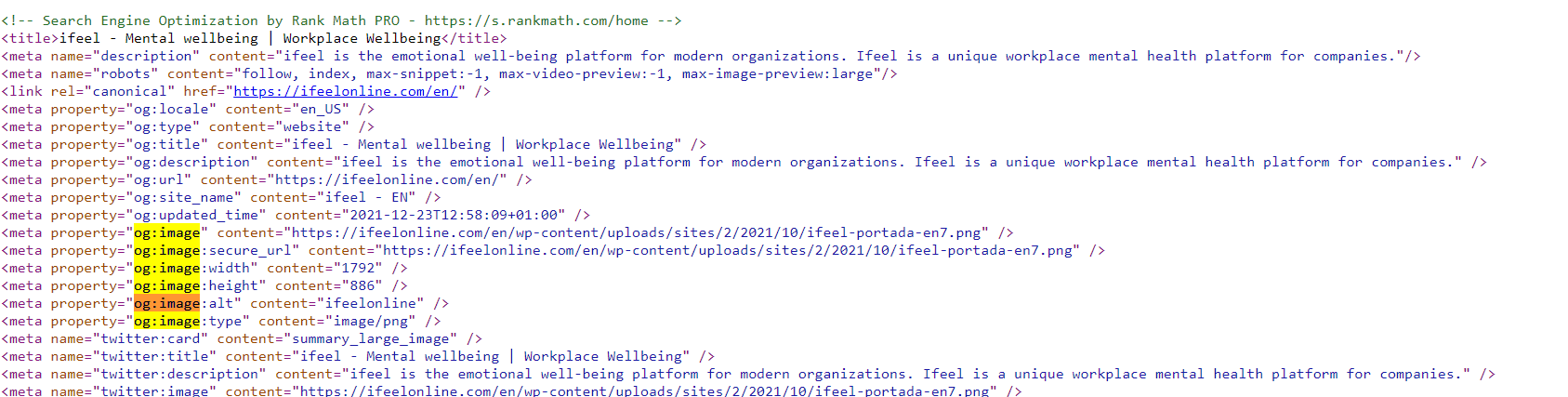
Hello,
Thank you for contacting Rank Math, and sorry for any inconvenience that might have been caused due to that.
I looked at the source code of the URLs shared by you and tested the image URLs on httpstatus.io tool, and they are throwing a 404 error. Hence, redirecting to the Homepage and causing issues.
Could you please upload a valid image URL, clear your cache and see if the issue is resolved ?
Please ensure that the dimensions of the image are the recommended dimensions of 1200 × 630 pixels.
Kindly note, that we only report the 404s. We do not have information on how or why they are generated. You can get further insight into them by enabling the advanced monitor at WordPress Dashboard > Rank Math > General Settings > 404 Monitor:
https://rankmath.com/kb/monitor-404-errors/#advanced-404-monitor
That will give you more information like referrer and user-agent. You can use that information to track down the source or find out if it is just bots generating those errors.
Please let us know how that goes. Looking forward to helping you further.
Thank you
Hello,
I have updated the sensitive data as requested. Can you please check further?
Thank you.
Hello! Thank you very much for the answer! The problem is that the same thing happens with all the header images of the blog posts.
If I can see the image in my browser, without any problem, and inside the website I can also see it, why does httpstatus.io show me a 404 status? can it be a server issue?
I have already tried clearing the cache and resizing the images, but that is not the issue.
Thank you!
Hello,
I tested the image URL with multiple external testing tools and all of them are returning 404 errors.
However, the image dimensions highly vary from the recommended dimensions. The dimension of the og:image in the Spanish website is 1532px X 731px whereas on the English website, the same image (with a different URL) has the dimension 1792px X 886px.
I also checked the /multitasking-at-work/ URL and there the dimensions are 708px X 420px.
Please set the image of the recommended dimensions (1200px X 630px) and let us know so that we can investigate further.
Looking forward to helping you.
Thank you.
Hello,
I have tried to change the image of the post we have mentioned. I have put the measures that you have indicated me. I have tried the url in link inspector of Linkedin and the image that shows is not the correct one. Thank you very much!
Hello,
I tested the /multitasking-at-work/ URL with Facebook’s Debugger tool and it is returning an invalid content type error.
Upon investigating, I found that the image that you’ve set is a .jpg image and the content type is image/jpeg. You can have a look at the screenshot in the sensitive data section for a quick reference.
Social/OG images only support png, jpeg, and gif images. Here’s the official documentation from Facebook: https://developers.facebook.com/docs/sharing/webmasters/#images
Please set the image of one of the above-supported types and see if that fixes the issue.
If the issue persists, we might need to take a closer look at the settings. Please edit the first post on this ticket and include your WordPress & FTP logins in the designated Sensitive Data section.
Please do take a complete backup of your website before sharing the information with us.

It is completely secure and only our support staff has access to that section. If you want, you can use the below plugin to generate a temporary login URL to your website and share that with us instead:
https://wordpress.org/plugins/temporary-login-without-password/
You can use the above plugin in conjunction with the WP Security Audit Log to monitor what changes our staff might make on your website (if any):
https://wordpress.org/plugins/wp-security-audit-log/
We really look forward to helping you.
Hello,
Since we did not hear back from you for 15 days, we are assuming that you found the solution. We are closing this support ticket.
If you still need assistance or any other help, please feel free to open a new support ticket, and we will be more than happy to assist.
Thank you.