Can’t connect to google analytics

#962769
  • Resolved Jks Tutors
    Rank Math free

    the dot next to search console is red, i’ve tried reconnecting and i’ve allowed access it says

    Rank Math SEO already has some access
    See the 7 services that Rank Math SEO has some access to.
    Make sure you trust Rank Math SEO
    Review Rank Math SEO’s Privacy Policy and Terms of Service to understand how Rank Math SEO will process and protect your data.
    To make changes at any time, go to your Google Account.
    Learn how Google helps you share data safely.

    I press continue, and then it just goes to the same page in wordpress showing me the red dot next to search console. i don’t know what I have to do please help!

Viewing 2 replies - 1 through 2 (of 2 total)

  • Hello,

    We apologize for the issue you are facing with connecting to Google Analytics. It seems like there might be a glitch in the connection between Rank Math and your Google account. Here are some steps you can try to resolve this:

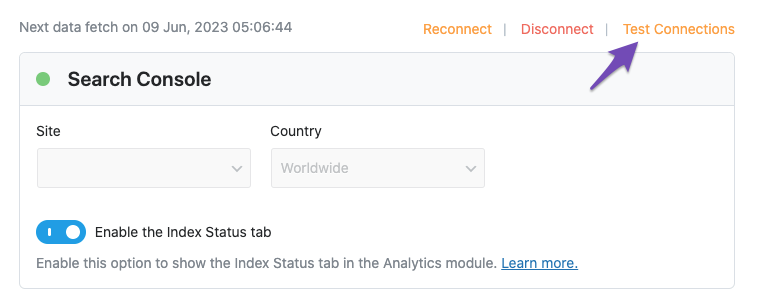
    1. Test Connections: Go to Rank Math SEO → General Settings → Analytics and click on the Test Connections option at the top right. This will help you validate the existing connections. A green signal indicates a valid connection, while a red signal indicates an issue.
      Test connections

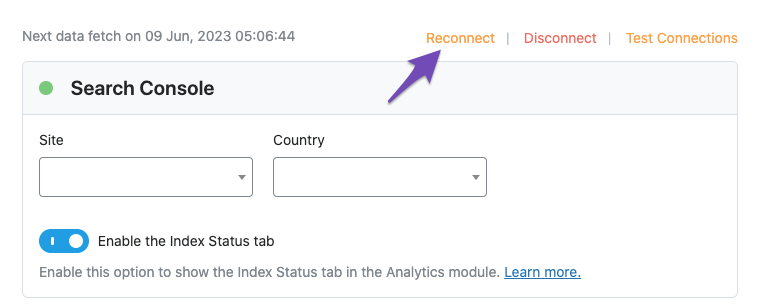
    2. Reconnect Your Google Account: If you see a red signal, try reconnecting your Google account again. You can do this by clicking on the reconnect option that appears after testing the connections.
      Reconnect Search Console connection

    3. Check Permissions: Ensure that you have granted all necessary permissions to Rank Math when prompted during the connection process. If any permissions were denied, it could cause issues.

    4. Clear Cache: Sometimes, clearing your browser cache or trying a different browser can help resolve connectivity issues.

    If the problem persists even after trying these steps, we recommend replying to this ticket with any error logs you may have, and a human agent from the Rank Math Support team will assist you further.

    Thank you for raising this concern, and we hope to resolve it for you soon!

    Sources:
    Resolving Rank Math Analytics Related Issues » Rank Math
    Resolving Rank Math Analytics Related Issues » Rank Math

    Hello,

    Thank you for contacting us and sorry for any inconvenience that might have been caused due to that.

    Please follow this guide to remove the Rank Math App from your Google account: https://rankmath.com/kb/analytics-issues/#expired-google-oauth-token

    After that, please reconnect your Google account from WP Dashboard > Rank Math > General Settings > Analytics with all the required permissions and see if that works for you.

    Also, please make sure that you are not connecting to Google Search Console via a domain property but rather a URL prefix and that you have verified the correct version of your website on the Google Search Console (HTTP or HTTPS, www or non-www).

    Let us know how it goes. Looking forward to helping you.

    Hello,

    Since we did not hear back from you for 15 days, we are assuming that you found the solution. We are closing this support ticket.

    If you still need assistance or any other help, please feel free to open a new support ticket, and we will be more than happy to assist.

    Thank you.

Viewing 2 replies - 1 through 2 (of 2 total)
The ticket ‘Can’t connect to google analytics’ is closed to new replies.