
-
Hey all,
I’m having trouble connecting Rankmath to Google. I’ve gone through the steps of deleting access from Google and reconnecting it but it’s still red under “search console” in analytics. I’ll also mention that I’m new to SEO and not a developer so perhaps I’m doing something wrong?
Please advise,
-Dan

-
Hello,
We apologize for the issue you are facing with connecting Rank Math to Google. It can be frustrating, especially when you’re new to SEO. Here are some steps you can follow to troubleshoot the connection issue:
-
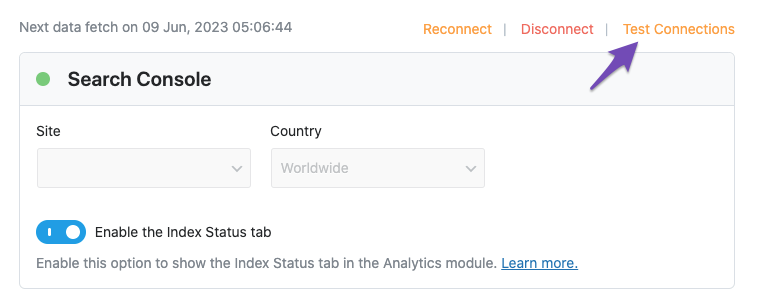
Test Connections: Go to Rank Math SEO → General Settings → Analytics and click on the Test Connections option at the top right. This will help you validate the existing connections. A green signal indicates a valid connection, while a red signal indicates an issue.
-
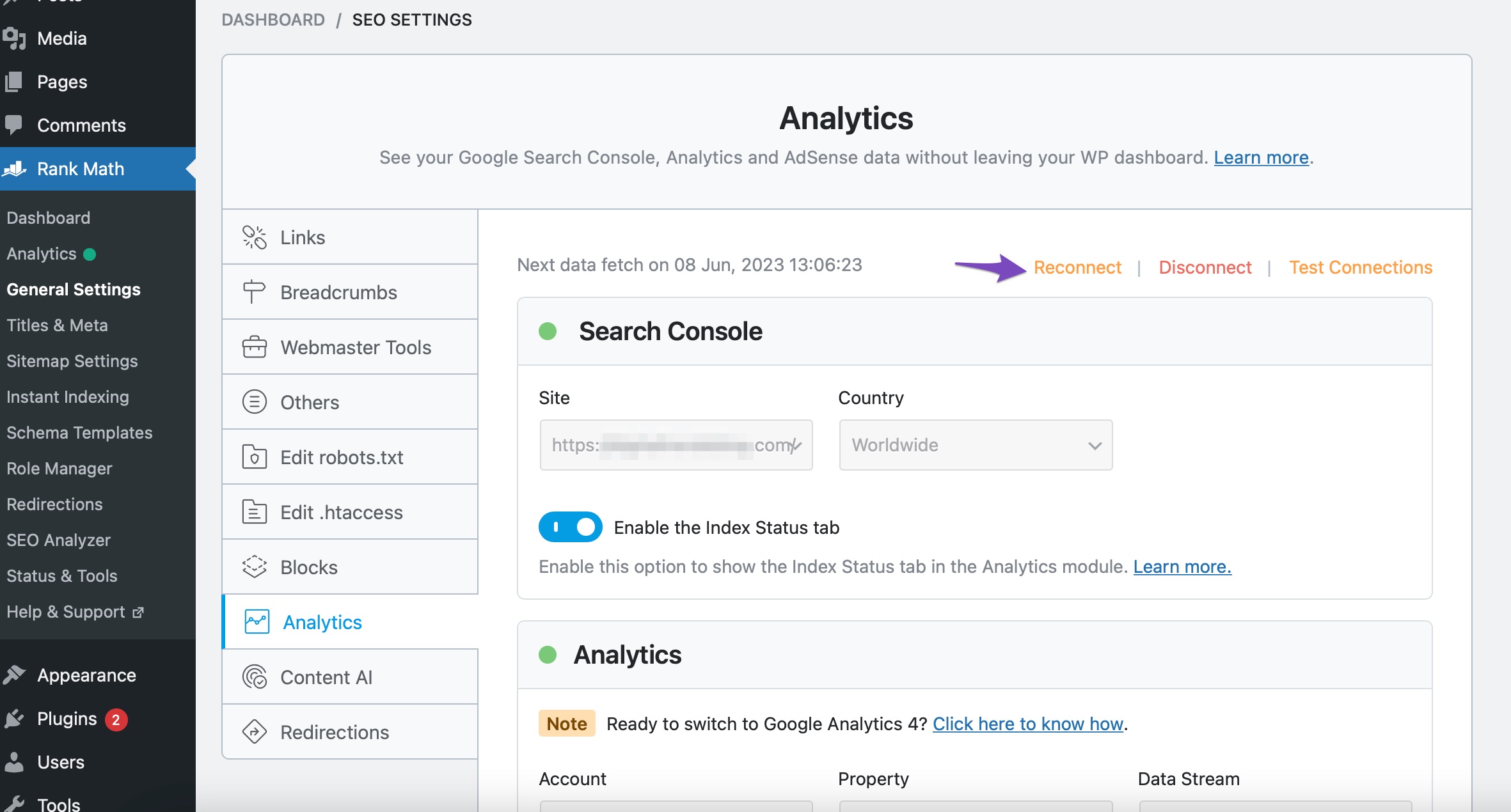
Reconnect Your Google Account: If you see a red signal, try reconnecting your Google account. You can do this by clicking the Reconnect button in the Analytics settings.
-
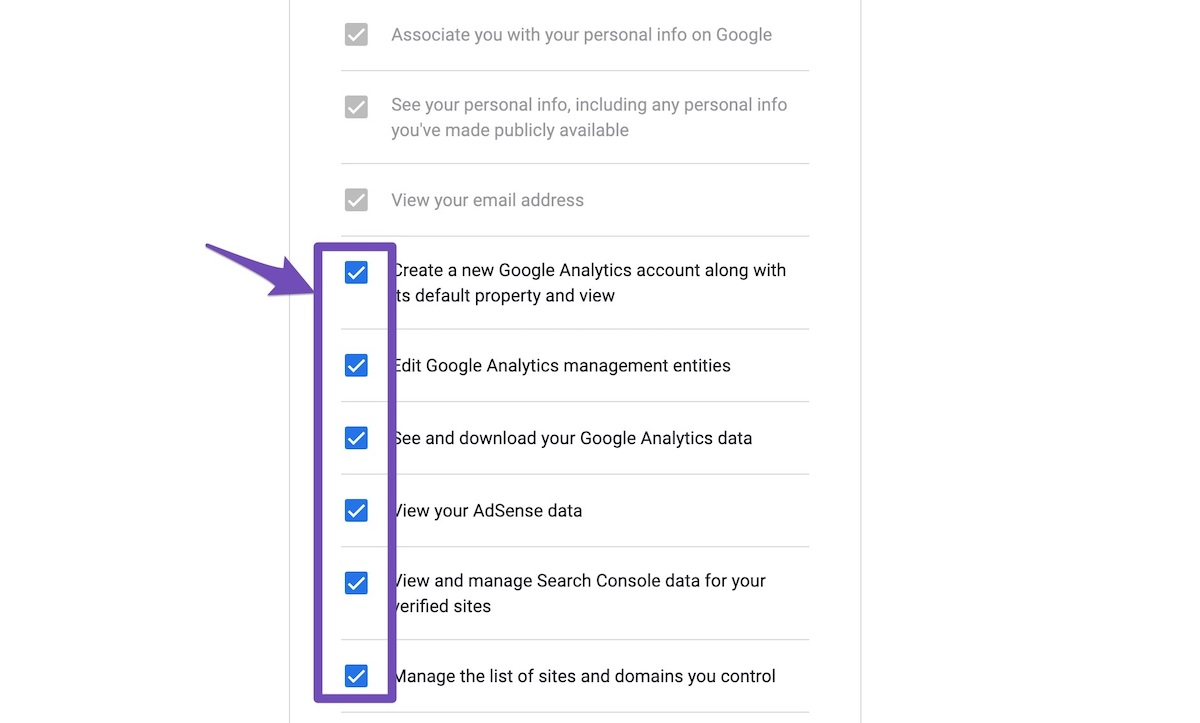
Check Permissions: Ensure that you allow all permissions when prompted during the reconnection process. This is crucial for Rank Math to access your Google Analytics data.
-
Expired Tokens: If the problem persists, it might be due to expired authorization tokens. You can remove the Rank Math app from your Google Account permissions and then reconnect it again. To do this, visit your Google Account permissions and remove Rank Math SEO.

-
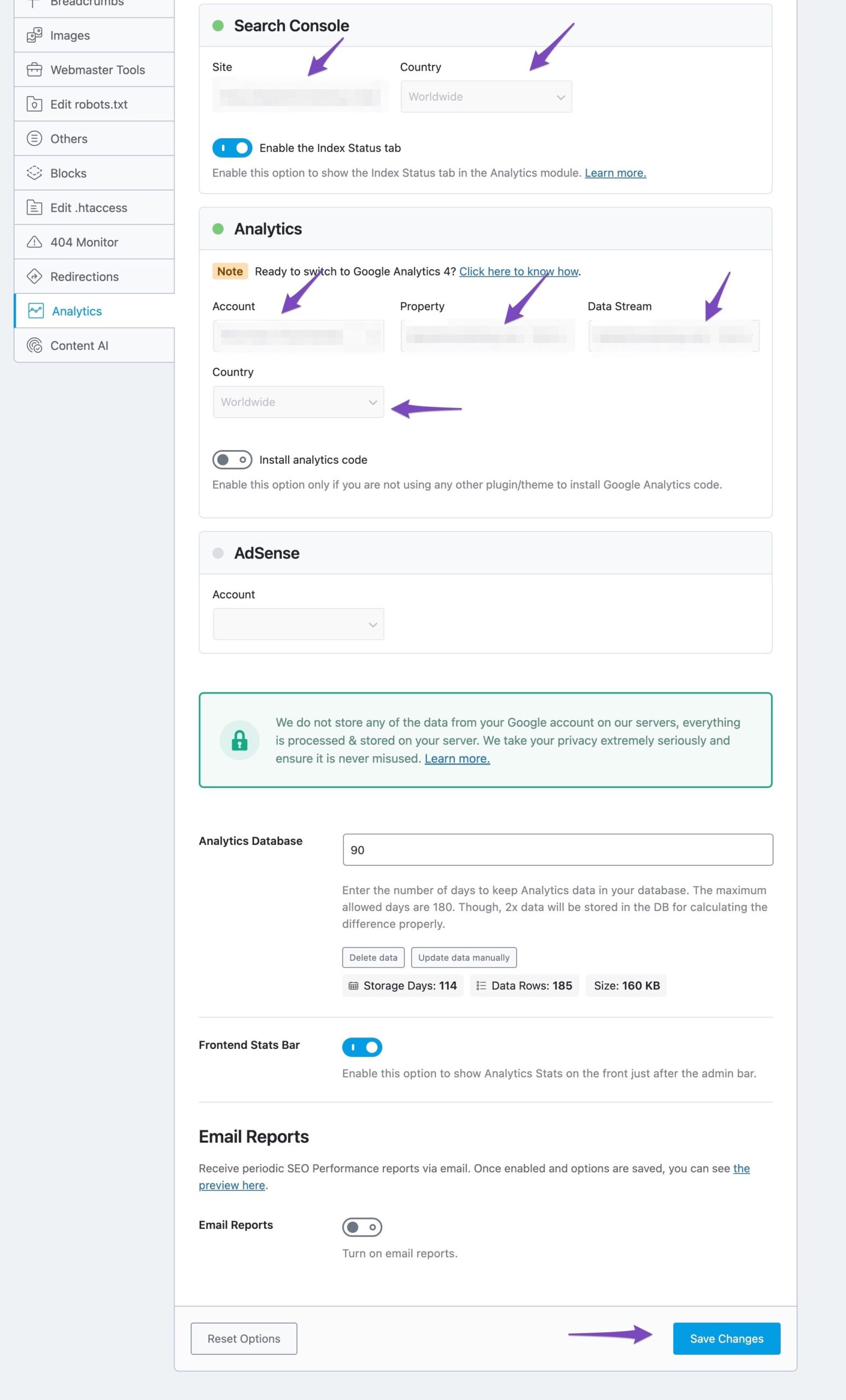
Configure Analytics Properties: After reconnecting, make sure to select all the values in the drop-down list to configure your Analytics properties and click on Save Changes.
If you continue to experience issues after following these steps, please reply to this ticket, and a human agent from the Rank Math Support team will assist you further. Thank you for raising this concern, and we hope to resolve it soon!
Sources:
Resolving Rank Math Analytics Related Issues » Rank Math
What to Do When Rank Math Analytics Shows Zero Search Traffic » Rank MathHello,
Thank you for contacting Rank Math support, and sorry for any inconvenience that might have been caused due to that.
To make sure that everything works correctly please go through this article to set up the Analytics module: https://rankmath.com/kb/install-google-analytics/
If however, you are having challenges with this, then follow the steps below to fix it.
1. Check to make sure that you have verified Google Search Console, if not, follow this guide: https://rankmath.com/kb/google-site-verification/
2. Please make sure that you are not connecting to Google Search Console via a domain property but rather a URL prefix and that you have verified the correct version of your website on the Google Search Console (HTTP or HTTPS, www or non-www).
3. Then remove Rank Math’s access from Google Please remove RankMath’s app from your Google apps permissions: https://myaccount.google.com/permissions
4. Reconnect the Google account again to regenerate the auth token from Google, by going to WordPress Dashboard > Rank Math > General Settings > Analytics and configure the Search Console and Analytics settings again
Kindly check all necessary checkboxes to allow Rank Math to access some of the Google Services.
We hope this resolves the issue for you.
If you still face any problems or have any questions, please let us know. We’re always here to help.
Hey there,
I’ve tried these steps several times with no luck. Can I grant you access to my account to try and solve this?
-Dan
Hello,
If you already have a Google Search Console and Analytics account, then we might need to take a closer look at the settings. Please edit the first post on this ticket and include your WordPress & FTP logins in the designated Sensitive Data section.
Please do take a complete backup of your website before sharing the information with us.
It is completely secure and only our support staff has access to that section. If you want, you can use the below plugin to generate a temporary login URL to your website and share that with us instead:
https://wordpress.org/plugins/temporary-login-without-password/
You can use the above plugin in conjunction with the WP Security Audit Log to monitor what changes our staff might make on your website (if any):
https://wordpress.org/plugins/wp-security-audit-log/
Also, you can add the following email addresses to your Google Search Console and Analytics so that we can check this as well:
m*******@r***********
r*************@r***********
You can follow the guides to add a user in the Google Analytics and Search Console:
https://rankmath.com/kb/add-user-to-google-analytics/
https://rankmath.com/kb/add-user-to-google-search-console/Looking forward to helping you.
Thank you.
Hey there,
Sorry for the delay in my response, I was out of town. I have a google search console account but not analytics. I’m brand new to SEO so this is all above my head. I can share my wordpress login but am unsure what you mean by “FTP” please clarify when you can.
Thanks,
-DanHello,
You can skip the FTP part. Please proceed with sharing your WordPress admin login and give access to your GSC account as well as instructed above.
Looking forward to hearing back from you.
Hello,
I have updated the sensitive data as requested. Can you please check further?
Thank you.
Hey there,
That’s all been added please let me know how it goes after you’ve looked into this.
Thanks,
-DanHello,
We tried to check your website but looks like the password you’ve shared is not correct. Please update the logins in the sensitive data section so that we can check this further for you.
Looking forward to helping you.
Thank you.
Hello,
I have updated the sensitive data as requested. Can you please check further?
Thank you.
My apologies, that has been updated. Please let me know if there’s any more issues.
Thanks,
-DanHello,
We’ve checked your site, and it seems that you have chosen
sc:domainin the drop-down section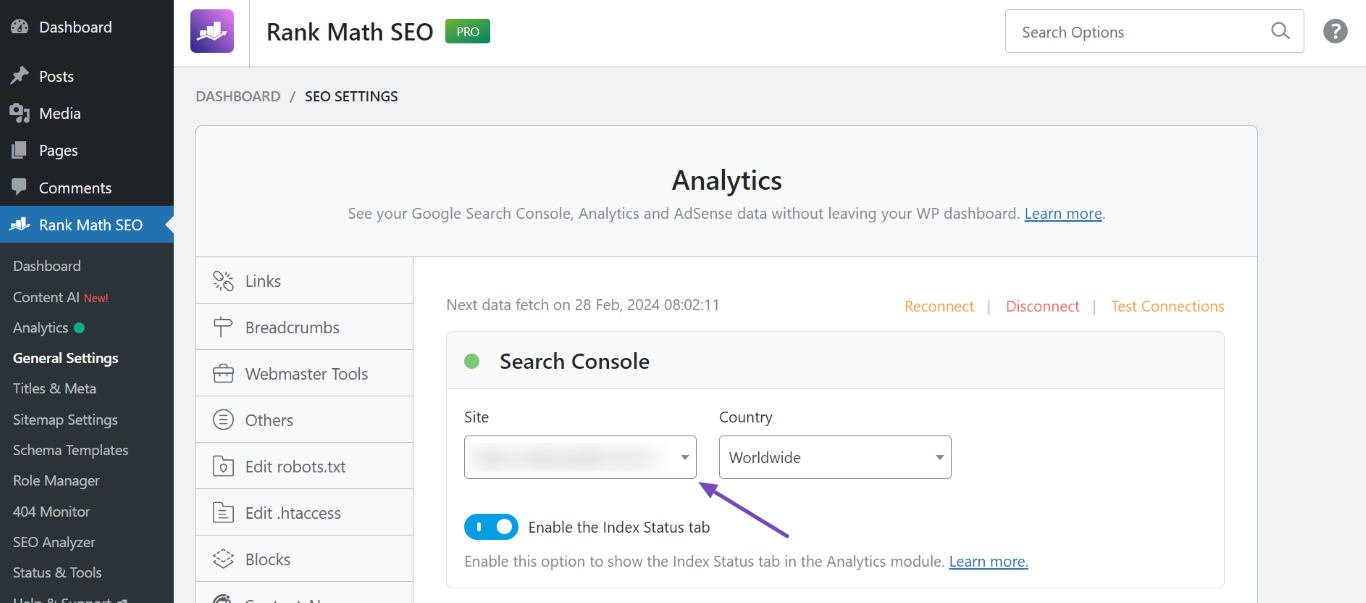
Please note that our plugin doesn’t fully support fetching data from domain properties. You’ll have to connect the URL-prefix property to fetch the data properly in Rank Math Analytics and Index Status. The URL-prefix property also helps keep your sitemap in sync with Google Search Console as we submit it automatically for you.
You can follow our guide here to create the URL Prefix property:
https://rankmath.com/kb/google-site-verification/#num-1-1-open-google-search-consolePlease verify using the URL prefix and ensure that you have verified the correct version of your website on the Google Search Console (HTTP or HTTPS, www or non-www)
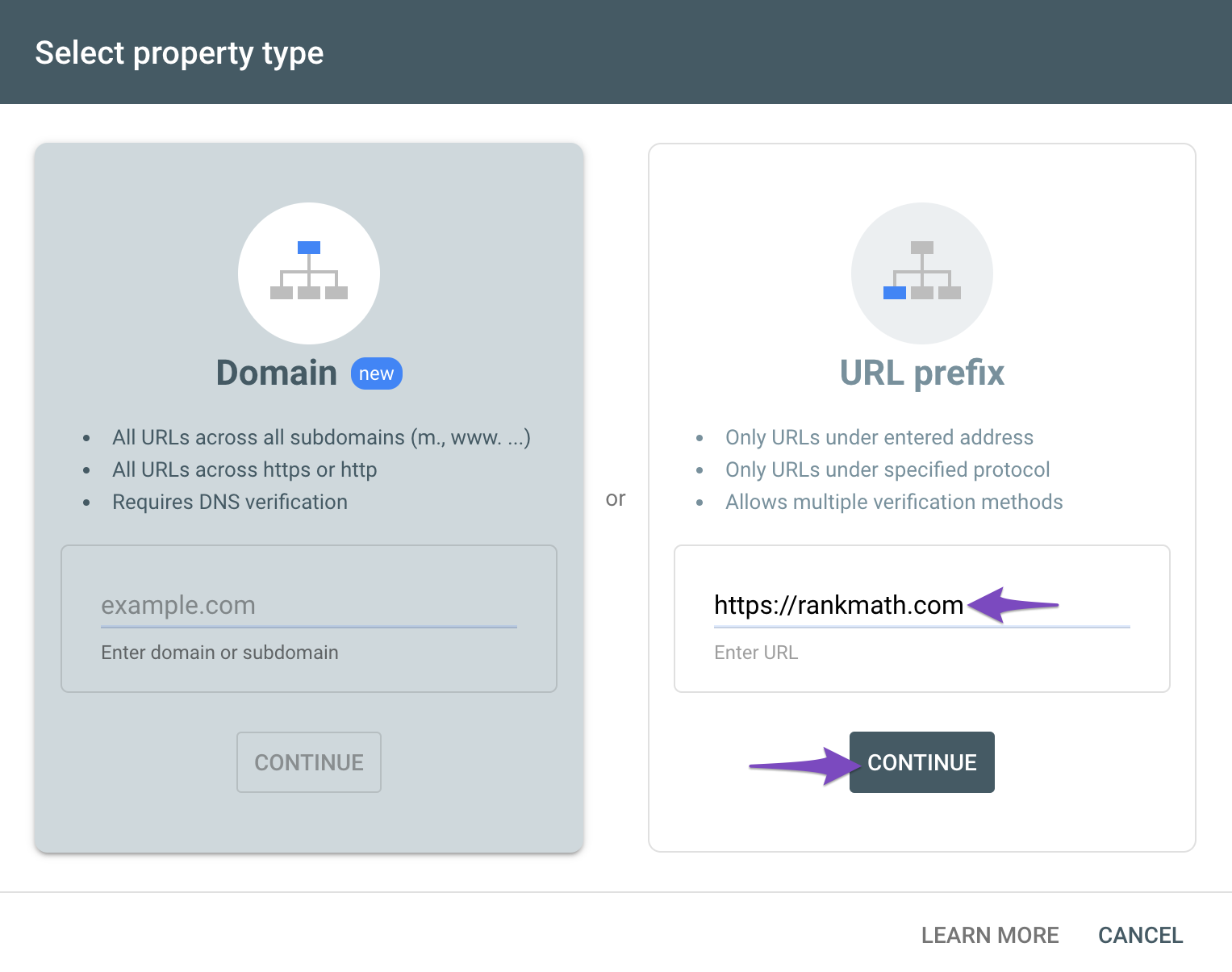
Once done, reconnect your website to your Google Search Console account.
Hope that helps.
Hey there,
Thank you so much! This finalized the connection and I can see my page as the 4th link in a google search now which is exciting. While I have you, I have a few other questions. The link in a google search reads “Bucket List Guitars: Home”. In the Local SEO settings I have the Website name set to “Bucket List Guitars”. Do I need to input a new sitemap for that to change or does it just take some time? Also in the google search theres a price bracket of $24-$364 which I’d like to remove. Again I’m new to SEO so I’m not sure if you all as the plugin creators are the one’s to assist with these questions or not.
Thanks,
-DanHello,
Google often changes website titles algorithmically, especially if it determines that your original title is not appropriate or sufficient. Your website title currently reads “Home – Bucket List Guitars,” which may be the reason Google is altering it to “Bucket List Guitars: Home.”
Please consider changing your title by removing “Home -” and then request a re-indexing using the URL Inspection Tool. After that, wait for Google to recrawl your website.
We hope this clarifies the issue. If you have any other questions or concerns, please let us know.
Hello,
Since we did not hear back from you for 15 days, we are assuming that you found the solution. We are closing this support ticket.
If you still need assistance or any other help, please feel free to open a new support ticket, and we will be more than happy to assist.
Thank you.
-



The ticket ‘Can’t connect Rankmath to Google’ is closed to new replies.