Hello, we apologize for the issue you are facing with the canonical tags in Rank Math. To enable canonical tags for all your posts at once and ensure they are automatically set for future posts, you can use the bulk editing options available in the Rank Math SEO plugin.
-
Bulk Editing: You can set a default canonical URL for all your posts by going to the Rank Math settings and navigating to the Bulk Editing section. Here, you can apply changes to multiple posts at once, including setting a canonical URL.
-
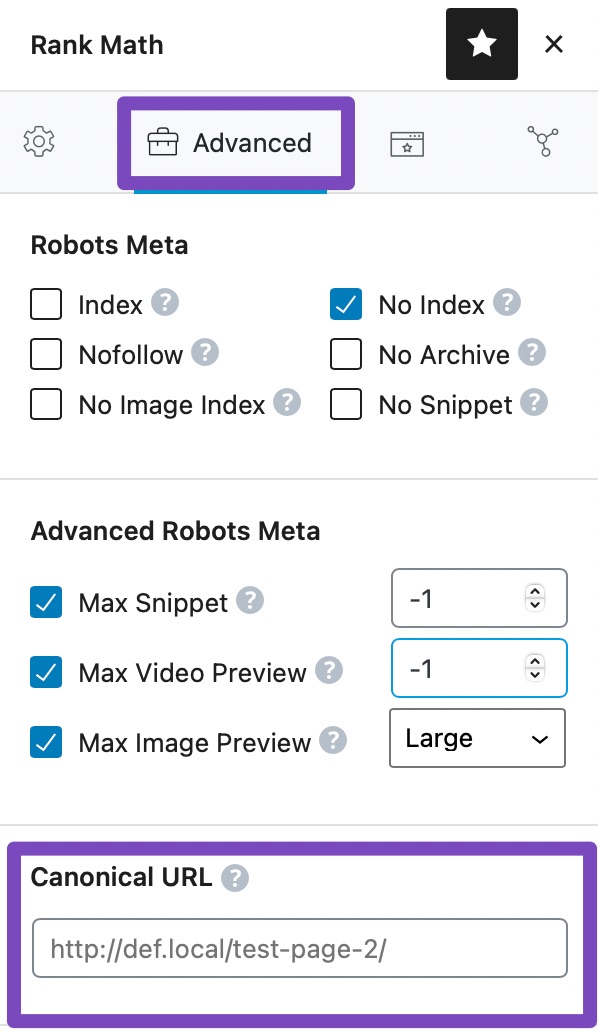
Default Canonical URL: By default, Rank Math automatically adds a canonical URL to all your posts. If you want to customize this, you can do so in the Advanced Tab of the Rank Math meta box when editing a post. However, if you want to set a specific canonical URL for all posts, you may need to do this individually unless you use the bulk editing feature.
-
Future Posts: For future posts, Rank Math will automatically set the current post URL as the canonical URL unless you specify otherwise in the post settings.
For more detailed instructions on bulk editing and managing canonical URLs, you can refer to our documentation here: Bulk Editing Options in Rank Math.
If you still have trouble finding these options or need further assistance, please reply to this ticket, and a human agent from the Rank Math Support team will assist you further.
Sources:
Bulk Editing Options in the Rank Math SEO Plugin
Hello,
Thank you for your query and we are so sorry about the trouble this must have caused.
The Canonical URL field is only configurable per post since Rank Math generates the canonical as self-referencing as the default settings which can’t be changed.
To set the Canonical URL, you’ll have to do it individually by post.
Please also note that when handling translated versions of a post/page, it is handled by hreflang tag rather than the canonical tag so if you’re using translation plugins like WPML or TranslatePress, they handle the translated versions for you and Google will recognize them accordingly.
Hope that helps. Thank you.
Hello,
Since we did not hear back from you for 15 days, we are assuming that you found the solution. We are closing this support ticket.
If you still need assistance or any other help, please feel free to open a new support ticket, and we will be more than happy to assist.
Thank you.



