Cannot import data from Google Analytics – Analytics panel in Rank Math is empty

#880829
  • Resolved Aya
    Rank Math free

    Cannot import data from Google Analytics – Analytics panel in Rank Math is empty, SEO Performance/Keywords are all zeros.

    Under General Settings – Analytics it says:
    Storage Days: 0 Data Rows: 0Size: 80 KB
    Manual updating of data does not help.

    I tried to do everything according to the recommendations from your site – and test connection with Google, and reconnect, and reindexing and rebuild databases – does not help 🙁

    On another site – everything is fine, but here is such nonsense, I do not understand what can be the matter.

    What else should I do, what logs should I send?

Viewing 6 replies - 16 through 21 (of 21 total)
  • Hello,

    We’ve checked your website and we can see the DISABLE_WP_CRON constant is still set to true.

    Please try to set the DISABLE_WP_CRON constant to false on your wp-config.php file or you can get in touch with your hosting provider to enable the Cron Jobs on your site.

    Let us know how that goes.

    Thanks.

    Aya
    Rank Math free

    Sorry to bother you, but looks like the problem appears again 🙁

    RankMath writing in Analytics window:
    Last updated 10/03/2024
    but no data for last week in graph/numbers.

    Next data fetch on Oct 10, 2024 15:10:04

    And in Settings Analytics it still says these numbers:
    Storage days: 3 Data rows: 1.2KS Size: 8 MB

    Your wrote what if I reconnect analytics data update task will be recreated. I tried this but no effect.

    Also I try to rebuild databases, analytics indexes – no effect.

    What else can I do?

    I update private data with current login.

    Aya
    Rank Math free

    Yes, Cron jobs runs by hosting provider (Cron jobs in admin panel)
    cd /home/site.com && /usr/local/bin/php /home/site.com/wp-cron.php

    here is screenshot:
    https://1drv.ms/i/s!AiXIdQbqwTmk5_lYdaGdKGn6xj_e3A?e=QA32GL

    Hello,

    We logged in to your website using the details provided in the sensitive data section.

    Upon checking your website, we observed that you’re connected to Google Search Console using sc-domain:

    Please note that Rank Math does not support domain property verification in Google Search Console (sc-domain:yourdomain.com)

    See attached screenshot in the sensitive data section

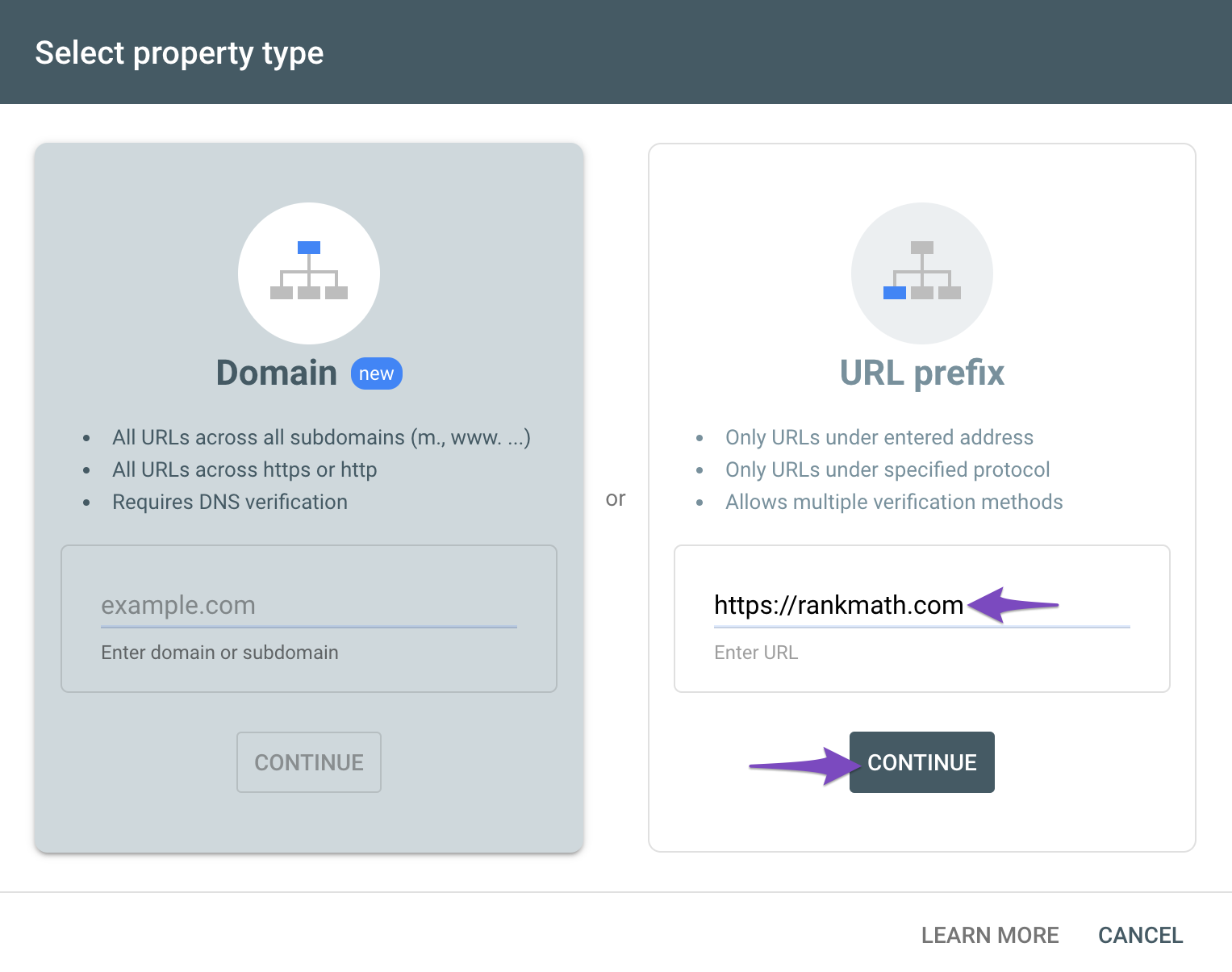
    Please make sure that you are not connecting to Google Search Console via a domain property (sc-domain:yourdomain.com) but rather a URL prefix. Because our plugin is only compatible with the URL prefix properties and doesn’t fully support fetching data from domain properties. Also, the IndexStatus feature doesn’t work with it.

    You need to make sure that you have connected a URL-prefix property to Rank Math. You can do this by following these steps:

    • Go to your Google Search Console dashboard and click on Add Property.
    • Choose URL-prefix and enter the full URL of your website. Make sure it matches the one in your WordPress settings.
    • Verify your ownership of the property using any of the methods provided by Google. Rank Math can help you verify the property, follow this guide: https://rankmath.com/kb/google-site-verification/
    • Navigate to Rank Math > General Settings > Analytics and Click on Disconnect and then Connect again to reconnect your Google account
    • Select the URL-prefix property that you just added and click on Save Changes.
    • More instructions are here: https://rankmath.com/kb/google-site-verification/

    We hope this helps you fix the issue. If you have any questions or need further assistance, please let us know. We’re always happy to help.

    Aya
    Rank Math free

    Please make sure that you are not connecting to Google Search Console via a domain property (sc-domain:yourdomain.com) but rather a URL prefix. Because our plugin is only compatible with the URL prefix properties and doesn’t fully support fetching data from domain properties. Also, the IndexStatus feature doesn’t work with it.

    Thank you for information! I didn’t even think that this could be the reason, because on two other sites I have the same domain property – and there everything is updated normally!

    Hello,

    We are glad that everything has been sorted out.

    Please feel free to reach out to us again in case you need any other assistance.

    We are here to help.

    Thank you.

Viewing 6 replies - 16 through 21 (of 21 total)

The ticket ‘Cannot import data from Google Analytics – Analytics panel in Rank Math is empty’ is closed to new replies.