
-
Hi, I try many times to connect one of my website to rank math but from the dashboard links it send me to your homepage.
I update all: WP, theme and all plugins.
I try to deactivate an reactivate rank math plugin, but any time I click to connect to rank math I arrive to you HP an nothing happened.
What can I do to resolve the problem?
Can You help me?
Thanks

-
The site I want to connect is https://www.radon360.it
Thanks in advance for your job.Hello,
Thank you for contacting Rank Math and bringing your concern to our attention. I’m sorry for any inconvenience this issue may have caused you.
This happens when there’s a mismatch in the domain name. For initial troubleshooting, ensure that you are using the latest version of the Rank Math plugin. You may refer to our changelog page here: https://rankmath.com/changelog/free
Then, go to WordPress Dashboard > Settings > General, and make sure that the “WordPress Address” and “Site Address” have the same setup.
Meaning both URLs have the same exact protocols. They should be matching and not have a mismatch.
Once done, reconnect again your site.
If the issue still persists after following the steps above, please add this filter on your site and connect again:
/**
 * Filter whether we need to check for URL mismatch or not.
 */
add_filter( 'rank_math/registration/do_url_check', '__return_false' );
Here is a guide you can follow to add the filter:
https://rankmath.com/kb/wordpress-hooks-actions-filters/Let us know how this goes.
Thank you.
Thank you very much for your support!
THis issue has been resolved.
Now I had a similar problem to connect with google analytics.
I disconnect al from the website/rank math, and I try to connect: it seems all goes right, but after I give access to rank math to google services in the back office nothing happened.
Can you help me one more time?
ThanksHello,
Would you please confirm whether the connection is successful and the data shows 0 (zero) or connection doesn’t happens at all?
If connection doesn’t happens at all would you please try to follow the steps as mentioned here: https://rankmath.com/kb/connect-your-google-account/
Hope that helps. Please don’t hesitate to let us know if you need our assistance with anything else.
Thank You
I tried to follow your guide, it seems everything cos well, but when I come back to my site no website is shown in search consolle, I can’t show you a screenshot of that but every combo box is empty.
Some more advice on how to fix this issue?
ThanksHello,
You can use this tool to share the screenshot and add the link here.
Regarding the issue, please follow these steps for initial troubleshooting:
1. Please delete RankMath’s app from here:
https://myaccount.google.com/permissions
2. Re-create tables by clicking WP Dashboard > Rank Math > Status & Tools > Database Tools and click the
Re-create database Tablebutton.
3. Reconnect the account inside Rank Math by clicking here and ensure that you approve all the permission notices that show up:
WP Dashboard >> Rank Math >> General Settings >> Analytics tab, and click theReconnectlink
Allow all the permissions on the next screen.
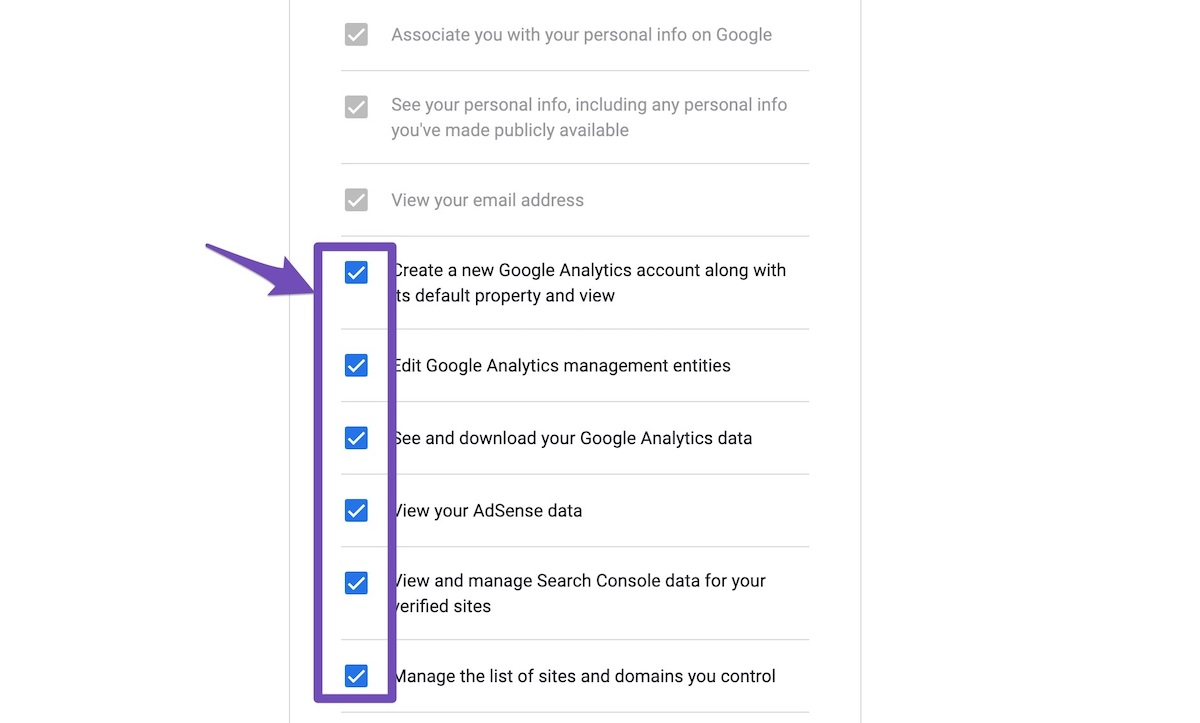
4. Let the process complete, which might take around 30 minutes.
5. Now head over to WP Dashboard > Rank Math > Status & Tools > Database Tools and click the
Rebuild Index for Analyticsbutton.
6. Please check if the data shows up here:
/wp-admin/admin.php?page=rank-math-analytics#/
If that does not help, please paste the data from here:
WP Dashboard > Rank Math > Status & Tools > System Status and click theCopy System Info to Clipboardbutton
We really look forward to helping you.
Thank you.
I have more than one website in the same account for google search console, could be a problem?
I made all your steps but still doesn’t work
this is the system info
### rank-math ### version: 1.0.109 database_version: 1 plugin_plan: Free active_modules: link-counter, analytics, seo-analysis, sitemap, rich-snippet, woocommerce, role-manager, local-seo, 404-monitor, content-ai refresh_token: Il token esiste permissions: Search Console: Accordato rank_math_404_logs: 32 KB rank_math_redirections: Non è stato trovato rank_math_redirections_cache: Non è stato trovato rank_math_internal_links: 32 KB rank_math_internal_meta: 16 KB rank_math_analytics_gsc: 80 KB rank_math_analytics_objects: 80 KB rank_math_analytics_inspections: 128 KB ### wp-core ### version: 6.1.1 site_language: it_IT user_language: it_IT timezone: +00:00 permalink: /%postname%/ https_status: true multisite: false user_registration: 0 blog_public: 1 default_comment_status: undefined environment_type: production user_count: 11 dotorg_communication: true ### wp-active-theme ### name: Betheme (betheme) version: 26.6.5 author: Muffin group author_website: https://muffingroup.com/ parent_theme: none theme_features: core-block-patterns, editor-style, automatic-feed-links, custom-logo, editor-styles, post-formats, post-thumbnails, title-tag, menus, wc-product-gallery-zoom, wc-product-gallery-lightbox, wc-product-gallery-slider, widgets-block-editor, woocommerce, widgets theme_path: /home/web/www.radon360.it/www/wp-content/themes/betheme auto_update: Disabilitato ### wp-plugins-active (19) ### a3 Lazy Load: version: 2.7.0, author: a3rev Software, Aggiornamenti automatici abilitati Autoptimize: version: 3.1.5, author: Frank Goossens (futtta), Aggiornamenti automatici abilitati Checkout Field Editor for WooCommerce: version: 1.8.1, author: ThemeHigh, Aggiornamenti automatici disabilitati Code Snippets: version: 3.2.2, author: Code Snippets Pro, Aggiornamenti automatici abilitati Contact Form 7: version: 5.7.4, author: Takayuki Miyoshi, Aggiornamenti automatici abilitati CookieYes | GDPR Cookie Consent: version: 3.0.8, author: CookieYes, Aggiornamenti automatici abilitati Disable Gutenberg: version: 2.9, author: Jeff Starr, Aggiornamenti automatici abilitati Duplicator: version: 1.5.2.1, author: Snap Creek, Aggiornamenti automatici abilitati Easy WP SMTP: version: 2.0.1, author: Easy WP SMTP, Aggiornamenti automatici abilitati PDF Embedder: version: 4.6.4, author: WP PDF Embedder Team, Aggiornamenti automatici disabilitati Post Types Order: version: 2.0, author: Nsp Code, Aggiornamenti automatici abilitati Product Feed PRO for WooCommerce: version: 12.1.8, author: AdTribes.io (latest version: 12.3.2), Aggiornamenti automatici disabilitati Rank Math SEO: version: 1.0.109, author: Rank Math, Aggiornamenti automatici abilitati Slider Revolution: version: 6.2.22, author: ThemePunch, Aggiornamenti automatici disabilitati WooCommerce: version: 7.4.1, author: Automattic, Aggiornamenti automatici abilitati WooCommerce Shipping & Tax: version: 2.2.3, author: WooCommerce, Aggiornamenti automatici abilitati WooCommerce Stripe Gateway: version: 7.1.0, author: WooCommerce, Aggiornamenti automatici abilitati WooCommerce Tiered Price Table: version: 3.3.1, author: bycrik, Aggiornamenti automatici disabilitati WP Mail Logging: version: 1.10.5, author: SendLayer, Aggiornamenti automatici abilitati ### wp-server ### server_architecture: Linux 4.9.0-13-amd64 x86_64 httpd_software: Apache php_version: 7.4.10 64bit php_sapi: apache2handler max_input_variables: 10000 time_limit: 150 memory_limit: 256M max_input_time: 60 upload_max_filesize: 2M php_post_max_size: 8M curl_version: 7.52.1 OpenSSL/1.0.2u suhosin: false imagick_availability: false pretty_permalinks: true htaccess_extra_rules: true ### wp-database ### extension: mysqli server_version: 10.1.45-MariaDB-0+deb9u1 client_version: mysqlnd 7.4.10 max_allowed_packet: 335544320 max_connections: 512 ### wp-constants ### WP_HOME: undefined WP_SITEURL: https://radon360.it/ WP_CONTENT_DIR: /home/web/www.radon360.it/www/wp-content WP_PLUGIN_DIR: /home/web/www.radon360.it/www/wp-content/plugins WP_MEMORY_LIMIT: 40M WP_MAX_MEMORY_LIMIT: 256M WP_DEBUG: false WP_DEBUG_DISPLAY: true WP_DEBUG_LOG: false SCRIPT_DEBUG: false WP_CACHE: false CONCATENATE_SCRIPTS: undefined COMPRESS_SCRIPTS: undefined COMPRESS_CSS: undefined WP_ENVIRONMENT_TYPE: Non definito DB_CHARSET: utf8mb4 DB_COLLATE: undefined ### wp-filesystem ### wordpress: writable wp-content: writable uploads: writable plugins: writable themes: writable 0: WritableHello,
Using multiple websites connected to the same Google account shouldn’t be a problem.
Could you please make sure that you are not connecting to Google Search Console via a domain property but rather a URL prefix and that you have verified the correct version of your website on the Google Search Console (HTTP or HTTPS, www or non-www)?
The URL-prefix property also helps keep your sitemap in sync with Google Search Console as we submit it automatically for you. In addition, the domain property won’t work correctly on some sections of the Analytics module such as the IndexStatus.
If the issue still persists, we might need to take a closer look at the settings. Please edit the first post on this ticket and include your WordPress & FTP logins in the designated Sensitive Data section.
Please do take a complete backup of your website before sharing the information with us.
It is completely secure and only our support staff has access to that section. If you want, you can use the below plugin to generate a temporary login URL to your website and share that with us instead:
https://wordpress.org/plugins/temporary-login-without-password/
You can use the above plugin in conjunction with the WP Security Audit Log to monitor what changes our staff might make on your website (if any):
https://wordpress.org/plugins/wp-security-audit-log/
We really look forward to helping you.
Thank you.
Hello,
Since we did not hear back from you for 15 days, we are assuming that you found the solution. We are closing this support ticket.
If you still need assistance or any other help, please feel free to open a new support ticket, and we will be more than happy to assist.
Thank you.



The ticket ‘Cannot connect to rank math’ is closed to new replies.