Hello,
I apologize for the issue you are facing while trying to connect Google services in Rank Math. It seems like you are encountering difficulties with the Analytics module and the Search Console connection.
To troubleshoot this problem, I recommend testing the connections to your Google account within Rank Math. Here’s how you can do it:
- Go to Rank Math SEO → General Settings → Analytics.
- Click on the Test Connections option at the top right of the Analytics settings.
- Rank Math will validate the existing connections. A green signal indicates a valid connection, while a red signal indicates an issue with the connection.
If you see a red signal, as shown in the image below, it indicates a glitch in the corresponding connection:
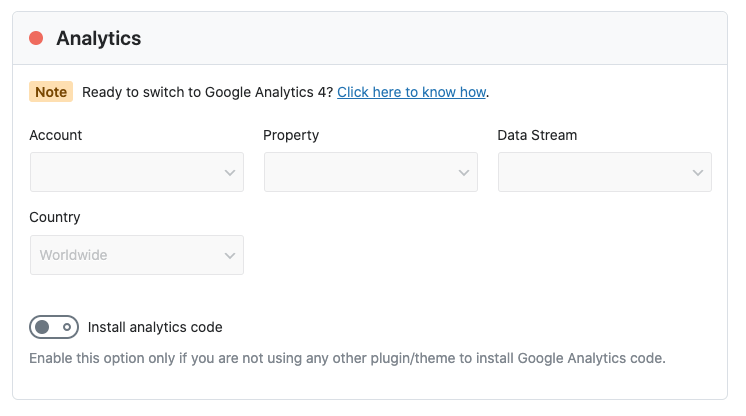
To resolve this, simply reconnect your Google account by following these steps:
- Click on the Reconnect option as shown in the image below:
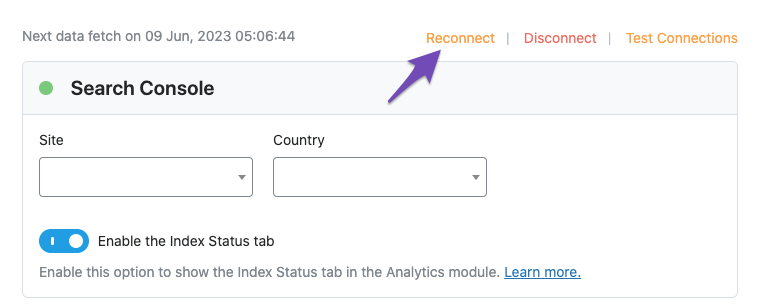
If reconnecting doesn’t solve the issue or if you continue to face problems, please consider opening a support ticket with Rank Math. You can share the error log with the support team for further assistance. You can open a support ticket here.
I hope this helps resolve the connectivity issues you are experiencing. If you need further assistance, feel free to ask.
Warm regards.
Sources:
How to Setup Rank Math SEO Plugin Properly
Resolving Rank Math Analytics Related Issues » Rank Math
How to Connect Your Google Account With Rank Math SEO » Rank Math
there is not “test connections” button and nothing allows me to get past this step. when i check my google search console, there are no properties listed.
Hello,
Thank you for contacting us and sorry for any inconvenience that this issue might have caused.
Can you please confirm if you have a verified Google Search Console and Google Analytics property on the Google account you connected? Please double-check that the Google account you connected has a functional Google Search Console and Google Analytics property. If you do not have a Google Search Console property, you can create one by following this guide. You can also sign up for Google Analytics here.
Looking forward to helping you resolve this issue.
Thank you! I seem to be through the issues. No onward to optimizing! Appreciate your help.
Hello,
We are super happy that this resolved your issue. If you have any other questions in the future, know that we are here to help you.
If you don’t mind me asking, could you please leave us a review (if you haven’t already) on https://wordpress.org/support/plugin/seo-by-rank-math/reviews/#new-post about your overall experience with Rank Math? We appreciate your time and patience.
If you do have another question in the future, please feel free to create a new forum topic, and it will be our pleasure to assist you again.
Thank you.




