Hello,
Thank you for contacting Rank Math.
If you want to show the child/subcategory in the breadcrumbs, please go to the post/page and make the child category the primary term for that post/page:

Enable the Show Categories option at Rank Math > General settings > Breadcrumbs > Enable Show Category(s)

Once done, clear the website cache.
I hope this helps. Looking forward to helping you.
I will try that. I have my recipes set as recipe main category then other sub-categories are selected as well such as “fall baking” “apple recipes” etc. Some of my posts have more breadcrumb links than others and I haven’t set those as having other primary categories. Just wondering why they aren’t all the same.
Hello,
Let us know how this goes.
As my colleague said for showing the breadcrumbs properly you have to set the recipe’s Sub Category as Primary. In addition to that, you also have to disable the Hide Post Title option by going Rank Math > General Settings > Breadcrumbs , and then scrolling down you will find the option. By this, all your recipes post will be shown in breadcrumbs in this rule.

Looking forward to helping you.
Thank you.
I can’t find where to set the sub categories as primary. When I hover over the subcategory under the main recipe category I don’t get the option to choose that as primary as seen in your screen shot.
Hello,
To enable the primary term options, head over to Rank Math > Titles & Meta > Post Type and select the Categories as Primary Taxonomy
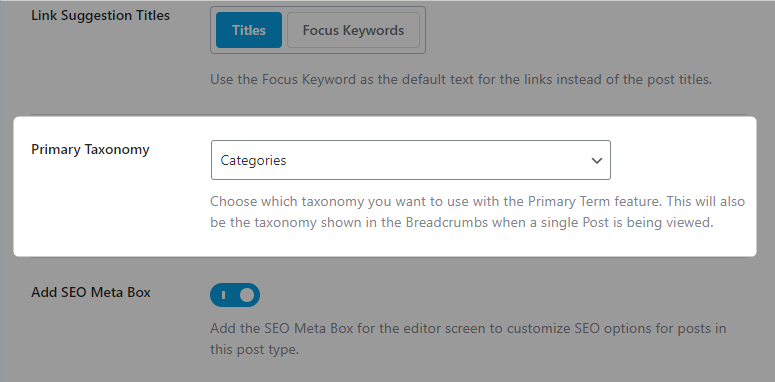
Once done, you can select the child/subcategory to set for your breadcrumbs.
I hope that helps.
Thank you.
Got it now. Thank you so much!
Hello,
We are super happy that we could address your concern. If you have any other questions in the future, know that we are here to help you.
If you don’t mind us asking, could you please leave us a review (if you haven’t already) on https://wordpress.org/support/plugin/seo-by-rank-math/reviews/#new-post about your overall experience with Rank Math? We appreciate your time and patience.
If you have another question in the future, please feel free to create a new forum topic, and it will be our pleasure to assist you again.
Thank you.



