Hello,
We apologize for the issue you are facing with the basic setup and indexing. While we cannot provide remote support or calls, we can guide you through the setup process here.
To get started with Rank Math, you can use the Setup Wizard, which is a user-friendly way to configure the plugin. Here’s how to access it:
- Go to your WordPress Dashboard.
- Navigate to Rank Math SEO in the left sidebar.
- Click on the Setup Wizard tab.
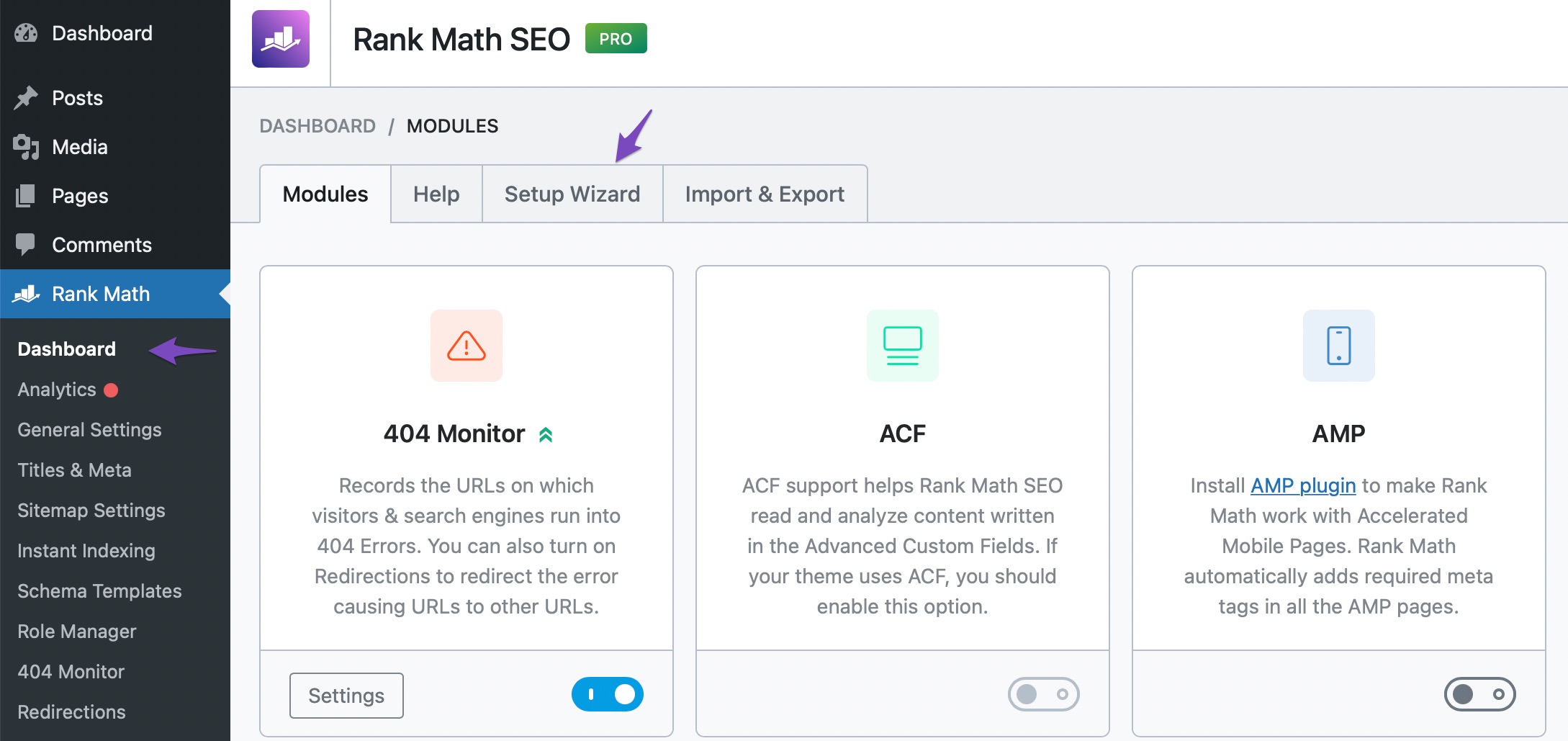
For detailed instructions on using the Setup Wizard, you can refer to our detailed article on using Rank Math’s Setup Wizard.
If you are experiencing indexing issues, we recommend checking out our guide on How to Fix Indexing Issues in Google Search Console, which can help you identify and resolve common problems.
If you have any specific questions or if there are technical issues occurring on your site, please reply to this ticket with your site URL, and a human agent from our support team will assist you further.
Thank you for reaching out, and we look forward to helping you!
This is an automated reply from Rank Math Support Bot. If you need further assistance, please reply to this topic and a human support agent will reply to you shortly.
Hello,
Since we did not hear back from you for 15 days, we are assuming that you found the solution. We are closing this support ticket.
If you still need assistance or any other help, please feel free to open a new support ticket, and we will be more than happy to assist.
Thank you.


