Hello,
We apologize for the issue you are facing with the 301 redirection and the double slash problem. It seems like there might be some inconsistencies in how your URLs are being handled, which can indeed affect your website’s SEO and traffic.
To address the issue of having both versions of the URL (with and without the trailing slash), we recommend implementing a redirection rule in your .htaccess file to ensure that all requests to URLs without a trailing slash are redirected to their counterparts with a trailing slash. This will help maintain consistency and prevent duplicate content issues.
Here’s a code snippet you can add to your .htaccess file:
RewriteEngine On
RewriteCond %{REQUEST_FILENAME} !-f
RewriteCond %{REQUEST_FILENAME} !-d
RewriteRule ^(.+[^/])$ https://htaccess.madewithlove.com/ [R=301,L]
This rule checks if the requested URL is not a file or directory and then redirects it to the same URL with a trailing slash. Make sure to back up your .htaccess file before making any changes, as incorrect modifications can break your site.
You can edit your .htaccess file directly from the WordPress dashboard by navigating to Rank Math SEO → General Settings → Edit .htaccess.
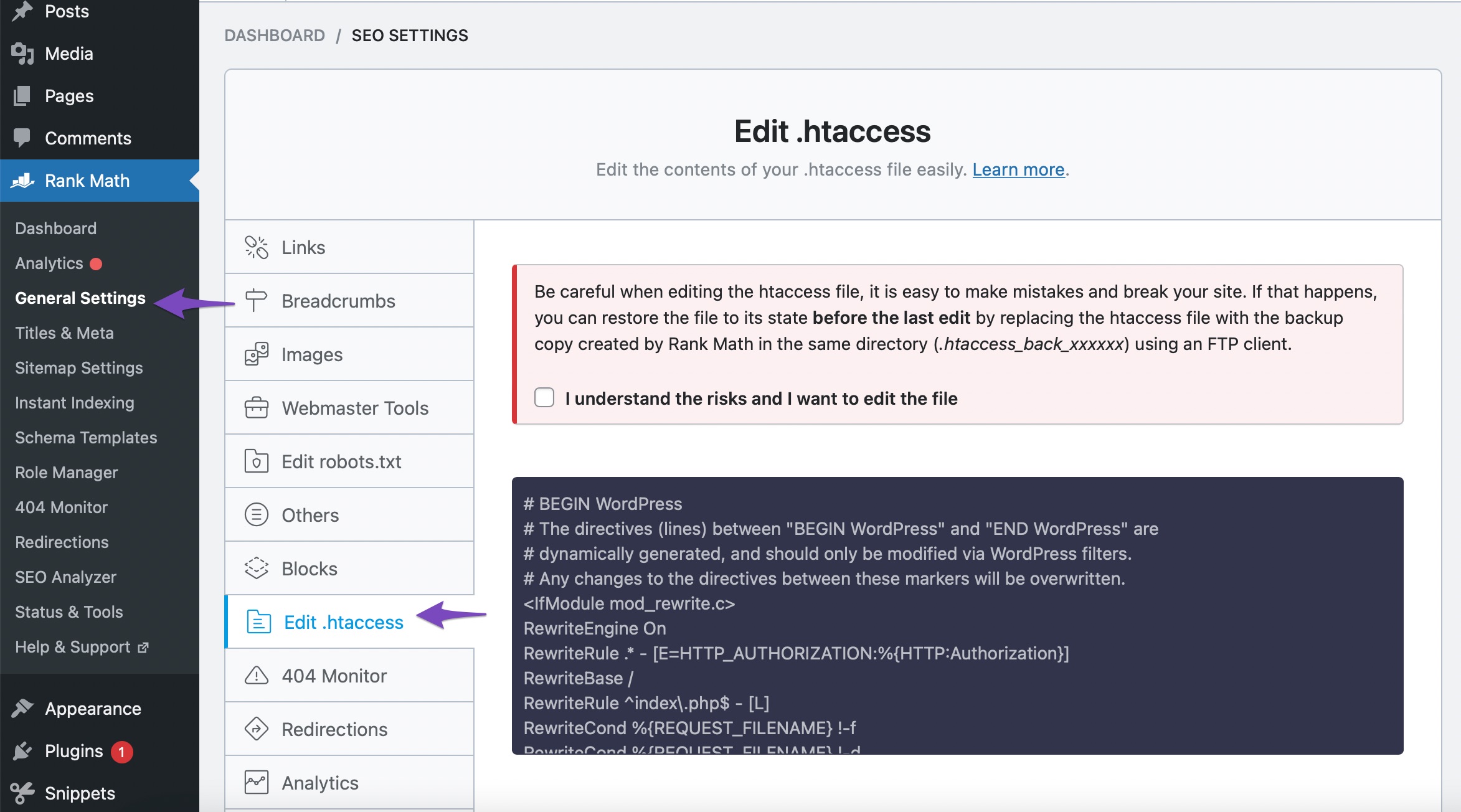
After adding this code, check if the URLs are redirecting correctly. If you continue to experience issues, please reply to this ticket, and a human agent from the Rank Math Support team will assist you further.
Thank you for bringing this concern to our attention, and we hope to help you resolve it soon!
Sources:
How to Redirect to URLs With Trailing Slash » Rank Math
Hello,
Thank you for contacting us and sorry for any inconvenience that might have been caused due to that.
It is absolutely normal. If your website’s permalink is set with a trailing slash then the non-trailing slash will automatically redirect to the correct one by WordPress.

Also, Rank Math will only include the correct version which is trailing slash on your sitemap.
Hope that helps and please don’t hesitate to let us know if you have any other questions.
Thank you.
I know WordPress will automatically redirect the non-trailing slash to the correct one. I haven’t created any non-trailing slash URL/permalink. I believe the non-trailing slash version itself is a mistake of Rank Math. So I request you to correct it. It is hugely affecting my SEO.
Hello,
It seems like you’ve marked this ticket as resolved.
Can you please confirm if you still need our assistance with this issue or anything else?
Looking forward to hearing back from you.
Thank you.
Please troubleshoot the rankmath and let me know if there is any issues
Hello,
The details you see in those reports are rather informational than being errors themselves.
Since the URL structure of your site uses a trailing slash it is correct for the non-trailing slash URL to make a 301 redirect to the trailing slash version when visited.
Google does not index redirected URLs, so you need not worry about the 301 redirect.
We hope this helps.
Thanks.





